

Campfire Writing is a worldbuilding and writing platform with 18 modules, a capped free plan and subscription or lifetime pricing, running in the browser, on Mac and Windows desktops, and on phones. Scrivener is a one-time desktop writing app for Mac, Windows and iOS. Pick Campfire for deep, linked worldbuilding. Pick Scrivener for long-form drafting and Compile's output formats.
Every Campfire fact here comes from campfirewriting.com and every Scrivener fact from literatureandlatte.com, read on 20 October 2026. Prices are in US dollars as of October 2026. This page is published by Deckle, which makes a third app, and the short section on it is marked as ours.
Campfire Writing vs Scrivener at a glance
| Campfire Writing | Scrivener | |
|---|---|---|
| What it is | Worldbuilding modules plus a Manuscript module, with an ebook store | Writing and organising, with Compile for output |
| Platforms | Browser; desktop for Mac (10.11+) and Windows (7+); CF Creators app for iOS and Android | macOS (11+), Windows (10+, 64-bit), iOS and iPadOS |
| Offline | Desktop app, yes; phone app needs a connection | Yes, a desktop app |
| Price model | Free plan with caps; monthly, annual or lifetime, for all modules or single ones | One-time, one licence per platform |
| Price (as of October 2026) | Standard $12 a month, $99 a year or $336 lifetime; Manuscript alone $16 a year | $59.99 Mac or Windows; $23.99 iOS; crossgrade $37.95 |
| Free option | Free plan, every module capped (25,000 manuscript words, 10 characters) | 30-day trial counted in days of use, Mac and Windows |
| Worldbuilding | 18 modules: Characters, Maps, Timeline, Magic, Languages, Species, Relationships and more | Character and location sheets as Binder documents from templates |
| Export | Manuscript to EPUB and PDF; elements to DOCX while online; project backup | Word, RTF, OpenOffice, PDF, Final Draft, plain text, EPUB, Kindle ebooks, Pandoc and MultiMarkdown |
| Import | DOCX and EPUB, split into chapters automatically | Word, OpenOffice, plain text, Final Draft, images, PDFs, movies, sound files, web pages |
| Collaboration | Invite viewers, commenters and editors with a free account | None listed on its product pages |
| Where your work lives | Campfire's servers, backed up "with Amazon servers"; desktop copy syncs | Project files on your own disk; sync "using Dropbox or transfer with iTunes" |
| Publishing | Sell an EPUB in Campfire's own store and reading app | None; you upload Compile's files to a store yourself |
How do Campfire and Scrivener organise a novel?
Campfire splits a project into modules, and each module holds elements: one character sheet is one Characters element, one family tree is one Relationships element. The Manuscript module is the word processor. Campfire says its Index Card View can "organize your chapters like cards on a digital corkboard," with manuscript and chapter goals and writing stats. You can tag story elements such as characters and locations in the text, open a notes sidebar while drafting, and keep a project-wide notepad. Version history restores older drafts.
Scrivener organises a project in the Binder, a tree of documents. On the Corkboard, Literature & Latte says, "every section of your project is attached to a virtual index card", and moving a card moves the section in the manuscript. The Outliner shows synopses and metadata, and Scrivenings joins several sections into one document to edit. Snapshots with Compare show what changed in a section, and Targets track manuscript, section and session word counts.
Scrivener is ahead on views of the manuscript itself. Campfire is ahead on linking the manuscript to a world.
Campfire vs Scrivener for worldbuilding
Campfire's worldbuilding goes much further. Its 18 modules are Manuscript, Characters, Timeline, Maps, Calendar, Encyclopedia, Magic, Languages, Research, Locations, Arcs, Relationships, Items, Species, Cultures, Philosophies, Religions and Systems.
- Characters comes with "more than 100 character attribute traits," with sheets for backstory, stats and artwork, and moodboards.
- Relationships draws character links and family trees "in freestyle flowcharts."
- Maps takes uploaded map images or links from Inkarnate, with interactive pins, nested maps and marked regions.
- Timeline tracks multiple timelines, with 10+ free story-structure templates.
- Research saves web links, annotated videos, PDFs, images and notes, linked to other elements.
Scrivener has no worldbuilding modules. Characters and places are ordinary documents in the Binder, made from templates such as character or location sheets, and its Research folder holds imported files, PDFs, images and web pages. That works for many novelists. It is a set of documents, not a linked database.
Does Campfire or Scrivener work offline?
Both have offline desktop apps. Campfire's FAQ says "the desktop app allows you to write offline!" for Mac and Windows, and it syncs with the browser version. Subscribers must sign in online now and then so Campfire can check the plan is active. With only lifetime purchases, "you shouldn't need to ever go online."
Campfire's phone app is different: "An internet connection is required to use the app," and it leaves out the Arcs, Calendars, Languages, Relationships and Research modules. Exporting elements to formats such as DOCX also needs a connection, because Campfire's servers do the conversion.
Scrivener is a desktop app on macOS, Windows and iOS, so every version works offline. Moving a project between devices is manual: Literature & Latte says to "sync using Dropbox or transfer with iTunes."
Can Campfire or Scrivener format a book for publishing?
Both export EPUB and PDF. Neither vendor describes professional print typesetting.
Campfire's pricing page says you can "compile your manuscript and export it as a PDF or EPUB ready for publication," and the word processor page adds a publishing preview. The pages read for this article do not describe trim sizes, bleed or print typesetting controls. Campfire can also sell your EPUB in its own store, with bonus content such as character profiles and maps.
Scrivener's Compile writes EPUB, PDF, Word and more. Scrivener for macOS 3.5.0 (1 October 2025) removed Kindle (.mobi) from Compile, so as of October 2026 only the Windows version still offers it. Literature & Latte describes PDF output "for printing, self-publishing" and does not call it professionally typeset. Compile is configurable and takes learning: the steps are in the Scrivener compile tutorial. Many authors on either app hand the finished manuscript to a formatting app. KDP's manuscript file page asks for a PDF whenever a print interior has bleed, with fonts embedded and images at 300 DPI or more. The full rules are in KDP print file requirements.
Campfire vs Scrivener price over three years
Campfire is a subscription or a lifetime purchase. Scrivener is paid once per platform. This table uses each vendor's published US prices as of October 2026.
| Setup | Three years | Five years |
|---|---|---|
| Campfire Standard, monthly ($12) | $432 | $720 |
| Campfire Standard, annual ($99) | $297 | $495 |
| Campfire Standard, lifetime | $336 once | $336 once |
| Campfire Manuscript module only, annual ($16) | $48 | $80 |
| Campfire free plan | $0, within its caps | $0 |
| Scrivener, Mac or Windows | $59.99 once | $59.99 once |
| Scrivener, Mac and Windows bundle | $95.98 once | $95.98 once |
| Scrivener, Mac and Windows (licence plus crossgrade) | $97.94 once | $97.94 once |
Scrivener's minor updates are free. Its FAQ says "we occasionally release more major updates that are paid-for," and each licence "covers only one platform." Campfire's Standard Lifetime "also includes future modules we may develop and release." Campfire's own pricing, including where each figure appears and how it changes by location, is in what Campfire Writing costs. Scrivener's is in is Scrivener a one-time purchase.
Does Campfire or Scrivener use AI?
Neither vendor describes AI writing features. Campfire's homepage, FAQ and Write page list none, and a September 2024 post on Campfire's Threads account said it does not accept AI-generated work or use anything created on Campfire to train AI. The detail is in does Campfire Writing use AI. Literature & Latte mentions no AI feature on Scrivener's overview, features or FAQ pages, covered in does Scrivener use AI.
Moving between Campfire and Scrivener
There is no direct route either way. Campfire does not import Scrivener projects, and Scrivener does not import Campfire projects.
Scrivener to Campfire. Compile the Scrivener manuscript to Word (.docx). Campfire imports "a DOCX or EPUB file" and splits it into chapters. Character and location sheets do not come across as Campfire elements, so rebuild them in the Characters and Locations modules.
Campfire to Scrivener. Download a project backup first (File, then Download Project Backup). Export elements you need to DOCX while online, and import those into Scrivener, which takes Word documents. Scrivener's import list names Word, plain text and Final Draft files, not EPUB, so for the manuscript itself use a DOCX route rather than Campfire's EPUB export. The general method is in how to move a manuscript between writing apps.
Pick Campfire if
- You build worlds with maps, magic systems, languages, species or relationship webs.
- You want to start free and pay only for the modules you use.
- You write in the browser, on a desktop and on your phone.
- You work with co-writers or editors who can join on a free account.
- You want to sell an EPUB with bonus content in Campfire's own store.
Pick Scrivener if
- Your work is long-form drafting and restructuring, not worldbuilding.
- You want a one-time price and your project files on your own disk.
- You want Compile's range of outputs: Word, PDF, EPUB, Kindle, Final Draft.
- You write screenplays or non-fiction too, with Scrivener's script formatting, footnotes and MLA or APA templates.
Where Deckle sits
Deckle is our app, so weigh this section accordingly.
Deckle is a desktop app for Windows, macOS and Linux, sold as a one-time purchase. It works offline after activation, and a project is a folder on your own disk: one .deckle database plus research/ and .deckle-assets/ folders. It has no generative AI. For worldbuilding it has a Codex with Characters, Locations and Items sections plus any you add, such as Magic or Species, and a Timeline with plotlines and a Story order view. That is less than Campfire's 18 modules: there are no maps, languages or relationship webs.
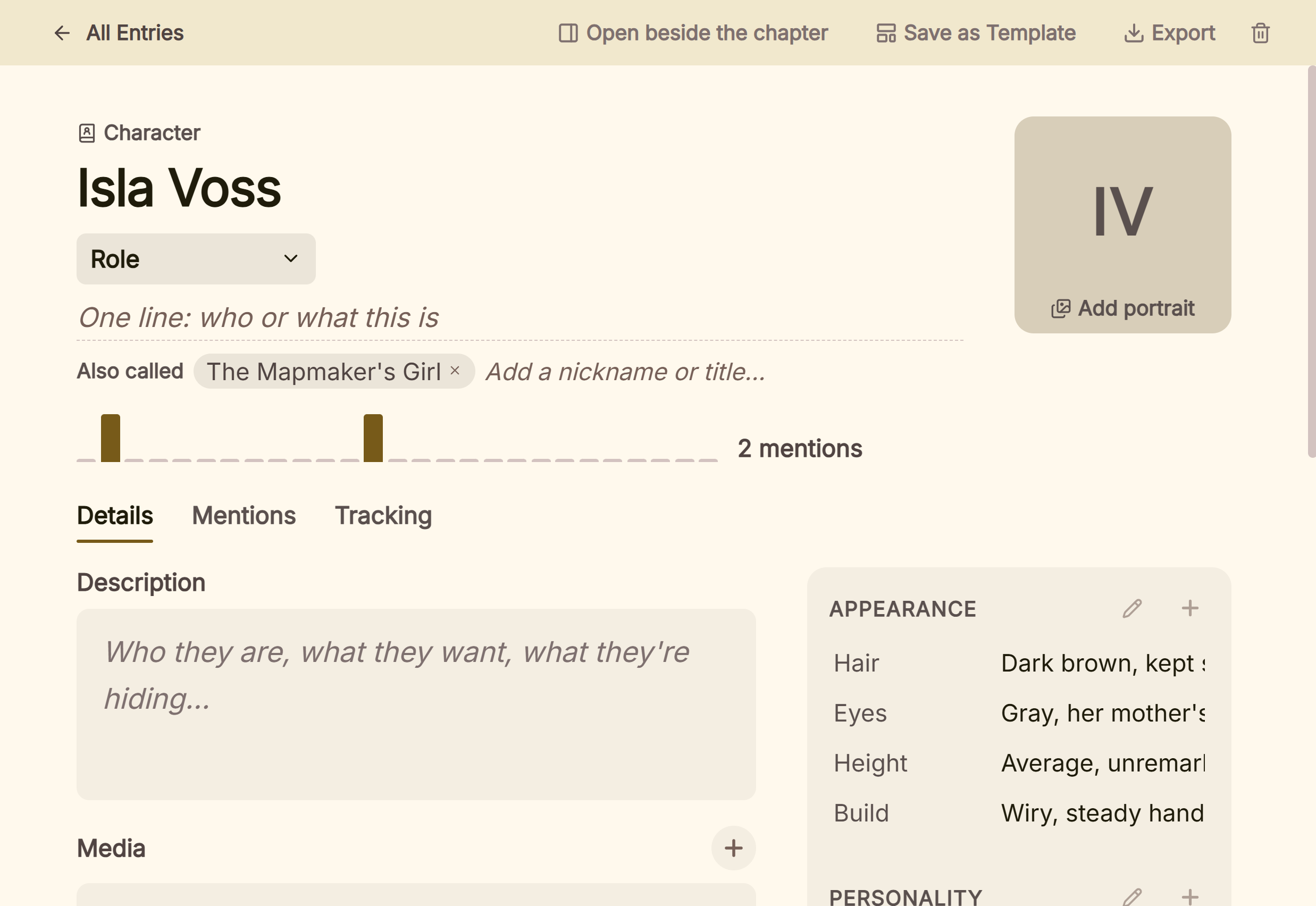 A Codex character entry, with its alias and mention count
Unlike either app above, Deckle formats the finished book itself, with 26 style presets, eight trim sizes, drop caps, running heads and a live preview, and exports EPUB, print PDF and DOCX.
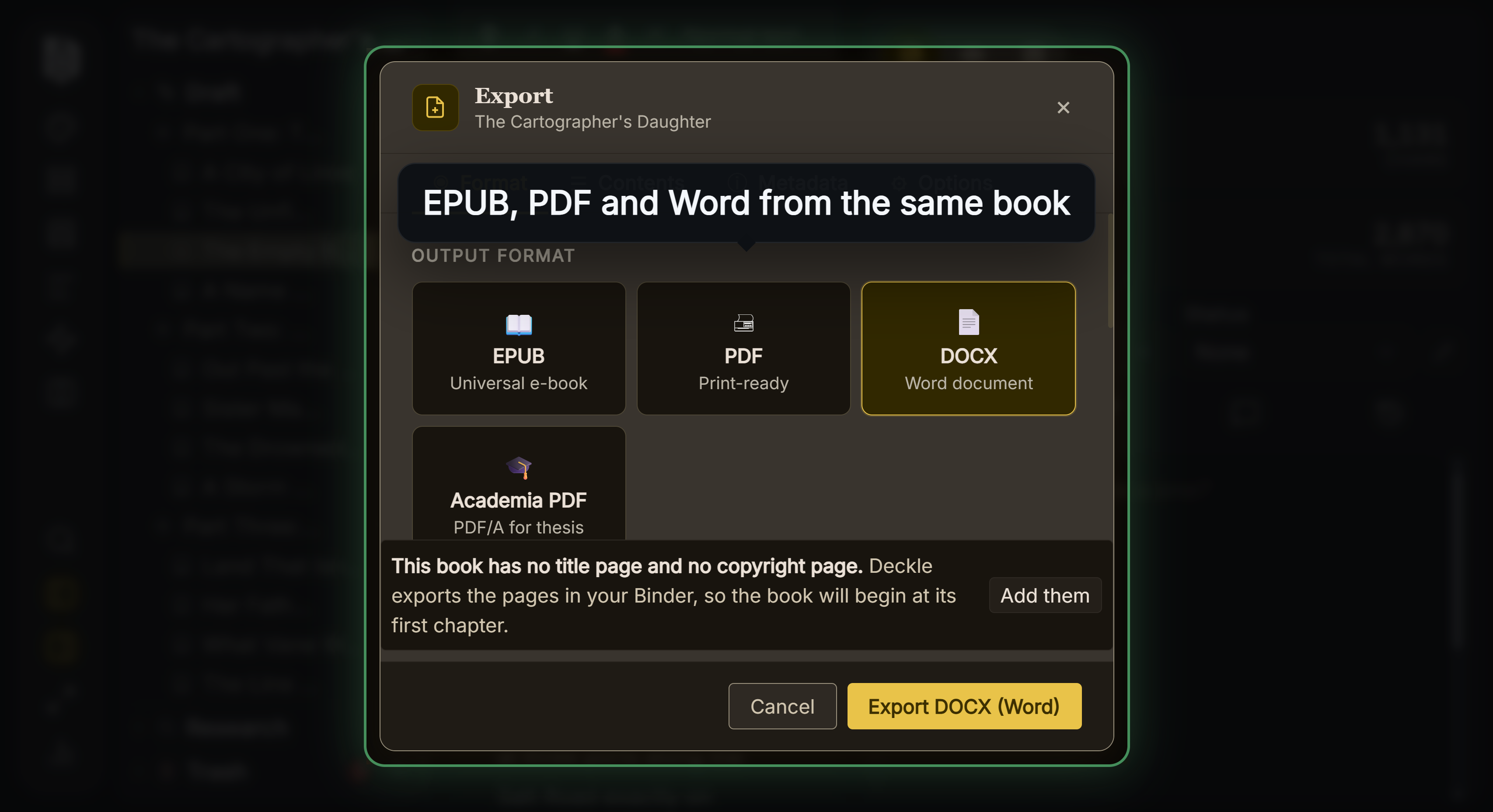 Every export format, from one project
It has no browser or phone version, no collaboration and no store. It imports Word, EPUB and zipped Scrivener projects, so a Campfire EPUB export or a Scrivener project goes straight in. The Scrivener side of that comparison is in Scrivener vs Deckle.
To try it, click Try it free on the screen Deckle opens to. There is no card, no account and no time limit. It opens a sample novel with every screen open to explore, and you can restyle it and export real EPUB, PDF and DOCX files. New writing is capped at about 500 words, and new documents and imports are blocked.
FAQ
Q: Is Campfire Writing better than Scrivener? A: Nothing authoritative ranks them. Campfire is ahead on worldbuilding modules, phone access and collaboration. Scrivener is ahead on manuscript views, output formats and a one-time price.
Q: Is Campfire Writing like Scrivener? A: Partly. Both have a manuscript editor with index cards. Campfire adds 18 linked worldbuilding modules, and Scrivener adds the Binder, Scrivenings and Compile.
Q: Does Campfire Writing work offline? A: The desktop app for Mac and Windows writes offline. The iOS and Android app needs an internet connection.
Q: Can I import a Scrivener project into Campfire? A: Not directly. Compile it to Word from Scrivener, then import the DOCX into Campfire, which splits it into chapters.
Q: Is Campfire Writing cheaper than Scrivener? A: Campfire's free plan costs nothing within its caps. Its Standard plan costs $99 a year or $336 lifetime, against $59.99 once for Scrivener on Mac or Windows, as of October 2026.
Q: Can Campfire export to EPUB like Scrivener? A: Yes. Campfire exports manuscripts to EPUB and PDF. Scrivener's Compile exports EPUB, PDF, Word and more; Kindle (.mobi) is gone from the Mac version since 3.5.0.
Q: Does Campfire have a Linux app? A: Campfire's FAQ names desktop apps for Mac and Windows only. Literature & Latte lists no Linux version of Scrivener either.
Sources
All retrieved 20 October 2026. Prices change, so check the vendor page before buying.
- Campfire, Pricing: plans, prices, modules, free plan caps, lifetime terms, PDF and EPUB export, collaboration (US prices, retrieved 21 October 2026: $12 a month is in the page as served; $99 a year and $336 lifetime are on the Annual and Lifetime tabs, which the page builds in the browser from a price table in its own script, and were read there)
- Campfire, FAQ: desktop platforms and offline use, sign-in for subscribers, phone app limits, DOCX element export, project backup, Amazon backups, collaborators
- Campfire, Word processor: Index Card View, goals, version history, DOCX and EPUB import, EPUB and PDF export, publishing preview
- Campfire, Write: Characters, Relationships, Maps, Timeline and Research modules
- Campfire, Gifting: annual Standard and per-module prices
- Literature & Latte, Scrivener overview: platforms, Corkboard, Outliner, import and export formats, Compile PDF wording, Dropbox sync
- Literature & Latte, Scrivener release notes for macOS (retrieved 21 October 2026): 3.5.0, 1 October 2025, Kindle (.mobi) removed from Compile
- Literature & Latte, Scrivener features: Scrivenings, templates, Snapshots, EPUB and Kindle
- Literature & Latte, Scrivener FAQs: licence per platform, trial, paid major upgrades
- Literature & Latte, Scrivener store and crossgrading: prices
- Amazon KDP Help, Save Your Manuscript File: PDF for interiors with bleed, embedded fonts, 300 DPI images
- Literature & Latte's checkout, Paddle price data for the store's products: $59.99 macOS, $59.99 Windows, $95.98 macOS and Windows bundle (US, retrieved 21 October 2026)
Campfire is a product of Campfire Technology LLC. Scrivener is a trademark of Literature & Latte. Inkarnate, Threads and every other product name here belong to their owners. Deckle is not affiliated with or endorsed by any product named here.