

The main Storyist alternatives are Scrivener (Mac, Windows and iOS), Atticus (writing plus formatting on Windows, Mac, Linux and the browser) and Ulysses (Mac and iOS). Free options are bibisco and yWriter, and Deckle writes and formats a book on Windows, macOS and Linux. Storyist has no Windows version, so a PC needs one of these instead.

No standards body ranks writing software, so this page ranks nothing. Every Storyist fact comes from storyist.com and Storyist's two App Store listings, read on 20 October 2026. Other tools' facts come from their own sites on the same date. Prices are in US dollars as of October 2026.
What does Storyist do well?
Storyist pitches itself at novelists and screenwriters. It is a word processor and story planner in one, and it formats the finished book too.
- Planning beside the manuscript. An outliner gives "a high-level view of your story". Scenes can be arranged "as color coded index cards on a corkboard". Story Sheets are "editable forms" for plot, character and setting.
- Screenplays as well as novels. It reads and writes Final Draft (FDX and FCF) and Fountain files.
- Ebooks and print. "Storyist can create ePub and Kindle ebooks", though its own Amazon tutorial says the Kindle export needs Amazon's separate KindleGen tool (as of October 2026). Its book editor turns a manuscript "into a print-ready PDF", with mirrored margins, bleed and templates. Version 4.3 added "new templates for creating PDFs for printing paperbacks".
- Scrivener files. Storyist lists Scrivener among the formats it imports and exports, along with Word, RTF, HTML, ODT and plain text.
- Mac and iPad together. Projects stored in iCloud keep their versions, and "you can now see previous versions created on your other devices".
- One-time price. "No subscription required". The Mac version is $59 from Storyist's store and the iOS version $19.
- A light footprint. The Mac App Store listing and the iOS listing both carry the privacy label "Data Not Collected". The Mac app needs only macOS 10.14 Mojave.
If you write on a Mac and an iPad and want one app from first draft to print PDF, Storyist does that job.
Is there a Storyist for Windows?
No. Storyist's site offers two products, "Storyist for macOS" and "Storyist for iOS", and its store sells only those two. Neither storyist.com nor either App Store listing mentions Windows, Android or Linux. The iOS version runs on iPhone and iPad and needs iOS or iPadOS 17 or later.
So "download Storyist for Windows" has no official answer. A Windows PC needs a different app, and the ones that run on Windows are below.
Storyist alternatives at a glance
| Tool | What it is | Platforms | Price (as of October 2026) | EPUB | Print PDF | Generative AI |
|---|---|---|---|---|---|---|
| Storyist | Writing, planning and formatting | Mac, iPhone, iPad | $59 Mac; $19 iOS, one-time | Yes | Yes, book editor | None mentioned |
| Scrivener | Writing and organising | Mac, Windows, iOS | $59.99 Mac or Windows; $23.99 iOS | Yes, via Compile | Compile to PDF | None mentioned |
| Atticus | Writing and formatting | Windows, Mac, Linux, Chromebook, browser | $147 one-time | Yes | Yes | None mentioned |
| Ulysses | Markdown writing app | Mac, iPad, iPhone | $39.99 a year or $5.99 a month | Yes | PDF export | None of its own; supports Apple's Writing Tools and Siri AI |
| bibisco | Writing and organising | Windows, Mac, Linux | Free Community; $69 Supporters | Supporters only | PDF export | None mentioned |
| yWriter | Chapters and scenes | Windows | Free | Yes | Via LaTeX and the free TeXworks | None mentioned |
| Reedsy Studio | Writing and formatting | Web only, no offline | Free; add-ons from $4.99 a month | Yes, EPUB 3 | Yes | None listed |
| Deckle | Writing, organising and formatting | Windows, macOS, Linux | One-time purchase; free demo | Yes | Yes | None |
What is the best Storyist alternative for Windows?
Three Windows apps cover what Storyist does, each in a different way.
Scrivener is the nearest match for writing and planning. Literature & Latte's overview lists a Binder, a Corkboard of index cards, an Outliner, Snapshots and writing targets, and it exports Final Draft files. Its Compile makes EPUB, PDF and Word files, plus Kindle (.mobi) on Windows only, since Scrivener for Mac 3.5.0 (1 October 2025) removed it. Literature & Latte does not claim professional typesetting for the PDF. Scrivener costs $59.99 for Windows, and a Mac licence is a separate purchase. Storyist can export a .scriv project, so a book can move straight across. The two are compared in Storyist vs Scrivener.
Atticus is the nearest match for formatting. It costs $147 once and runs on Windows, Mac, Linux, Chromebook and in a browser. It exports EPUB, print-ready PDF and DOCX. Its homepage lists no outliner, index cards or story sheets.
Deckle does both, covered below.
Free Windows options are bibisco (Windows, Mac and Linux, with chapters, scenes and characters; its Timeline and EPUB export are in the paid Supporters Edition) and yWriter (Windows, with chapters, scenes and a storyboard view). More Windows tools are in novel writing software for Windows.
What can replace Storyist on a Mac?
On a Mac, the reasons to leave Storyist are different, because Storyist already runs there.
- Scrivener lists organising tools that Storyist's pages don't: Collections, Snapshots with Compare, and session targets.
- Ulysses suits writers who prefer Markdown and a single library across Mac, iPad and iPhone. It is a subscription.
- Vellum formats books on a Mac but does not write them. It imports only .docx.
The wider Mac field is in novel writing software for Mac, and the formatting-only tools are in book formatting software for Mac.
Is Deckle a Storyist alternative?
Deckle is our app, so weigh this section accordingly.
Deckle covers the same ground as Storyist, from draft to finished files, and it runs on Windows 10 and 11, macOS 11 and later, and Linux. A project is a folder on your own disk, holding one .deckle database plus research/ and .deckle-assets/ folders. It works offline after activation and contains no generative AI.
For planning, Deckle has a Binder (Draft, Research, Trash) and an Outliner with a Grid View of index cards and a List view. It adds a Codex for characters, locations and items, a Timeline with plotlines and a "Story order" view, inline comments, snapshots and Writing Stats with goals.
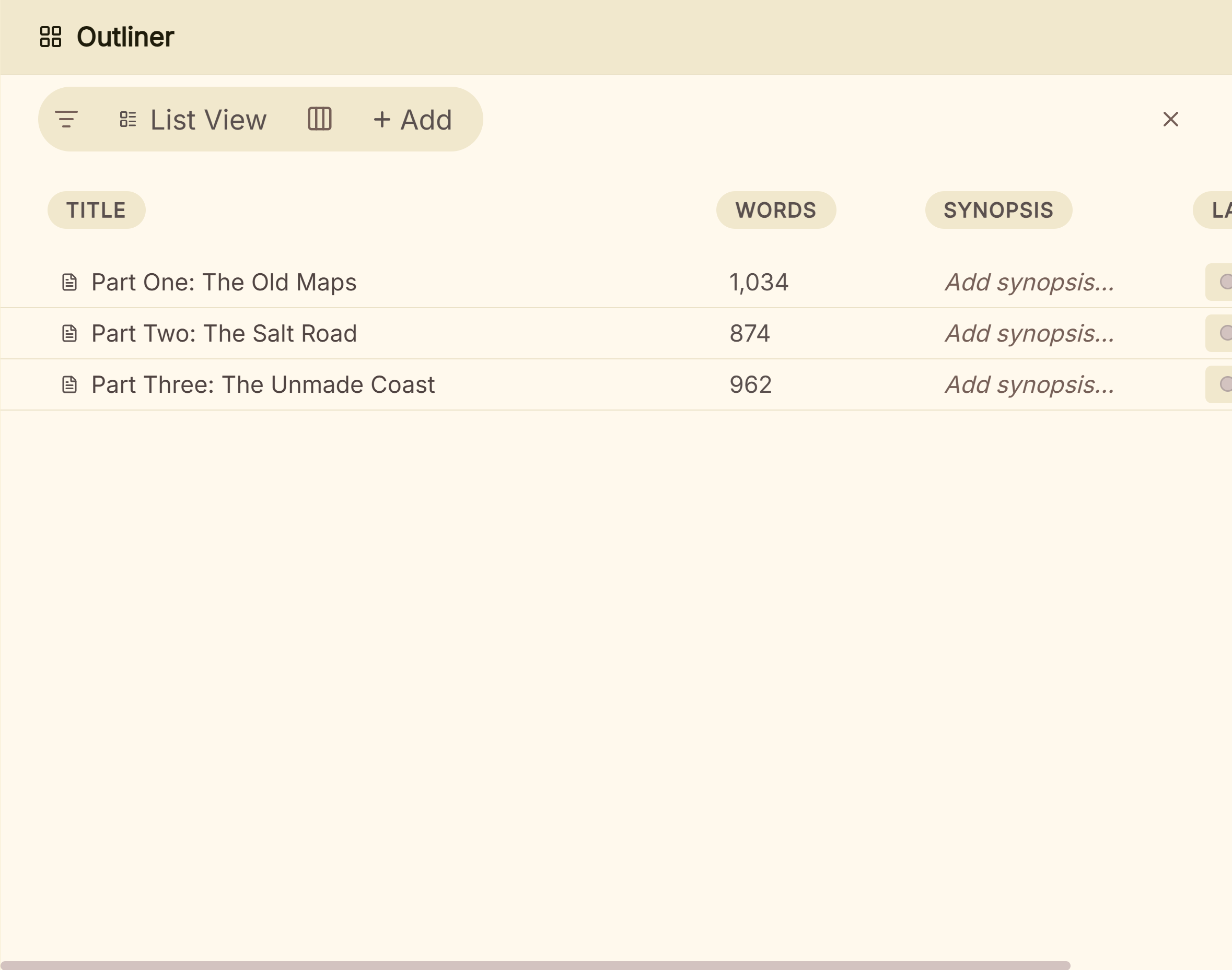 The Outliner's List view, a row per part
For the finished book, Deckle has 26 built-in style presets, eight trim sizes, bleed, drop caps and running heads. It exports EPUB (Generic, Kindle, Apple Books and Kobo targets), a print PDF and DOCX. The Kindle target writes an EPUB for KDP to convert.
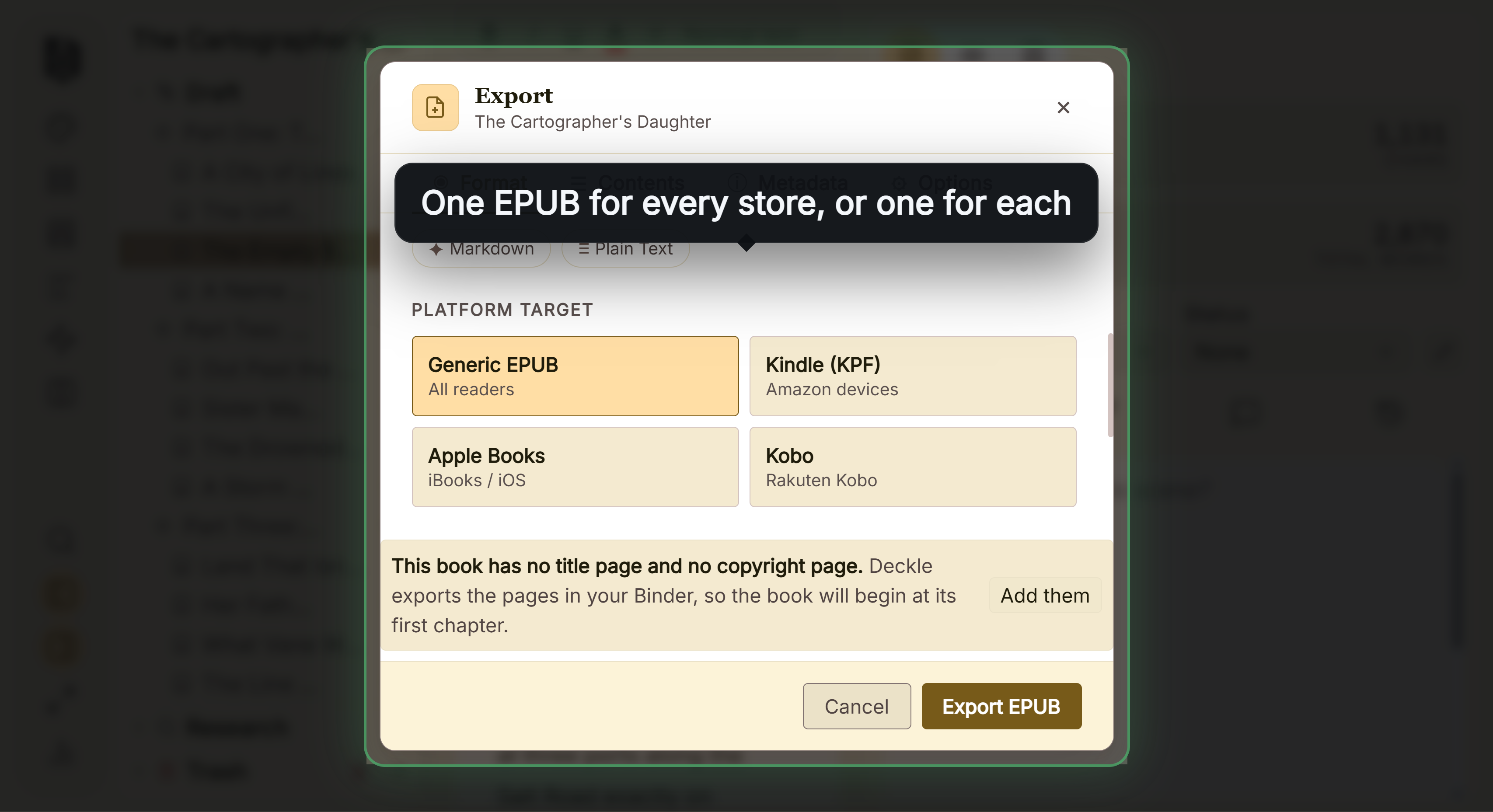 One EPUB per store, picked in the export window Deckle imports a zipped Scrivener project, so a Storyist book exported to
.scriv or Word comes across.
Where Deckle is behind Storyist:
- No iPhone or iPad app. Storyist has one.
- No screenplay formatting. Storyist writes screenplays and reads Final Draft and Fountain files.
- An older Mac won't run it. Deckle needs macOS 11. Storyist runs on macOS 10.14.
- No custom trim size. Deckle offers eight. Storyist sets the page size in its book editor.
Deckle is a one-time purchase. To try it, click Try it free on the screen Deckle opens to. There is no card, no account and no time limit. It opens a sample novel with every screen open to explore, and you can restyle it and export real EPUB, PDF and DOCX files. New writing is capped at about 500 words, and new documents and imports are blocked.
What you'd lose by leaving Storyist
| Storyist feature | What the alternatives offer |
|---|---|
| Mac, iPhone and iPad apps | Scrivener and Ulysses have them. Atticus runs in a tablet browser. Deckle, bibisco and yWriter are desktop only. |
| Novel and screenplay in one app | Scrivener imports and exports Final Draft files. The other tools here are for prose. |
| Story Sheets for plot, character and setting | Scrivener's Outliner holds synopses and metadata. bibisco has character and storyline tools. Deckle has the Codex. |
| Print-ready PDF from the same app | Atticus and Deckle make one. Scrivener compiles to PDF. bibisco exports a PDF with no typesetting claim, and yWriter goes through LaTeX, which Spacejock says to typeset with the free TeXworks. |
| Free reading after the trial | Storyist keeps "Viewer Mode" free after its 14-day trial, for viewing and exporting. Scrivener's trial lasts 30 days of use. |
| No subscription | Scrivener, Atticus, bibisco Supporters and Deckle are one-time. Ulysses is a subscription. |
How do I move a book out of Storyist?
Export from Storyist in a format the new app reads. Storyist exports Scrivener, Word (DOC and DOCX), RTF, ODT, HTML and plain text.
- To Scrivener: export
.scriv, or Word. - To Atticus: export .docx. Atticus finds chapters from headings, page breaks or three empty lines.
- To Deckle: export .docx with chapter titles as headings, or export
.scrivand zip the project first.
You don't need a licence to get your work out. Storyist says that after the trial "you can continue to use Storyist to view and export your work for free in Viewer Mode". Test two chapters before moving the whole book, using the method in how to move a manuscript between writing apps.
FAQ
Is there a Storyist for Windows?
No. Storyist makes only Storyist for macOS and Storyist for iOS. Scrivener, Atticus, bibisco, yWriter and Deckle run on Windows.
What is the best Storyist alternative?
Nothing authoritative ranks writing software. Scrivener suits writers who want deep planning on Mac or Windows, Atticus suits formatting, and Deckle suits writing and formatting on Windows, Mac or Linux.
How much does Storyist cost?
$59 for Mac from Storyist's store, or $59.99 on the Mac App Store. The iOS version is $19, or $19.99 on the App Store (as of October 2026). Both are one-time purchases.
Is Storyist free?
No, but both versions have a free 14-day trial. After it ends, Storyist keeps a free mode for reading and exporting your work.
Is Storyist on iPad?
Yes. Storyist for iOS runs on iPhone and iPad and needs iOS or iPadOS 17 or later.
Does Storyist use AI?
Storyist's pages and App Store listings mention no AI features. The detail is in does Storyist use AI.
How many Macs can I use Storyist on?
A licence from Storyist's store covers "a desktop and a laptop", provided you are the main user of both. A Mac App Store purchase restores on your other Macs with the same Apple ID.
Sources
All retrieved 20 October 2026. Prices change, so check the vendor page before buying.
- Storyist, homepage: "Storyist for macOS" and "Storyist for iOS", tagline
- Storyist, Storyist for macOS: features, import and export formats, ebooks, print-ready PDF, macOS 10.14
- Storyist Support, Publish on Amazon (retrieved 21 October 2026): Kindle export needs KindleGen
- Storyist, Store: $59 Mac, $19 iOS, iOS 17
- Storyist, What's new in Storyist 4: paperback print templates (4.3), iCloud versions (4.2)
- Storyist Support, Create a PDF for print: mirrored margins, bleed, templates
- Storyist Support, Install and purchase Storyist for macOS and Install your license: 14-day trial, Viewer Mode, desktop and laptop
- Mac App Store, Storyist 4: $59.99, version 4.4.1, "Data Not Collected"
- App Store, Storyist 4 for iPhone and iPad: $19.99, iOS 17, 14-day trial
- Literature & Latte, Scrivener overview, features and store
- Atticus and Atticus import guide, Ulysses pricing, Ulysses Help: Apple Intelligence (Writing Tools and Siri AI, retrieved 20 October 2026), Vellum importing help, bibisco download, bibisco Community vs Supporters (updated 28 February 2026, retrieved 20 October 2026), yWriter 7 (TeXworks for print PDF, retrieved 21 October 2026), Reedsy Studio FAQ
- Literature & Latte, Cross-grading: "Scrivener for macOS or Windows is $59.99" (the store page loads its prices from the checkout, so this page shows the figure in its text), retrieved 21 October 2026
- Literature & Latte, Scrivener release notes for macOS: 3.5.0, 1 October 2025, Kindle (.mobi) removed from Compile; the Windows notes, up to 3.1.6 (3 September 2025), record no such change (retrieved 21 October 2026)
Storyist is a trademark of Storyist Software LLC. Atticus, Ulysses, Vellum, Reedsy, bibisco and yWriter are trademarks of their owners. Scrivener is a trademark of Literature & Latte. Deckle is not affiliated with or endorsed by any product named here.