
The Draft2Digital formatter is free, runs in a browser, and converts a Word file into an EPUB and a black-and-white paperback PDF using D2D's template styles. Atticus costs $147 once (as of October 2026) and runs on Windows, Mac, Linux, Chromebook and the browser. You write the book in it and design it with 17+ themes, a custom theme builder and 1,500+ fonts.

Draft2Digital is also a distributor, and Atticus is not. The formatter is free whether or not you publish through D2D. Every fact below comes from Draft2Digital's and Atticus's own pages, read on 20 October 2026.
Draft2Digital vs Atticus at a glance
| Draft2Digital formatter | Atticus | |
|---|---|---|
| What it is | Free conversion and layout, part of a distributor | Writing and formatting app |
| Price (as of October 2026) | Free; $20 one-time only to publish through D2D | $147 one-time, "No monthly fees. Forever." |
| Runs on | Any browser | Windows, Mac, Linux, Chromebook, browser |
| Offline | No | Home page: "Works online and offline"; help (Feb 2024): online to import and export |
| Upload | .doc, .docx, RTF, TXT; your own EPUB passes through | .docx |
| Ebook output | EPUB | EPUB |
| Print output | Paperback PDF, black and white | Print-ready PDF |
| Other exports | None named | DOCX |
| Trim sizes | 6, from 5 x 8 to 8.5 x 11 in | Presets; "Atticus currently does not support custom trim sizes." |
| Design | Template Styles: chapter headers and scene breaks | 17+ chapter themes, custom theme builder, 1,500+ fonts |
| Footnotes | Stripped in ebook conversion | Footnotes listed |
| Writing tools | None | Chapters, parts, goals, habit tracker, collaboration |
| Extras | Wraparound print cover, automated end matter, distribution | Full-bleed images, large print |
| Try before buying | Free | No trial; 30-day money-back guarantee |
Is Draft2Digital's formatter really free, and what does Atticus cost?
The Draft2Digital formatter is free. D2D's FAQ says: "You may use Draft2Digital's conversion and layout tools free of charge, even without ebook distribution." Signing up needs only a name and an email address. The fees D2D charges are for publishing through it: a $20 one-time activation fee, paid "before publication is allowed", and $12 a year for accounts earning under $100 a year with titles in distribution.
Atticus costs $147 once, with updates included. Atticus lists no free plan or trial, and offers a 30-day money-back guarantee.
What each costs over three years
US list prices, as of October 2026.
| Route | Year 1 | Over 3 years |
|---|---|---|
| D2D formatter, files uploaded to stores yourself | $0 | $0 |
| D2D formatter and D2D distribution, earning over $100 a year | $20 | $20 |
| D2D formatter and D2D distribution, earning under $100 a year | $20 to $32 | up to $56 |
| Atticus | $147 | $147 |
The D2D range depends on when the maintenance fee starts, which its FAQ does not state. The table counts only the fees D2D's FAQ lists, not anything tied to sales.
Which gives more design control, Draft2Digital or Atticus?
Atticus gives more design control. It offers 17+ chapter themes, a custom theme builder, "1200+ Unique combinations" and 1,500+ fonts, with full-bleed images, large print and device previews.
Draft2Digital's control is its Template Styles. D2D's Knowledge Base says they "include pre-made decorative chapter headers and scene breaks", and one choice is "automatically applied to both your eBook and print layout." Its Print Book Inside page adds controls for where page numbering starts, drop caps, phrase caps, hyphenation, and widow and orphan control.
D2D's conversion also removes formatting on purpose. Its Knowledge Base says conversion "will strip out things that force formatting to be one exact way", naming "embedded fonts, extra line breaks, empty pages, footnotes." Your own fonts do not survive into the D2D ebook.
Draft2Digital vs Atticus for print books
Atticus suits more print formats. Draft2Digital's print is fixed: "D2D Print only offers perfect bound paperback books in black & white (grayscale)". It comes in six trim sizes (5 x 8, 5.25 x 8, 5.5 x 8.5, 6 x 9, 7.5 x 9.25 and 8.5 x 11 inches), from 32 to 1,050 pages.
Atticus exports a print-ready PDF in preset trim sizes. Its help says it "currently does not support custom trim sizes." On the PDF standard, Atticus says: "No, our PDF files are not classified as PDF X-1a," though they "meet most, if not all, of the criteria." D2D's FAQ does not name a PDF standard for its print file. KDP prefers PDF/X-1a and accepts other PDFs, as KDP print file requirements explains.
D2D has one print feature Atticus does not list: it generates a wraparound print cover "based on your ebook art", or places the barcode on a cover you upload.
Can you write a book in Draft2Digital or Atticus?
You can write in Atticus, and not in Draft2Digital. Atticus has drag-and-drop chapters, volumes and parts, book goals, a writing-habit tracker and a word counter. It added "Collaboration for authors, editors, and readers" on 3 December 2024. Version history is listed as "Coming Soon".
The Draft2Digital formatter takes a finished file. Every change after upload means editing the Word file and uploading again. D2D also asks you to leave out your own front matter and back matter: "Skip the title page, copyright page, dedication, also by, about the author, teaser, and any biographical pages."
Does Atticus work offline, and does Draft2Digital?
The Draft2Digital formatter does not work offline. It is a website.
Atticus states two things. Its home page says it "Works online and offline", "with or without an internet connection". Its help article, last updated 14 February 2024, says "You do need to be online to import and export files." The detail is on the Atticus offline page.
Pick the Draft2Digital formatter if
- Your book is a text novel or memoir in black and white.
- You want a free EPUB and paperback PDF from one Word file.
- You plan to distribute through D2D, which builds the print cover and end matter for you.
- Your trim size is one of D2D's six.
Pick Atticus if
- You want your own fonts and chapter designs.
- Your book has footnotes in the ebook.
- You want to write and format in the same app.
- You want a DOCX export as well as EPUB and PDF.
A third option: Deckle
Deckle is our app, so weigh this section accordingly.
Deckle is a desktop app for Windows, macOS and Linux that writes and formats a book in one project, offline. Like Atticus, it is paid, as a one-time purchase. It is a writing app first: a Binder, an Outliner with a Grid View of index cards, a Codex for characters, locations and items, a Timeline, snapshots and writing goals. For formatting it has 26 built-in style presets, 8 trim sizes, bleed, drop caps and running heads. Its footnotes sit at the foot of the page in print and pop up in the EPUB.
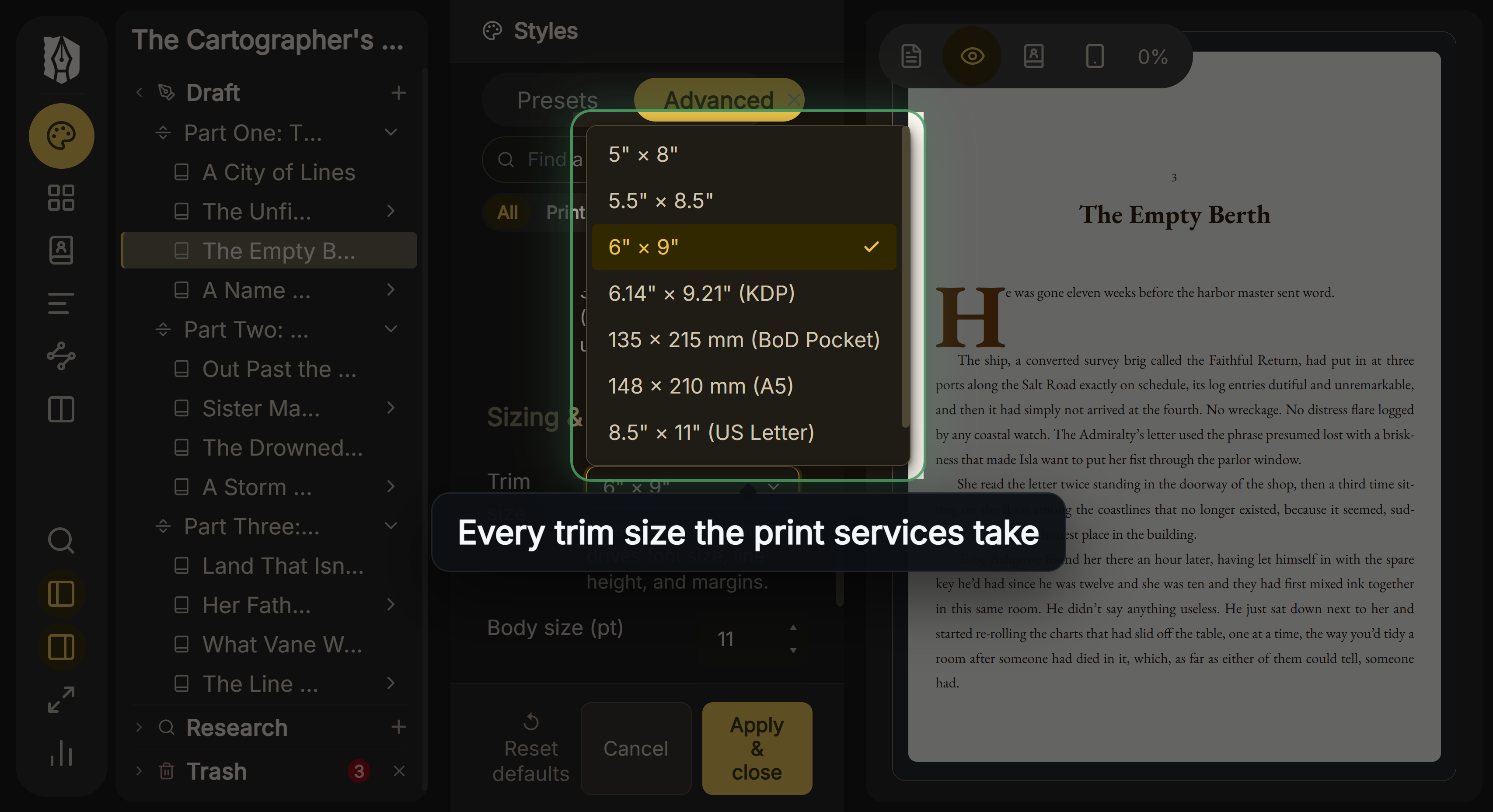 Deckle's trim sizes, chosen in Styles
It exports EPUB with Generic, Kindle, Apple Books and Kobo targets, a print PDF and DOCX. The Kindle target writes an EPUB for KDP to convert, not a KPF file.
Deckle is behind both in places. It has no web version, so it does not run on a Chromebook as D2D and Atticus do. It has no real-time collaboration, which Atticus has. It does not make a print cover, which D2D does. Its print PDF is a standard PDF, not PDF/X-1a. It has no custom trim size.
Deckle and D2D can also work together: D2D accepts a preformatted PDF interior, and the Draft2Digital free formatter page explains how D2D's bleed rule matches Deckle's print PDF.
To try Deckle, click Try it free on the screen Deckle opens to. There is no card, no account and no time limit. It opens a sample novel with every screen open to explore, and you can restyle it and export real EPUB, PDF and DOCX files. New writing is capped at about 500 words, and new documents and imports are blocked.
Moving a book from Draft2Digital to Atticus
- Start from your Word file, not from D2D's output. Atticus imports .docx.
- Remove any table of contents from the Word file. Atticus asks you to remove an existing TOC before import.
- Mark chapters with Heading 1 or 20pt+ text, page breaks, or three empty lines, which is how Atticus detects chapters.
- Add your front matter and back matter in Atticus. D2D generated these for you, so they are not in your Word file.
- Rebuild the print cover. D2D's wraparound cover was made from your ebook art inside D2D.
Common mistakes when comparing Draft2Digital and Atticus
- Treating the $20 as a formatting fee. It is D2D's publishing activation fee. Formatting and downloading are free.
- Expecting footnotes in a D2D ebook. D2D's conversion strips them.
- Planning a colour interior on D2D. D2D Print is grayscale only.
- Uploading your own front matter to D2D. D2D adds it, so it appears twice.
- Expecting a custom trim size in Atticus. Atticus says it does not support one yet.
FAQ
Is Draft2Digital or Atticus better for formatting a book?
Neither is ranked by any authority. Draft2Digital suits a free black-and-white paperback and EPUB from a Word file. Atticus suits more design control, footnotes and writing in the same app, for $147 once.
Is the Draft2Digital formatter free without publishing through D2D?
Yes. D2D says its conversion and layout tools are free "even without ebook distribution", and you can use its EPUB "anywhere".
Does Atticus distribute books like Draft2Digital?
No. Atticus exports files, and you upload them to KDP, IngramSpark or a distributor such as D2D yourself.
Can I upload an Atticus file to Draft2Digital?
Yes. D2D accepts your own EPUB for ebooks and a preformatted PDF interior for print. D2D cannot apply its template styles to an EPUB you upload.
Does Atticus have a free trial?
Atticus lists no free plan or trial. It offers a 30-day money-back guarantee.
Does Draft2Digital have templates like Atticus themes?
Yes, Template Styles with decorative chapter headers and scene breaks. Atticus offers more: 17+ themes and a custom theme builder.
Which works on a Chromebook?
Both. The D2D formatter runs in any browser, and Atticus lists Chromebook support.
Sources
All pages retrieved 20 October 2026.
- Draft2Digital, FAQ (free tools, fees, account, uploads, print specs, cover, front matter advice): https://draft2digital.com/faq/
- Draft2Digital, Knowledge Base (Template Styles, conversion strips fonts and footnotes, file types, EPUB pass-through): https://draft2digital.com/knowledge-base/
- Draft2Digital blog, Professional-Quality eBook Templates (one style for ebook and print): https://draft2digital.com/blog/draft2digital-introduces-professional-quality-ebook-templates/
- Draft2Digital blog, D2D Print Update and Walk Thru (print inside controls): https://draft2digital.com/blog/d2d-print-update-walk-thru-ep197/
- Atticus, home page (price, platforms, offline, exports, themes, fonts, guarantee): https://www.atticus.io/
- Atticus, Accessing Atticus (online to import and export, February 2024): https://www.atticus.io/accessing-atticus/
- Atticus, Importing existing work (.docx, chapter detection, remove TOC): https://www.atticus.io/importing-existing-work/
- Atticus, updates (collaboration, 3 December 2024): https://www.atticus.io/updates/
- Atticus Help, Does Atticus support custom trim sizes?: https://intercom.help/atticus-5877e36564df/en/articles/12684362-does-atticus-support-custom-trim-sizes
- Atticus Help, Does Atticus create PDF X-1a files?: https://intercom.help/atticus-5877e36564df/en/articles/12684255-does-atticus-create-pdf-x-1a-files
- Amazon KDP Help, Save Your Manuscript File (PDF/X-1a preferred): https://kdp.amazon.com/en_US/help/topic/G202145060
Prices and features last checked 20 October 2026. Draft2Digital is a trademark of Draft2Digital, LLC. Atticus is a trademark of its owner. KDP is a trademark of Amazon.com, Inc. Scrivener is a trademark of Literature & Latte. Deckle is not affiliated with or endorsed by any product named here.