

The Draft2Digital formatter is a free, browser-based tool that converts a Word manuscript into an EPUB and a print-ready paperback PDF. Draft2Digital says: "You may use Draft2Digital's conversion and layout tools free of charge, even without ebook distribution." Print is a black-and-white, perfect-bound paperback in six trim sizes, from 32 to 1,050 pages, per Draft2Digital's FAQ.

Every fact on this page comes from Draft2Digital's own FAQ, Knowledge Base and blog, read on 20 October 2026. The file requirements for publishing through Draft2Digital have their own page, Draft2Digital formatting requirements. This page covers the free formatting tool.
What is the Draft2Digital formatter?
The Draft2Digital formatter is the conversion and layout step of Draft2Digital (D2D), an ebook and print distributor. You upload a manuscript, pick a template style, preview the result, and download the files. D2D's print layout post says the tool "is browser-based, so you can use it regardless of what operating system you prefer."
It is a formatter, not a writing app. It has no chapter organiser, no notes and no drafting tools. It needs an internet connection, because it runs on D2D's site.
What files does the Draft2Digital formatter accept?
The Draft2Digital formatter accepts Word files first. D2D's FAQ says: "Upload your book in .doc or .docx file format, and we'll convert your manuscript into an ebook or print book." It adds: "Anything Word can read, we can read. (RTF, OTF, TXT, too!)"
The rules differ for ebook and print:
| Upload | Ebook | |
|---|---|---|
| Word (.doc, .docx) | Converted | Converted |
| RTF, TXT | Converted | RTF converted |
| ODT | Not named for ebook | Converted |
| Your own EPUB | Accepted, passed through, no template applied | "We do not accept preformatted epub or mobi files for print conversion." |
| Your own PDF interior | Not applicable | Accepted, with "very limited" customisation |
D2D's Knowledge Base states that "Draft2Digital cannot apply template styles to user-uploaded epubs." An EPUB you built yourself goes through as it is.
Draft2Digital word to EPUB: how the conversion works
The Draft2Digital formatter turns a Word file into an EPUB by reading its structure and rebuilding it as a reflowable ebook. D2D's Knowledge Base is direct about what this costs: conversion "will strip out things that force formatting to be one exact way", and it names "embedded fonts, extra line breaks, empty pages, footnotes" as examples.
That last word matters for non-fiction. A manuscript with footnotes loses them in D2D's ebook conversion, so a footnoted book needs a tool that writes EPUB footnotes itself, or an EPUB you supply.
D2D's advice for a clean conversion, from its FAQ:
- Upload only the story. "Skip the title page, copyright page, dedication, also by, about the author, teaser, and any biographical pages." D2D adds these for you.
- Mark chapters one way. "Mark each new chapter or scene break with something distinctive, and be consistent." D2D suggests chapter titles that are "centered and bold, or larger font, or use a heading style". Its print post asks for "the 'Heading 1' style for chapter headings."
- Insert images properly. The Knowledge Base asks for images placed with Insert > Picture, centred inline, each with a unique filename.
How Word headings become chapters, and why a heading style beats bold text, is covered in formatting your Word manuscript for import.
What templates does Draft2Digital offer?
Draft2Digital offers Template Styles. Its Knowledge Base says they "include pre-made decorative chapter headers and scene breaks." For an ebook, they sit on the right-hand side of the Preview step, after you upload. For print, they sit on the Print Book Inside page, and you click Apply Changes to see them in the preview.
D2D's 2017 template announcement says "The style you choose is automatically applied to both your eBook and print layout." One choice styles both editions. D2D does not publish a count of its templates on the pages read.
D2D's print walkthrough from 2025 shows more print controls on the Print Book Inside page: where page numbering starts, drop caps, phrase caps at scene openings, hyphenation, and widow and orphan control.
D2D also builds two things most formatters leave to you:
- A print cover. "Draft2Digital will automatically generate a wraparound cover based on your ebook art." You can also upload your own wraparound cover from D2D's template, and D2D places the barcode.
- End matter. D2D's automated end matter adds an author bio and an Also By page, and "will update content such as the author biography" across your books.
Draft2Digital print limits
Draft2Digital's FAQ says "D2D Print only offers perfect bound paperback books in black & white (grayscale)", so a colour, hardcover or custom-trim book needs another tool. The six trim sizes, page-count limits and bleed rules are in Draft2Digital print book sizes, and trim sizes in general are compared in book trim sizes explained.
D2D also refuses some book types in any format: "Draft2Digital will not distribute journals, workbooks, planners, calendars", or mainly interactive content.
Can you use the Draft2Digital formatter without publishing through D2D?
Yes. Draft2Digital's FAQ states: "You can create, convert, and download a pixel-perfect paperback PDF or ebook EPUB file without having to publish through D2D." It also says: "You are allowed to use your Draft2Digital converted epub anywhere." D2D's Knowledge Base adds that "Draft2Digital does not require authors to publish their ebooks through us in order to use D2D Print."
You do need a D2D account to upload a book. D2D says "All you need to sign up is a name and an email address that you can check regularly." The fees apply to publishing, not to formatting:
- "A non-refundable, one-time activation fee of $20 (USD) for new accounts", which must be paid "before publication is allowed".
- An annual maintenance fee of $12 (USD) for accounts earning under $100 a year, which does not apply to accounts "with no titles in distribution".
So an author who formats in D2D and uploads the files to KDP or IngramSpark directly pays nothing. D2D figures as of October 2026.
How to format a book with the Draft2Digital formatter
- Prepare the Word file. Remove your front matter and back matter, set chapter titles in Heading 1, and insert images inline.
- Sign up with a name and an email address.
- Upload the manuscript as .docx (or .doc, RTF or TXT for the ebook; Word, ODT or RTF for print).
- Pick a Template Style on the Preview step. It carries over to print.
- Set up print on the Print Book Inside page: trim size, template options and the other inside controls. Click Apply Changes to refresh the preview.
- Download the EPUB and the print PDF. D2D says it gives "the option of downloading the files we convert for you at no charge."
- Check both files before uploading anywhere. Run the EPUB through EPUBCheck, "the conformance checker for EPUB publications", as Apple requires, and open the PDF at full size.
Uploading the files to Amazon instead of D2D means meeting KDP's own rules, listed in KDP print file requirements. A D2D trim size such as 5.25 x 8 or 7.5 x 9.25 needs to be one KDP also prints. For the ebook, KDP accepts EPUB files "that meet the specifications outlined in the Kindle Publishing Guidelines".
Common mistakes with the Draft2Digital formatter
- Uploading your own front matter. D2D adds the title page, copyright page and Also By page, so yours would appear twice.
- Expecting footnotes in the ebook. D2D names footnotes among the things its conversion strips out.
- Uploading an EPUB and expecting a template. D2D cannot apply Template Styles to an EPUB you supply.
- Planning a colour or hardcover edition. D2D Print is black-and-white paperback only.
- Assuming formatting costs $20. The activation fee is for publishing through D2D. Converting and downloading is free.
- Skipping the file check. A converted file is what readers receive, so read it before you sell it.
Where Deckle fits
Deckle is our app, so weigh this section accordingly.
Deckle is a desktop app for Windows, macOS and Linux that writes and formats a book in one project, offline. It is not free: it is a one-time purchase. It overlaps with D2D's formatter in what it exports, and differs in where the formatting happens.
What D2D does that Deckle does not:
- It is free, and it runs in any browser, including on a Chromebook.
- It generates a print cover from your ebook art, and places the barcode.
- It distributes the book to stores, if you choose to publish through it.
What Deckle does that D2D's conversion does not:
- Footnotes survive. Deckle's footnotes go at the foot of the page in print and pop up in the EPUB, where D2D's conversion strips footnotes.
- Per-store EPUB targets. Deckle exports Generic, Kindle, Apple Books and Kobo EPUBs. The Kindle target writes an EPUB for KDP to convert, not a KPF file.
- More trim sizes than D2D on one side, fewer on another. Deckle has eight, including 6.14 x 9.21 inches (KDP), A5 and 135 x 215 mm, but not D2D's 5.25 x 8 or 7.5 x 9.25. Neither offers a custom size.
- Colour print as an option. Deckle's print is black and white by default, with a Print in colour setting. D2D Print is grayscale only.
The two can work together. D2D accepts a preformatted PDF interior, and Deckle's print PDF bleeds only at the top, bottom and outside edge, never the spine side, which is the shape D2D asks for: "Do not add bleed to your gutter." Deckle's bleed defaults to ⅛ inch, D2D's figure. For D2D's ebook side, the Generic EPUB target is the sensible choice for a distributor, as the Draft2Digital formatting requirements page explains.
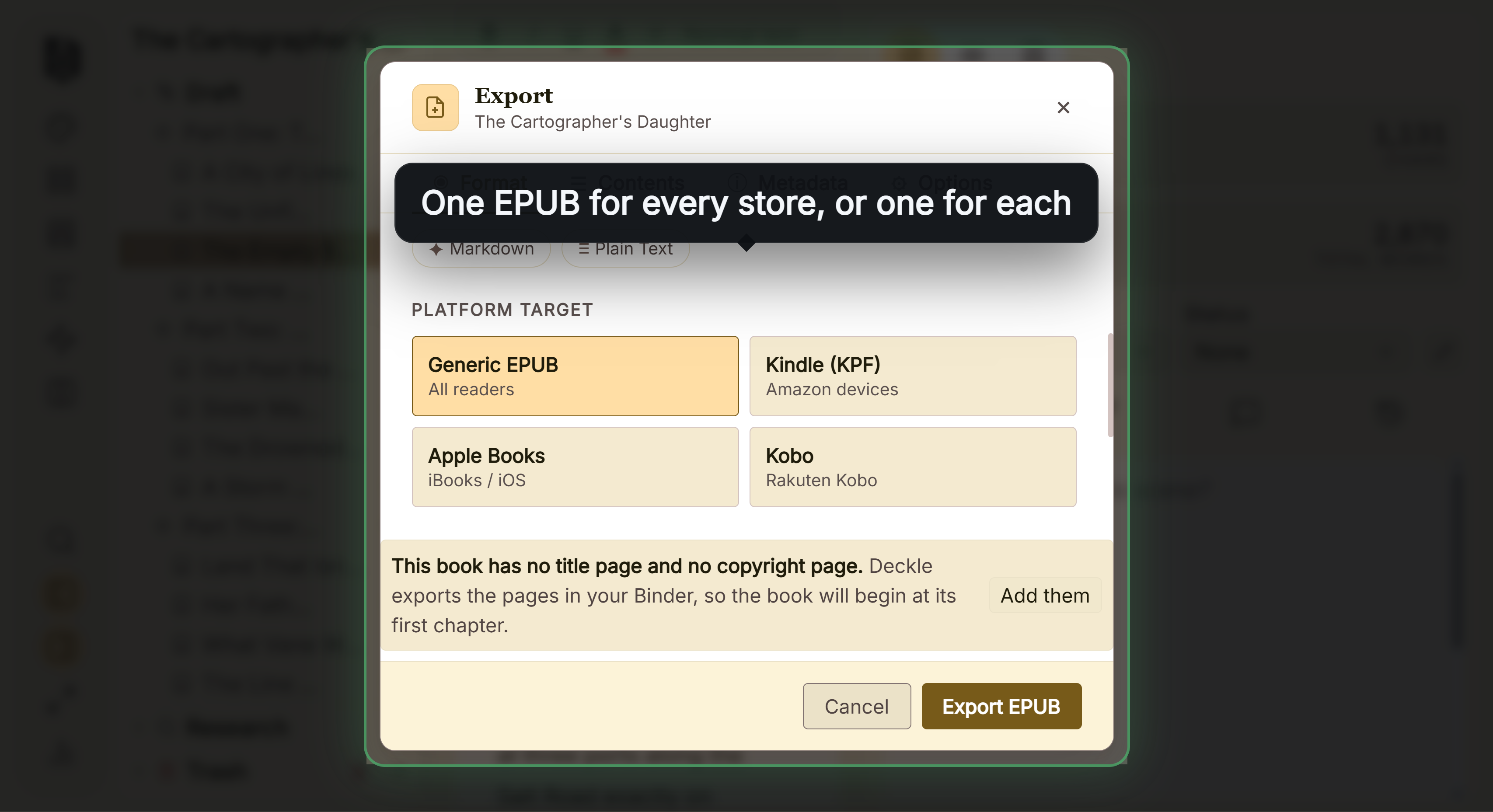 Deckle's EPUB targets, with Generic EPUB selected
To try Deckle, click Take Deckle for a Spin on the screen Deckle opens to. There is no card, no account and no time limit. It opens a sample novel with every screen open to explore, and you can restyle it and export real EPUB, PDF and DOCX files. New writing is capped at about 500 words, and new documents and imports are blocked.
FAQ
Is the Draft2Digital formatter free?
Yes. Draft2Digital says its "conversion and layout tools" are free "even without ebook distribution". The $20 activation fee applies only when you publish through D2D.
Can I use Draft2Digital's EPUB on Amazon KDP?
Yes. Draft2Digital says "You are allowed to use your Draft2Digital converted epub anywhere." KDP accepts EPUB files that meet its Kindle Publishing Guidelines.
Does Draft2Digital format books from a Word document?
Yes. It converts .doc and .docx into an EPUB and a print PDF, and it also reads RTF and TXT. Use Heading 1 for chapter titles.
Does Draft2Digital have templates?
Yes. Its Template Styles add "pre-made decorative chapter headers and scene breaks", and one choice styles both the ebook and the print layout.
What trim sizes does Draft2Digital offer?
Six: 5 x 8, 5.25 x 8, 5.5 x 8.5, 6 x 9, 7.5 x 9.25 and 8.5 x 11 inches, all perfect-bound paperback in black and white.
Can Draft2Digital convert a PDF to EPUB?
D2D's FAQ names .doc, .docx, RTF and TXT as uploads for conversion, and accepts a PDF only as a finished print interior. Upload the Word file for the ebook.
Does Draft2Digital keep footnotes?
Not in the ebook conversion. D2D's Knowledge Base lists footnotes among the things its conversion strips out.
Does Draft2Digital do hardcover or colour print?
No. "D2D Print only offers perfect bound paperback books in black & white (grayscale)."
Sources
All pages retrieved 20 October 2026.
- Draft2Digital, FAQ (free tools without distribution, accepted files, print specs, fees, account, using the EPUB anywhere, cover, end matter, chapter advice): https://draft2digital.com/faq/
- Draft2Digital, Knowledge Base (Template Styles, conversion strips footnotes, file types for ebook and print, full-bleed, journals and workbooks, D2D Print without D2D ebooks): https://draft2digital.com/knowledge-base/
- Draft2Digital blog, Draft2Digital Introduces Professional-Quality eBook Templates (31 August 2017): https://draft2digital.com/blog/draft2digital-introduces-professional-quality-ebook-templates/
- Draft2Digital blog, Draft2Digital Introduces Improved Automated Layout for Print (10 June 2017; browser-based, Heading 1): https://draft2digital.com/blog/draft2digital-introduces-improved-automated-layout-for-print/
- Draft2Digital blog, D2D Print: How to Publish a Print Book (30 May 2025; Print Book Inside, Apply Changes, custom PDF limits): https://draft2digital.com/blog/d2d-print-how-to-publish-a-print-book/
- Draft2Digital blog, D2D Print Update and Walk Thru (print inside controls): https://draft2digital.com/blog/d2d-print-update-walk-thru-ep197/
- Amazon KDP Help, supported eBook manuscript formats (EPUB accepted): https://kdp.amazon.com/en_US/help/topic/G200634390
- W3C, EPUBCheck (the conformance checker for EPUB publications): https://www.w3.org/publishing/epubcheck/
Prices and features last checked 20 October 2026. Draft2Digital and D2D are trademarks of Draft2Digital, LLC. Kindle and KDP are trademarks of Amazon.com, Inc. Scrivener is a trademark of Literature & Latte. Deckle is not affiliated with or endorsed by any product named here.