

The main bibisco alternatives are Manuskript and yWriter (free desktop novel apps), Scrivener (a one-time writing app with Compile), Penpoint (a small offline desktop app), Plottr (visual outlining) and Deckle (writing plus book formatting). The free bibisco alternatives are Manuskript, which is open source, and yWriter on Windows. Unlike bibisco, Manuskript, yWriter, Scrivener, Penpoint and Deckle all import a Word file.

Every bibisco fact on this page comes from bibisco.com, and every other fact from that vendor's own pages, all read on 20 October 2026. Prices are as of October 2026. No standards body ranks writing software, so this page ranks nothing.
What does bibisco do well?
bibisco is a desktop app for planning and writing a novel, on Windows 10 or later, macOS 10.13 High Sierra or later, and Linux, 64-bit only.
- A free edition. The Community Edition is free, and it includes a 30-day trial of the Supporters Edition's features.
- A one-time price. The Supporters Edition is "$69 one time payment, no subscriptions", with a 30-day money-back guarantee.
- Story design, not just files. bibisco's own comparison page says it "focuses on the story itself", with premise, fabula, setting, storylines, character interviews and locations.
- Free software licence. bibisco's FAQ says "bibisco is licensed under the terms of GNU GPL License".
- Local data. "As a desktop application, novel data is stored securely on your PC/Mac". The FAQ adds that "no novel data is housed on bibisco.com".
- Mobile, if you want it. As of October 2026 the Android, iPhone and iPad apps are free with Community features and no sync; bibisco Everywhere adds the cloud sync for $3.49 a month or $29.99 a year, with a 14-day trial. The details are in bibisco mobile.
- One licence on all your machines. You can use it "on multiple computers, as long as they belong to you or your family members", and you do not need a separate licence for each operating system.
If what you use most is the character interview and the guided story structure, few of the tools below copy it. bibisco may already be the right tool.
Why do writers leave bibisco?
bibisco's own pages state the trade-offs.
- It imports no manuscripts. bibisco's help says "In bibisco, it's not possible to import files with the extension DOC, DOCX, ODT, TXT as a project". The only file it imports is a
.bibisco2archive that bibisco itself made. To bring in an existing draft, you build the chapters and scenes by hand and "copy and paste the text from your DOC/DOCX/ODT/TXT file into each scene". - The free edition is narrower than it looks. bibisco's comparison table, updated 28 February 2026, marks 20 features as Supporters only. They include the Timeline, EPUB export, search and find/replace, writing goals, distraction-free mode, footnotes and comments, mind maps, and prologue, epilogue and parts.
- Updates are free for two years. "Within the first two years of purchase, you get free updates. After that, upgrades are available at a 50% discount".
- Sync is a second product. "bibisco Everywhere does not include the Supporters Edition license". The two are bought separately.
- No typeset print output is claimed. bibisco exports "PDF, DOCX, TXT, and EPUB formats". None of its pages describes print-ready or typeset PDF output.
bibisco alternatives at a glance
| Tool | What it is | Platforms | Price (as of October 2026) | Imports Word | Exports EPUB | AI |
|---|---|---|---|---|---|---|
| bibisco | Novel planning and writing | Windows, macOS, Linux (64-bit); free Android and iOS apps, sync via bibisco Everywhere | Free Community; Supporters $69 once | No | Supporters only | None mentioned |
| Manuskript | Open-source planning and writing (GPL-3.0) | Linux, Windows; macOS from source for 0.17.0 | Free | Via pandoc, marked work in progress | Via pandoc | None mentioned |
| yWriter | Free scene-based writing tool | Windows; Mac "in progress" | Free on Windows | Yes (from 7.1.3.4) | Yes, plus Mobi | None mentioned |
| Scrivener | Writing and organising, with Compile | macOS, Windows, iOS | $59.99 Mac or Windows, once; iOS $23.99 | Yes | Yes | None |
| Penpoint | Desktop drafting and worldbuilding | Windows, macOS, Linux | $40 once | Yes | Yes | None, by policy |
| Plottr | Visual outlining and series bible | Mac, Windows | $60/yr or $150 lifetime | Not listed | No | None, by policy |
| Deckle | Writing, organising and formatting | Windows, macOS, Linux | One-time purchase; free demo | Yes | Yes | None in the app |
What are the free bibisco alternatives?
The free bibisco alternatives are Manuskript and yWriter. Both keep your work on your own disk.
Manuskript is free and open source under GPL-3.0, per its GitHub repository, and written in Python. It has an outliner, index cards, a Snowflake-method novel assistant, character, plot and world sheets, a story-line view and a distraction-free mode with word and time goals. Version 0.17.0, of 30 June 2025, ships for Linux as a .deb, .rpm, Flatpak and Snap, and for Windows as a .zip. Mac users run it from source. Its download page says it is "still in the early development stages" and recommends frequent backups. It exports plain text, Markdown and HTML on its own, and EPUB, OpenDocument and DOCX need pandoc installed. PDF needs pandoc and LaTeX, its wiki says. Its DOCX import also runs through pandoc and is marked work in progress.
yWriter is free on Windows, from Spacejock Software. It splits a novel into chapters and scenes, with viewpoint, goal, conflict and outcome fields for each scene, a storyboard view, a daily progress log and automatic backups. It exports EPUB and Mobi, RTF of selected chapters, and LaTeX for print PDFs. Its changelog added "import and export from docx" in version 7.1.3.4. The latest version is 7.1.5.2, released 30 January 2024. The full yWriter picture is in yWriter alternatives.
bibisco's own Community Edition is the third free option. It keeps chapters, scenes, storylines, character interviews, locations, automatic backups, and export to PDF, DOCX, TXT and archive. It drops the Timeline and EPUB export after the 30-day trial.
Which paid apps replace bibisco?
Scrivener, from Literature & Latte, is the long-standing paid alternative. It costs $59.99 once for macOS or Windows, one licence per platform, and $23.99 on iOS. It has a Binder, Corkboard, Outliner, Snapshots with Compare, Scrivenings, Collections and Targets. It imports Word documents, plain text, Final Draft, PDFs and web pages, and it compiles to Word, RTF, PDF and EPUB, plus Kindle (.mobi) on Windows only, since Scrivener for Mac 3.5.0 (1 October 2025) removed it. It has no Linux version. The two are compared head to head in bibisco vs Scrivener.
Penpoint, from Tophat Creative, is a desktop app for Windows, macOS and Linux that works fully offline with no account. It costs $40 once, with a 14-day free trial. It has chapter and scene views, a corkboard, a codex, a timeline, margin comments and snapshots. It imports .docx, EPUB, RTF, Markdown, plain text and Scrivener 3 projects, and exports Word, PDF, EPUB and Markdown. Its site says "no AI ever touches your prose". Version 1.0.0 shipped on 2 October 2025, so it is a young product.
Plottr replaces bibisco's planning side only. It lays a book out on a drag-and-drop timeline with 30+ plot templates (the features page figure; the homepage now says 40+), and costs $60 a year or $150 for a lifetime licence. Its help says drafting is "not what Plottr is built for", and it exports to Word and Scrivener only. It is covered in Plottr alternatives.
Is Deckle a bibisco alternative?
Deckle is our app, so weigh this section accordingly.
Deckle is a desktop app for Windows, macOS and Linux that drafts, organises and formats a book in one project. It covers much of bibisco's planning ground in different shapes:
- Codex for characters, locations and items, plus custom sections, with entry templates you set up yourself. It exports as a Story bible (PDF) or Story bible (Word). What goes in one is covered in what to include in a story bible.
- Timeline with plotlines, optional calendar dates and a "Story order" view, a column per chapter, so flashbacks show out of sequence.
- Outliner with a Grid View of index cards and a List view with custom columns.
- Writing Stats with daily or weekly goals, streaks and words per chapter.
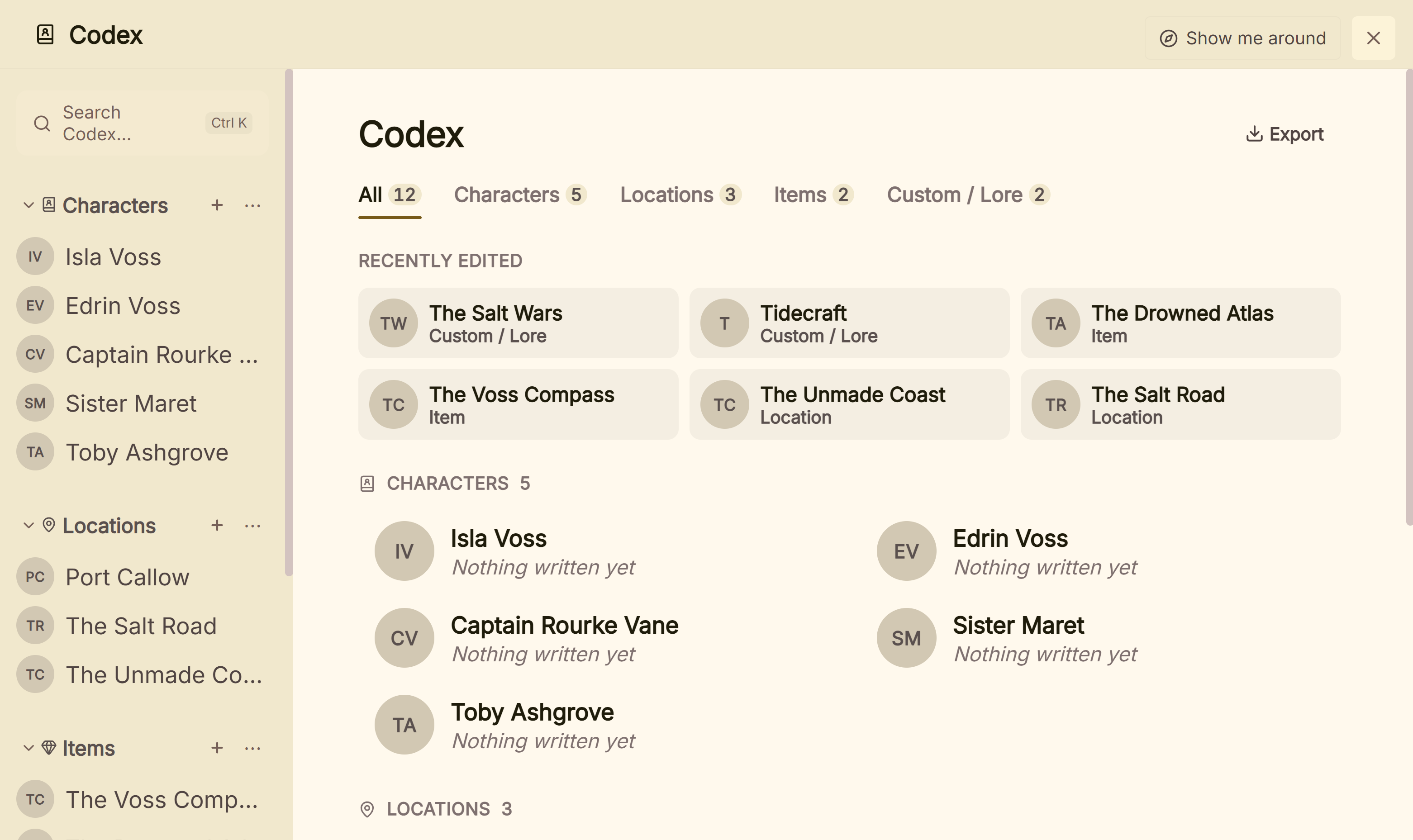 The Codex: characters, locations, items and custom sections
Where Deckle goes further is the finished book and the way in. It imports Word files (chapters come from heading styles), EPUB files and zipped Scrivener projects, so a bibisco DOCX export can come straight across. It exports EPUB for Kindle, Apple Books and Kobo, a print PDF in eight trim sizes, and DOCX, with 26 built-in style presets. The Kindle target writes an EPUB for KDP to convert, not a KPF file. A Deckle project is a folder on your own disk, holding one .deckle database plus research/ and .deckle-assets/ folders. It works offline after activation and has no generative AI.
What you would lose by switching from bibisco:
- Free and open source. Deckle is paid and is not open source.
- Mind maps and character interviews. Deckle has neither. Codex entry templates are the nearest thing to bibisco's interview questions.
- Mobile and sync. Deckle has no phone or tablet app and no cloud sync. bibisco has free phone and tablet apps, and bibisco Everywhere syncs them.
Deckle is a one-time purchase. To try it, click Try it free on the screen Deckle opens to. There is no card, no account and no time limit. It opens a sample novel with every screen open to explore, and you can restyle it and export real EPUB, PDF and DOCX files. New writing is capped at about 500 words, and new documents and imports are blocked.
How do I move a novel out of bibisco?
bibisco exports your novel as DOCX, PDF, TXT, EPUB (Supporters) or a .bibisco2 archive. The archive only opens in bibisco, so use DOCX to move.
- Export the novel from bibisco as DOCX.
- Open the file in Word or LibreOffice and check that each chapter title uses a heading style. Most apps, Deckle included, split chapters at headings. Formatting a Word manuscript for import walks through it.
- Import the DOCX into the new app.
- Move your character, location and object notes by hand. A DOCX carries the manuscript, not the story design around it.
- Keep the
.bibisco2archive as a backup, since it is the only file bibisco can open again.
The general method for any switch is in how to move a manuscript between writing apps.
What goes wrong when leaving bibisco?
- Judging the Community Edition during the trial. The first 30 days include Supporters features. The Timeline and EPUB export go away afterwards unless you buy.
- Expecting to import a Word draft into bibisco. bibisco imports only its own archives. Pasting scene by scene is the vendor's own method.
- Buying bibisco Everywhere for the desktop features. Everywhere is the sync subscription. It does not include the Supporters Edition.
- Reading "one-time" as "updates forever". bibisco's $69 covers two years of updates, then upgrades are half price.
FAQ
Q: What is the best bibisco alternative? A: Nothing authoritative ranks writing software. Manuskript and yWriter suit a free tool, Scrivener suits deep organising, Plottr suits outlining, and Penpoint and Deckle are one-time desktop apps.
Q: Is there a free alternative to bibisco? A: Yes. Manuskript is free and open source on Linux and Windows, and yWriter is free on Windows. bibisco's own Community Edition is also free.
Q: Is bibisco open source? A: bibisco's FAQ says "bibisco is licensed under the terms of GNU GPL License". Manuskript is also licensed under the GPL.
Q: Is bibisco free? A: The Community Edition is free. The Supporters Edition costs $69 once, and bibisco Everywhere costs $3.49 a month or $29.99 a year, as of October 2026.
Q: What is the difference between bibisco free and paid? A: bibisco lists 20 features as Supporters only, including the Timeline, EPUB export, search and find/replace, writing goals and mind maps.
Q: Can bibisco import Word documents? A: No. bibisco's help says DOC, DOCX, ODT and TXT files cannot be imported as a project. You paste the text into each scene.
Q: Is bibisco better than Scrivener? A: Neither is better in every case. bibisco guides story design and runs on Linux. Scrivener imports Word files and compiles to more formats.
Q: Does bibisco work on iPad? A: Yes. bibisco's release notes added the iOS app in version 5.1.2, on 8 July 2026, and say "Community features are available for free on Android and iOS, without cloud sync." Sync needs bibisco Everywhere.
Sources
All retrieved 20 October 2026. Prices change, so check the vendor page before buying.
- bibisco, download page: editions, $69 one-time, "2 years of free updates", 30-day money-back guarantee, bibisco Everywhere prices, version 5.1, 20% education discount, GPL licence, platforms
- bibisco docs, Differences between Community and Supporters Editions (updated 28 February 2026): the feature table, Supporters-only features
- bibisco docs, Project import issues (updated 26 February 2026): DOC, DOCX, ODT and TXT cannot be imported;
.bibisco2only; copy and paste into scenes - bibisco docs, How to import a backup file (updated 28 February 2026): backup files have the
.bibisco2extension - bibisco docs, General FAQs: system requirements, export formats, local data, update policy
- bibisco, FAQ: multiple computers, licence, Everywhere is a separate product
- bibisco docs, bibisco 5 release notes (updated 12 August 2026): 5.1.3 of 12 August 2026, iOS app in 5.1.2 and "Community features are available for free on Android and iOS, without cloud sync" (retrieved 21 October 2026)
- bibisco, Scrivener vs bibisco: "focuses on the story itself"
- Manuskript, GitHub repository, releases and import and export capabilities
- Spacejock Software, yWriter 7 and yWriter 7 download and changelog: docx import and export in 7.1.3.4, 7.1.5.2 of 30 January 2024
- Literature & Latte, Scrivener overview, FAQ and store; support article Does Scrivener use AI?
- Penpoint, penpoint.app and changelog
- Plottr, pricing and Can I write my story in Plottr?
- Plottr, features ("30+ proven plot templates") and home page ("40+ plot outlining templates"), retrieved 21 October 2026
- Literature & Latte, Cross-grading: "Scrivener for macOS or Windows is $59.99" (the store page loads its prices from the checkout, so this page shows the figure in its text), retrieved 21 October 2026
- Literature & Latte, Scrivener release notes for macOS: 3.5.0, 1 October 2025, Kindle (.mobi) removed from Compile; the Windows notes, up to 3.1.6 (3 September 2025), record no such change (retrieved 21 October 2026)
Prices and features last checked 20 October 2026. Scrivener is a trademark of Literature & Latte. bibisco is a trademark of its owner, as are Manuskript, Plottr and yWriter. Penpoint is a product of Tophat Creative, LLC. Deckle is not affiliated with or endorsed by any product named here.