

World Anvil has no offline mode. Its FAQ says "you must be connected to the internet to use it." The offline alternatives for a novelist are desktop apps that keep a story bible beside the manuscript: Campfire Writing's desktop app, Penpoint, bibisco, Manuskript, Plottr, Obsidian and Deckle. None of them copies World Anvil's full worldbuilding toolset.
This page covers the novelist's use of World Anvil: a world bible and a book. It leaves out RPG campaigns. Every World Anvil fact comes from its own FAQ, pricing page, help guides and blog, read on 20 October 2026, and prices are as of October 2026.
Does World Anvil work offline?
No. World Anvil's FAQ answers "Can I use World Anvil offline?" with "No, World Anvil is a browser based software and you must be connected to the internet to use it." It also says "There is not currently a mobile app for World Anvil." You reach it through a desktop or phone browser.
What World Anvil does for novelists
World Anvil is a browser-based worldbuilding platform with a novel-writing module called Manuscripts. Its FAQ says Manuscripts "fully integrates with your worldbuilding bible." Its help guides cover outlining, a Save the Cat beat sheet, versions of a manuscript, a daily word count, and viewing and editing your world's articles "without leaving your writing space."
Manuscripts 1.5 arrived on 9 October 2026. It added a corkboard for scene and chapter summaries and word-count goals for the whole manuscript or one chapter. World Anvil's post says "this is not even its final form!"
On the worldbuilding side, World Anvil's pricing page lists article templates, interactive maps, timelines, Chronicles (parallel timelines), whiteboards, family trees, a Diplomatic Relations Web, calendars, secrets and co-authors. That is a wider set of worldbuilding tools than any offline app on this page.
What World Anvil costs a novelist
Manuscripts and private worlds need a paid tier, and membership "starts at $4.50 USD a month for an annual subscription" ($54 a year) as of October 2026; every tier and price is in World Anvil price.
What happens to your book if your World Anvil membership lapses?
Your private work stays private and readable, and you cannot edit it. The FAQ says "you won't be able to edit your private content until you make it public or renew your subscription." For a novelist, the private content is usually the unpublished manuscript and its world notes. This is the practical cost of a subscription tool, and it is the main reason people search for an offline alternative.
World Anvil's FAQ also says "Your worlds, articles, images, and manuscripts always remain your intellectual property." Ownership is not in question. Editing access is.
Can you export a World Anvil manuscript?
Yes, as HTML only, on the Master tier and above, which Amazon KDP's format list accepts for ebooks but which is not a print interior; the steps and limits are in World Anvil export, and KDP's print rules are in KDP print file requirements.
Offline alternatives to World Anvil for writing a novel
These apps run on your own computer. Facts come from each vendor's own page, read on 20 October 2026.
| App | What it is | Offline | Worldbuilding | Manuscript export | Price (October 2026) |
|---|---|---|---|---|---|
| Campfire Writing | writing and worldbuilding modules | desktop app "allows you to write offline!" (Mac, Windows) | 18 modules, including Maps, Relationships, Calendar, Languages, Species | PDF, EPUB | free plan with caps; Standard $12/month shown |
| Penpoint | desktop drafting and worldbuilding | fully offline, no account | codex of characters, nestable locations and items; timeline | Word, PDF, EPUB, Markdown | $40 once |
| bibisco | novel planning and writing | yes, local data | characters, storylines; timeline on Supporters | PDF, DOCX, TXT; EPUB on Supporters | free Community; Supporters $69 once |
| Manuskript | open-source planning and writing | yes, plain-text files | characters, plots and world sheets | text, Markdown, HTML; more with pandoc | free (GPL-3.0) |
| Plottr | outlining and series bible | base plan lists "Work Offline" | timelines, characters, places, series bible | Word, Scrivener (outline and notes) | $60/year or $150 lifetime |
| Obsidian | general Markdown notes | yes, files on your device | notes you structure yourself | PDF, one note at a time | free core |
| Deckle (ours) | writing and book formatting | yes, after activation | Codex and Timeline | EPUB, print PDF, DOCX, Markdown | one-time purchase |
If you need maps and relationship webs, look at Campfire first. It is the only app here with Maps and Relationships modules. Its free plan caps maps at 2, and its mobile apps need a connection.
If you want a story bible and a manuscript in one offline app, Penpoint, bibisco and Deckle all keep the two together. Plottr plans but does not draft: its help says "we recommend doing the bulk of your writing in a program designed for it." The Campfire and Plottr cases are covered in more depth in Campfire Writing alternatives and Plottr alternatives. Manuskript and bibisco are weighed on licence and file format in open source Scrivener alternatives. Manuskript's own export table lists EPUB, DocX and OpenDocument as pandoc only, and PDF as pandoc plus LaTeX, so plan to install pandoc before you need a book file.
Deckle's Codex as a World Anvil alternative
Deckle is our app, so weigh this section accordingly.
Deckle is a desktop app for Windows, macOS and Linux that writes and formats a book. Its story bible is the Codex. What follows was checked in the code.
What the Codex does:
- Sections. Characters, Locations and Items are built in, and you add your own sections, such as Magic or Factions.
- Entries with fields. Fields are text, multi-line, dropdown or date. Entry templates set up the fields for a kind of entry.
- Aliases and mentions. Each entry lists every chapter that names it, by its name or an alias, in manuscript order. In the editor, Codex names get a faint dotted underline and show the entry's card when you rest the pointer on one. The underline is a setting, and it never reaches the exported book.
- Beside the writing. The Inspector's Codex tab shows the people, places and things in the chapter you are writing.
- An image gallery per entry, for portraits, sketches or a picture of your map.
- Story bible export. The whole Codex exports as a Story bible (PDF) or a Story bible (Word), and one entry exports as a sheet.
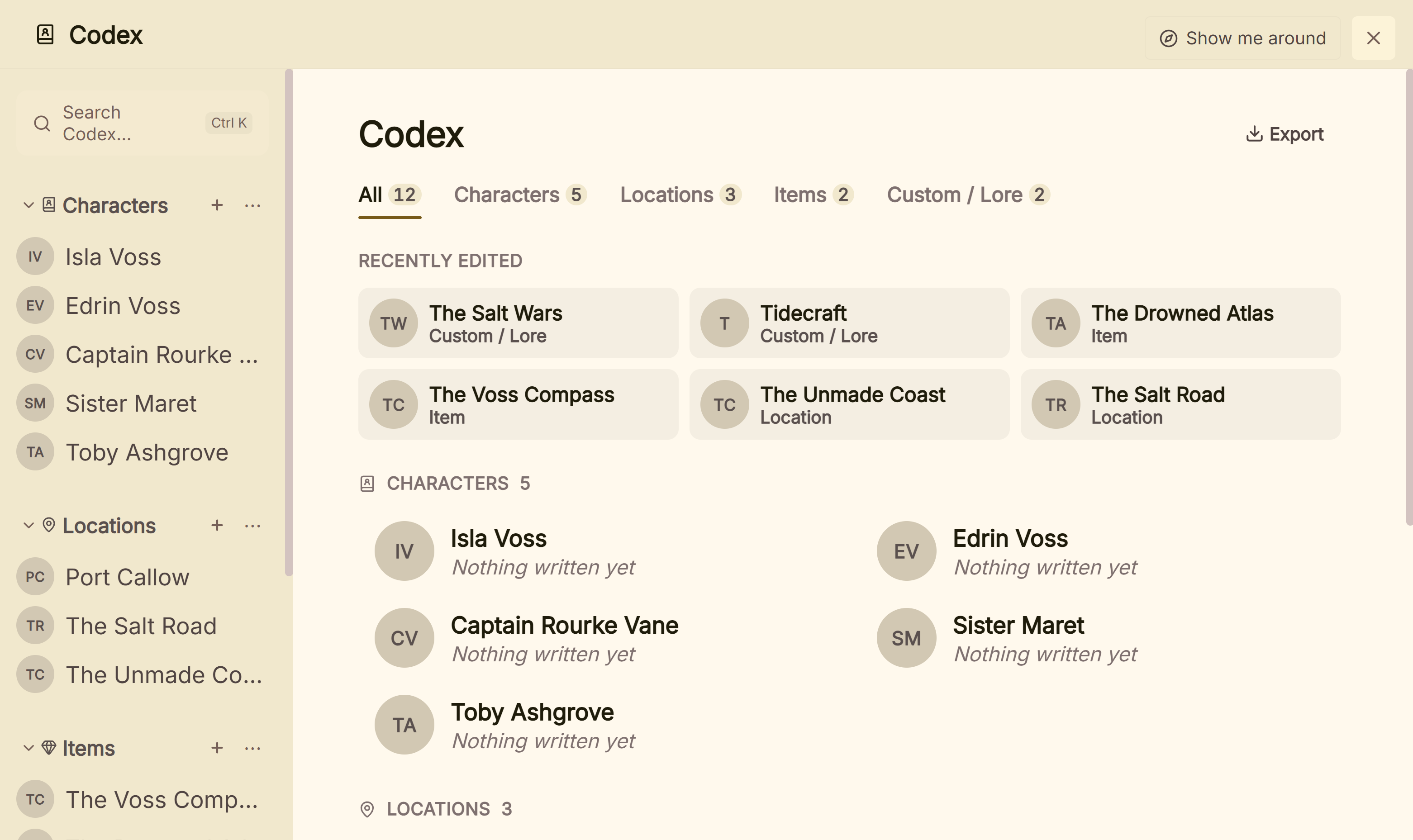 The Codex, with a custom Lore section beside the built-in three
Deckle's Timeline shows events to scale or in story order, with plotlines and period markers. Lanes can run by plotline or by any Codex section, one lane per character or place.
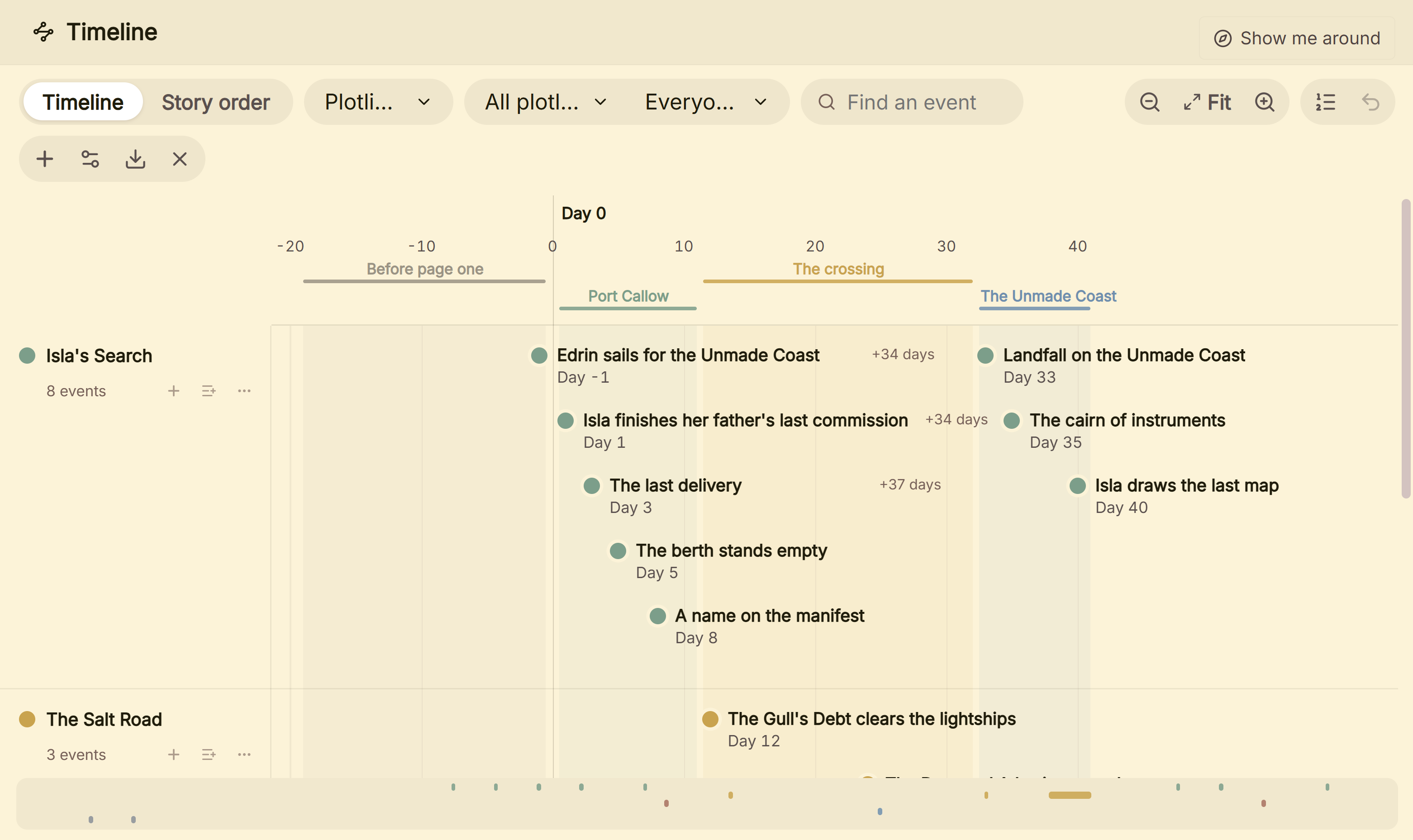 The Timeline's ruler counts in a unit you name, here days
What it does not do, compared with World Anvil:
- No interactive maps. A map can sit in an entry's image gallery as a picture. There are no pins, markers or layers.
- No relationship webs or family trees. Entries have no field that links one entry to another.
- No invented-world calendars. The Timeline can label its ruler with real Gregorian dates, or with a unit you name, such as "Day". It has no calendar engine for custom months or weekdays.
- One book's world at a time. The Codex lives inside one project. There is no shared world across separate projects, no publishing your world to readers, and no co-authors.
What Deckle adds is the book itself. It exports EPUB targets for Kindle, Apple Books and Kobo, a print PDF in 8 trim sizes with bleed, and DOCX, all from the same project. The Kindle target writes an EPUB for KDP to convert, not a KPF file. A project is a folder on your own disk, holding one .deckle database (all the writing, notes and settings) plus research/ and .deckle-assets/ folders. Nothing is stored on a server, and it works offline after activation. It is a one-time purchase, so there is no membership to lapse.
To move a World Anvil manuscript in, paste the HTML export into Word as World Anvil suggests, save it as .docx, and import it. Deckle splits chapters from Word heading styles. The full method is in how to move a manuscript between writing apps. World articles have no direct import into the Codex. A saved HTML page can be imported into Research.
To try it, click Try it free on the screen Deckle opens to. There is no card, no account and no time limit. It opens a sample novel with every screen open to explore, and you can restyle it and export real EPUB, PDF and DOCX files. New writing is capped at about 500 words, new documents and imports are blocked, and you can add up to 3 Codex entries and 3 Timeline events.
FAQ
Q: Can I use World Anvil offline? A: No. World Anvil's FAQ says it is browser based and "you must be connected to the internet to use it."
Q: Does World Anvil have an app? A: No. Its FAQ says "There is not currently a mobile app for World Anvil." It runs in a desktop or phone browser.
Q: Is World Anvil worth it for writers? A: It suits a novelist who wants maps, family trees and a public world beside the book; the full answer is in Is World Anvil worth it for writers?.
Q: What is the best offline alternative to World Anvil? A: No authority ranks them. Campfire's desktop app is closest on worldbuilding modules. Penpoint, bibisco and Deckle keep a story bible and the manuscript together offline.
Q: Can World Anvil export to PDF? A: Not directly. Manuscripts exports HTML, and World Anvil suggests your browser's print-to-PDF, pasting into Word, or an EPUB converter.
Q: What happens if I cancel World Anvil? A: Your private content stays private and viewable, and you cannot edit it until you renew or make it public. Subscriptions are non-refundable.
Q: Is there a free alternative to World Anvil for novelists? A: Manuskript is free and open source, bibisco has a free Community Edition, and Obsidian's core is free. All three work offline.
Sources
All retrieved 20 October 2026. worldanvil.com blocks direct fetches behind a Cloudflare challenge, so its official pages were read through the r.jina.ai reader proxy (https://r.jina.ai/https://www.worldanvil.com/...), which returns the vendor page's own text. blog.worldanvil.com was fetched directly.
- World Anvil, FAQ: offline, mobile app, ownership, export, lapsed membership, refunds, starting price
- World Anvil, Pricing: tiers, free-tier limits, Manuscripts and private worlds by tier, worldbuilding features
- World Anvil, Export your manuscript: HTML export, Master tier, nesting limit
- World Anvil, Manuscripts guides: outlining, Save the Cat, versions, daily word count, editing world articles
- World Anvil blog, October feature drop: new Manuscripts (9 October 2026): Manuscripts 1.5
- Amazon KDP Help, What file formats are supported for eBook manuscripts?: HTML, DOCX and EPUB accepted (tier 5)
- Amazon KDP Help, Save Your Manuscript File: print PDF rules (embedded fonts, 300 DPI images, PDF/X preferred)
- Manuskript wiki, Import and Export capabilities: which exports need pandoc and LaTeX
- Campfire Writing, Pricing and FAQ: modules, free-plan caps, offline desktop app, exports
- Penpoint, penpoint.app: offline, codex, timeline, exports, price
- bibisco, download page and general FAQs: offline, exports, prices; Community vs Supporters (updated 28 February 2026, retrieved 20 October 2026): Timeline and EPUB export are Supporters only
- Manuskript, GitHub repository: GPL-3.0, plain-text files, world sheets
- Plottr, Pricing and Can I write my story in Plottr?: offline, prices, not for drafting
- Obsidian, obsidian.md, pricing and PDF export
Prices and features last checked 20 October 2026. World Anvil is a trademark of its owner, as are Campfire Writing, Penpoint, bibisco, Manuskript, Plottr and Obsidian. Kindle is a trademark of Amazon.com, Inc. Scrivener is a trademark of Literature & Latte. Deckle is not affiliated with or endorsed by any product named here.