

The main Ulysses alternatives on a Mac and iPad are Scrivener, Storyist and Obsidian. Scrivener and Storyist are one-time purchases with native Mac and iPad apps, so they suit a writer leaving the Ulysses subscription. Obsidian is free and keeps plain Markdown files. Deckle is a Mac desktop option for writing and formatting a book, with no iPad app.

This page is for Mac, iPad and iPhone users. If you need Ulysses on a PC, the options are in Ulysses alternatives for Windows. Every Ulysses fact below comes from ulysses.app, help.ulysses.app and the App Store listing, read on 2026-10-20. Scrivener, Storyist and Obsidian facts come from their vendors' own pages. Prices are US list prices as of October 2026.
Why do people look for a Ulysses alternative?
Three reasons come up, and each one is on the vendor's own pages.
- The subscription. Ulysses costs $39.99 a year or $5.99 a month in the US. The App Store listing also sells a one-time "Perpetual License" in-app purchase at $199.99. Ulysses's help says it "does not include a trial period".
- The newest system floor. The same listing asks for macOS 15.4 or later, or iOS and iPadOS 26.0 or later. An older Mac or iPad cannot run it.
- Book output. Ulysses exports DOCX, PDF and ePub, and says ePub "technically leaves fewer options for an individual layout". Ulysses makes no claim about print typesetting, trim sizes or bleed.
What does Ulysses do well?
Judge any replacement against these five.
- Plain-text writing. Ulysses's help says "In Ulysses, you write in plain text". Formatting is typed as Markdown XL tags.
- One library. Every text sits in one library, with groups, keywords, writing goals and deadlines.
- Apple sync. Ulysses syncs through iCloud across Mac, iPad and iPhone, and the pricing page includes Apple Family Sharing for up to five other family members.
- Publishing to blogs. Ulysses publishes directly to WordPress, Ghost, Medium and Micro.blog.
- A grammar and style check for more than 20 languages.
No single alternative matches all five. Blog publishing and iPhone sync are the two features to pick against first.
Which Ulysses alternatives run on Mac and iPad?
| Ulysses | Scrivener | Storyist | Obsidian | Deckle (ours) | |
|---|---|---|---|---|---|
| Mac | Yes (macOS 15.4+) | Yes (macOS 11+) | Yes (macOS 10.14+) | Yes | Yes (macOS 11+) |
| iPad and iPhone | Yes | Yes, separate iOS app | Yes, separate iOS app | Yes | No |
| Writing format | Markdown XL in a library | Rich text in a project | Rich text in a project | Markdown files on your disk | Rich text in a project folder |
| Long-book structure | Groups, sheets, keywords | Binder, index cards, Outliner | Outliner, index cards, Story Sheets | Folders and links; Longform is a community plugin | Binder, Outliner with Grid View |
| Ebook export | ePub | EPUB, Kindle e-books | EPUB and Kindle | Not documented as built in | EPUB (Generic, Kindle, Apple Books, Kobo) |
| Print PDF | PDF with export styles | Compile to PDF | Print-ready PDF, paperback templates | One note at a time | PDF with trim sizes and bleed |
| Price model | Subscription, or $199.99 perpetual | One-time, per platform | One-time, per platform | Free core; Sync paid | One-time purchase |
Scrivener: the long-project alternative
Scrivener is a long-form writing and organising app for macOS, Windows and iOS. Literature & Latte's overview lists a Binder, index cards, an Outliner with synopses and metadata, Snapshots with Compare, and Targets. Its Compile produces Word, PDF and EPUB, plus Kindle (.mobi) on Windows only, since Scrivener for Mac 3.5.0 (1 October 2025) removed it. It costs $59.99 for the Mac and $23.99 for iOS, both one-time, and it syncs between them through Dropbox. Scrivener writes rich text, not markup. Ulysses's own import guide says a Scrivener project is something "Ulysses can't handle directly", so moving between the two runs through MultiMarkdown or DOCX. The head-to-head is in Scrivener vs Ulysses.
Storyist: the write-and-format alternative
Storyist is a word processor and story planner for macOS and iOS/iPadOS only. Its Mac page says "No subscription required". The Storyist store lists the Mac app at $59 and the iOS app at $19. It has an outliner, index cards, Story Sheets for plot, character and setting, and word count goals. Its book editor produces print-ready PDFs, version 4.3 added paperback print templates, and it creates EPUB and Kindle ebooks. It imports and exports Scrivener .scriv projects. Storyist mentions no AI.
Obsidian: the plain-Markdown alternative
Obsidian is the nearest match for a writer who chose Ulysses for Markdown. It "stores your notes locally as plain text Markdown files", runs on Mac, iPad, iPhone, Windows, Linux and Android, and its core app is "Free without limits". Sync costs $4 a month billed yearly. Obsidian is a general notes app, not a book tool. Its built-in export is a PDF of one note at a time, on desktop only, and long-manuscript features come from community plugins such as Longform. The longer comparison is in Scrivener vs Obsidian.
How much do Ulysses alternatives cost over three years?
US list prices before tax, as of October 2026, for a writer who wants a Mac app and an iPad app:
| Option | Year 1 | Years 2 and 3 | Three-year total |
|---|---|---|---|
| Ulysses, yearly | $39.99 | $39.99 a year | $119.97 |
| Ulysses, monthly | $71.88 | $71.88 a year | $215.64 |
| Ulysses Perpetual License (App Store in-app purchase) | $199.99 | $0 | $199.99 |
| Scrivener for macOS + Scrivener for iOS | $59.99 + $23.99 | $0 listed | $83.98 |
| Storyist Mac + iOS (Storyist store) | $59 + $19 | $0 listed | $78.00 |
| Obsidian core app | $0 | $0 | $0 |
| Obsidian with Sync, billed yearly | $48 | $48 a year | $144 |
What the table can't show:
- One Ulysses subscription covers Mac, iPad and iPhone together, and Family Sharing adds up to five other people.
- Scrivener's major versions may be paid upgrades. Literature & Latte publishes no price for a future upgrade.
- Obsidian's free core needs your own sync if you write on two devices, such as an iCloud or Dropbox folder.
- Deckle is not in the table. It has no iPad app, so it cannot fill the same pair of roles.
Can I move my writing out of Ulysses?
Yes. Ulysses exports Plain Text, Rich Text, Markdown, TextBundle, TextPack, HTML, ePub, PDF and DOCX. Use Markdown or TextBundle for a move. Ulysses's help warns that Plain Text "will strip out all of your markup tags". Only TextBundle "can also take your images along". Texts kept in an External Folder are already ordinary Markdown files, which any of the apps above can open.
Two things don't travel. Markdown XL comments, annotations and highlights are Ulysses features with no plain Markdown equivalent. Material sheets are skipped when you export a group. The general approach to carrying a draft across is in how to move a manuscript between writing apps, and the Word route is in how to export from Ulysses to Word.
Is Deckle a Ulysses alternative on a Mac?
Deckle is our app, so weigh this section accordingly.
Deckle is a desktop app for Mac, Windows and Linux that writes and formats a book in one place. It has a Binder, an Outliner with a Grid View of index cards, Continuous View, Focus Mode, a Codex, a Timeline, and writing goals with daily or weekly targets. It exports EPUB, PDF, DOCX, Markdown and plain text. Its print PDF comes with 26 built-in style presets, eight trim sizes, bleed, drop caps and running heads, which is the part Ulysses does not claim.
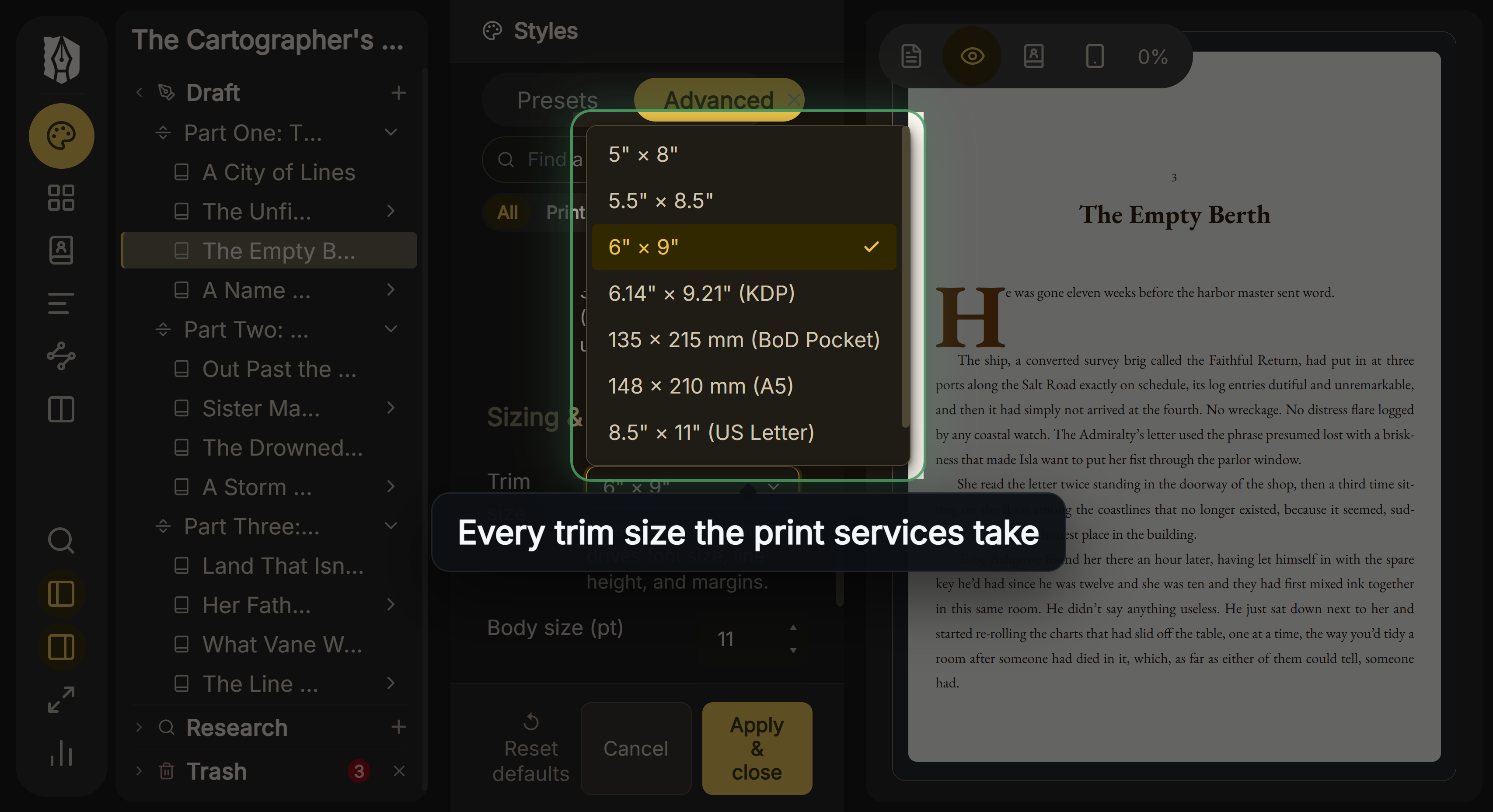 Trim size is picked in Styles, with the page previewed beside it
Deckle is not a Markdown editor. A project is a folder holding one .deckle SQLite database (all the writing, notes and settings) plus research/ and .deckle-assets/ folders, and the text is not stored as .md files. Markdown is a way in: a Markdown folder import makes each file a chapter, and one long file splits at its # headings. Ulysses's Markdown export can come across that way.
What you would give up by switching from Ulysses: the iPad and iPhone apps, iCloud sync, blog publishing and typing formatting as markup. Deckle has no mobile version and no cloud sync. Its spell check covers 16 languages, against Ulysses's grammar and style check for 20 or more.
Deckle is a one-time purchase. To try it, click Try it free on the screen Deckle opens to. There is no card, no account and no time limit. It opens a sample novel with every screen open to explore, and you can restyle it and export real EPUB, PDF and DOCX files. New writing is capped at about 500 words, and new documents and imports are blocked.
What goes wrong when leaving Ulysses?
- Buying the Ulysses perpetual licence to escape the subscription without testing it. It has no trial.
- Exporting the library as Plain Text. It strips the markup. Use Markdown or TextBundle.
- Choosing a Mac-only app when you draft on an iPad. Deckle has no iPad app. Scrivener, Storyist and Obsidian do.
- Counting Obsidian plugins as Obsidian features. Longform is made by the community, not by Obsidian.
- Expecting Markdown XL comments to survive a move. They exist only inside Ulysses.
FAQ
Q: What is the best Ulysses alternative for Mac? A: It depends on the job. Scrivener suits a long, research-heavy book. Storyist writes and formats in one app. Obsidian keeps plain Markdown files for free.
Q: Is there a free alternative to Ulysses? A: Obsidian's core app is free, including for commercial use, as of October 2026. Its Sync service is a paid add-on.
Q: Is there a Ulysses alternative with no subscription? A: Scrivener and Storyist are one-time purchases for Mac and iPad, as of October 2026. Ulysses itself sells a $199.99 Perpetual License inside its App Store app.
Q: Does Ulysses have a lifetime licence? A: Yes. The App Store lists a $199.99 Perpetual License in-app purchase. Ulysses's help says it covers Mac, iPhone and iPad and has no trial.
Q: Which Ulysses alternative works on iPad? A: Scrivener, Storyist and Obsidian all have iPad apps. Deckle does not.
Q: Is Scrivener better than Ulysses? A: Scrivener is better for organising a long book with research inside it. Ulysses is better for plain-text writing across Apple devices with blog publishing.
Q: Can I use Ulysses on Windows? A: No. Ulysses runs on Mac, iPad and iPhone only.
Sources
All retrieved 2026-10-20.
- Ulysses, home page (library, goals, grammar check, blog publishing)
- Ulysses, Pricing ($39.99 a year, $5.99 a month, Family Sharing)
- Apple App Store, Ulysses Writing App (system requirements, $199.99 Perpetual License)
- Ulysses Help, Perpetual License (covers Mac, iPhone and iPad; no trial)
- Ulysses Help, Export (formats, Plain Text strips markup, ePub layout limit, material sheets)
- Ulysses Help, Import into Ulysses (.scriv not handled directly)
- Literature & Latte, Scrivener overview and store (tools, platforms, prices)
- Storyist, Storyist for Mac, What's new in Storyist 4 and store (features, print templates, prices)
- Obsidian, home page, Pricing and Export to PDF
- Literature & Latte, Cross-grading: "Scrivener for macOS or Windows is $59.99" (the store page loads its prices from the checkout, so this page shows the figure in its text), retrieved 21 October 2026
- Literature & Latte, Scrivener release notes for macOS: 3.5.0, 1 October 2025, Kindle (.mobi) removed from Compile; the Windows notes, up to 3.1.6 (3 September 2025), record no such change (retrieved 21 October 2026)
Last checked 2026-10-20. Ulysses is a trademark of Ulysses GmbH & Co. KG. Scrivener is a trademark of Literature & Latte. Storyist is a trademark of its owner. Obsidian is a trademark of Dynalist Inc. Deckle is not affiliated with or endorsed by any product named here.