

Scrivener has no drop cap setting, and it cannot make a drop cap in print, PDF or Word output. Its manual mentions drop caps once, for ePub and Kindle only: a section layout option that wraps the first letter in a span you style with your own CSS. The manual says "Scrivener itself cannot create floating boxes." For print, Literature & Latte staff say to add the drop cap afterwards in Word or a page layout program.

This page quotes the Scrivener 3 User Manual (macOS revision 3.5.2-01, Windows revision 3.1.6.0-02), both searched in full for "drop cap" and "first letter". It also quotes forum answers by Keith Blount, Literature & Latte's founder and developer (KB on the forum), and Ioa, Head of Support and Documentation (AmberV). For how Compile works in general, see the Scrivener compile tutorial.
What You'll Need
- Scrivener 3 on macOS or Windows. The ebook option exists in both manuals.
- A compile format you can edit. Built-in formats can't be changed directly, so duplicate one first.
- For print: Microsoft Word or a page layout program, because the drop cap is added after compiling.
Does Scrivener have a drop cap option?
No. Searching both manuals for "drop cap" finds one passage, in the section layout's New Pages tab (section 24.2.5 in both manuals). It describes the Add "first-letter" span style to the first letter checkbox:
For ePub and Kindle: this wraps the very first letter (from any main text content) of the section in a span with the "first-letter" class assigned to it. This can be used to style drop-caps or other visual effects.
The manual then gives two ways to style that span: write CSS in the CSS compile format pane (24.7 on the Mac, 24.6 on Windows), or create a style called "First Letter" and format it in the Styles pane (24.5 on the Mac, 24.4 on Windows). It ends: "For true drop-caps you will need to use CSS directly as Scrivener itself cannot create floating boxes."
The staff answers say the same, more bluntly:
- Ioa, on print, 2018: "There is no way to do it. Drop caps require box and canvas style page layout, and the ability to flow text around boxes."
- Ioa, 2017: "You can't really do drop caps in programs that do not have canvas style desktop publishing layout models. This is just a text editor."
- Keith, 2011: "there's no way of doing that in Scrivener, I'm afraid, so you will have to export to a word processor or page layout program to add that effect."
- Keith, 2018: "none of Scrivener's built-in Compile formats do this", so the first-letter option is something "the user can take advantage of if they want to."
How do I make a drop cap in a Scrivener ePub?
These are Ioa's steps for Scrivener 3, ePub 3 and Kindle (KF8), posted in 2018 and linked again by staff in 2021 and 2022:
- In the Compile window, right-click the ebook format in the left sidebar and edit it, duplicating it if needed.
- In the Section Layouts pane, select the layout your chapter text uses.
- Open the New Pages tab in the lower half of the pane.
- Set Number of opening words to make uppercase to zero if necessary. Ioa: "This will activate the Add 'first-letter' span style to first letter checkbox." Tick it.
- In the CSS pane, choose Append or Use custom style sheet.
- Add your drop cap CSS using the
first-letterclass. - Save the format and compile.
Ioa showed the HTML the option writes:
<p><span class="first-letter">T</span>est of the feature.</p>So the CSS must target the class, not the ::first-letter pseudo-element. Her minimal test rule was .first-letter { font-size: 200%; }, and she reported, "I just tested that and it works fine." That rule makes a large first letter. A true drop cap also needs a float. Amazon's Kindle Publishing Guidelines (section 11.3.6) say drop caps "should be specified using percentages or relative units", and that "the top of the drop cap should be aligned with the body text". Amazon's sample CSS, with Scrivener's class name in place of Amazon's:
span.first-letter {
  font-weight: normal;
  font-size: 320%;
  float: left;
  margin-top: -0.3225em;
  margin-bottom: -0.3245em;
}
Amazon's sample wraps this in an @media amzn-kf8 block for Kindle. Test the result in Kindle Previewer, since Amazon says drop caps "should not be illegible or cut off." The general rules for setting a drop cap and how deep to sink it apply in any tool.
Why is my Scrivener drop cap in the wrong place?
Keith explained where the span goes: "the 'first-letter' span style is only added to the first letter of the first word of the first section that follows a section (page) break." Text after a scene break in the same chapter does not get one.
Two faults have come up on the forum:
- A chapter that opens with dialogue. In 2018 Keith reproduced a case where the drop cap appeared in the wrong place when a section began with a quote. He wrote that it was fixed for 3.1: "the speech mark and the first letter will have the 'first-letter' span style added."
- No span at all. In June 2021 Ioa could not "get any response out of the checkbox no matter the settings I use" for one user's project, and raised the priority of her report to the developers. In October 2021 she tested the option on another project and it worked. If your compiled ePub has no
first-letterspan, open it in an ebook editor and check the HTML before changing the CSS.
Ioa also warns that ebook drop caps are fragile by nature. Not every reader floats boxes, so the worst case is "one very tall character at the front of the line", and some devices "show too much whitespace below the dropcap."
How do I get a drop cap in a Scrivener PDF or paperback?
Scrivener can't make one, so add it after compiling. Keith's advice is to "export to a word processor or page layout program", and Ioa recommends InDesign for print.
In Word, compile to Microsoft Word (.docx), then follow Microsoft's Insert a drop cap steps:
- Windows: select the first character of the paragraph, go to Insert > Drop Cap, and choose Dropped.
- Mac: choose View > Print Layout, select the paragraph, then Format > Drop Cap, choose Dropped and click OK.
Repeat for each chapter. A drop cap added in Word is lost the next time you compile, so add it once the text is final.
If you want something inside Scrivener, Ioa points out that capitalising the first few words is "another, much easier way" to mark a chapter opening. The same New Pages tab has Number of opening words to make uppercase and Use small caps (section 24.2.5). The manual notes these are "faked small-caps".
Common Mistakes
- Looking for a drop cap checkbox. There isn't one. The first-letter option only adds a hook for CSS.
- Using
::first-letterCSS on headings. Ioa explains that in the default Ebook format "titles tend to be distant from the first paragraph", so selectors such as.heading-1 + p::first-lettermiss. Target thefirst-letterclass. - Leaving Number of opening words to make uppercase above zero. Ioa's steps set it to zero first.
- Expecting a drop cap after a scene break. The span only goes after a section or page break.
- Styling the drop cap in the editor. Editor formatting has no effect on the ePub drop cap. The CSS does the work.
- Expecting a PDF drop cap. Print, PDF and Word output have no drop cap support at all.
How Deckle handles drop caps
Deckle is our app, so weigh this section accordingly.
Deckle has a drop cap setting. In Styles > First paragraph, set Initial to Drop cap (or Raised cap), then choose how many lines it spans (2 to 5), its colour, whether it uses the heading font, bold, letter spacing, and the gap beside it in the PDF. Small caps lead-in sets the first words in small caps beside the initial. The drop cap goes on the first paragraph of each chapter in both the PDF and the EPUB, and the Inspector's Preview tab shows it as you change it. In the EPUB, the letter is floated so Kindle shows it, and readers that support the CSS initial-letter property (a W3C Working Draft) use that instead. Since 1.7.8 the text starts level with the top of the letter, as in a printed book.
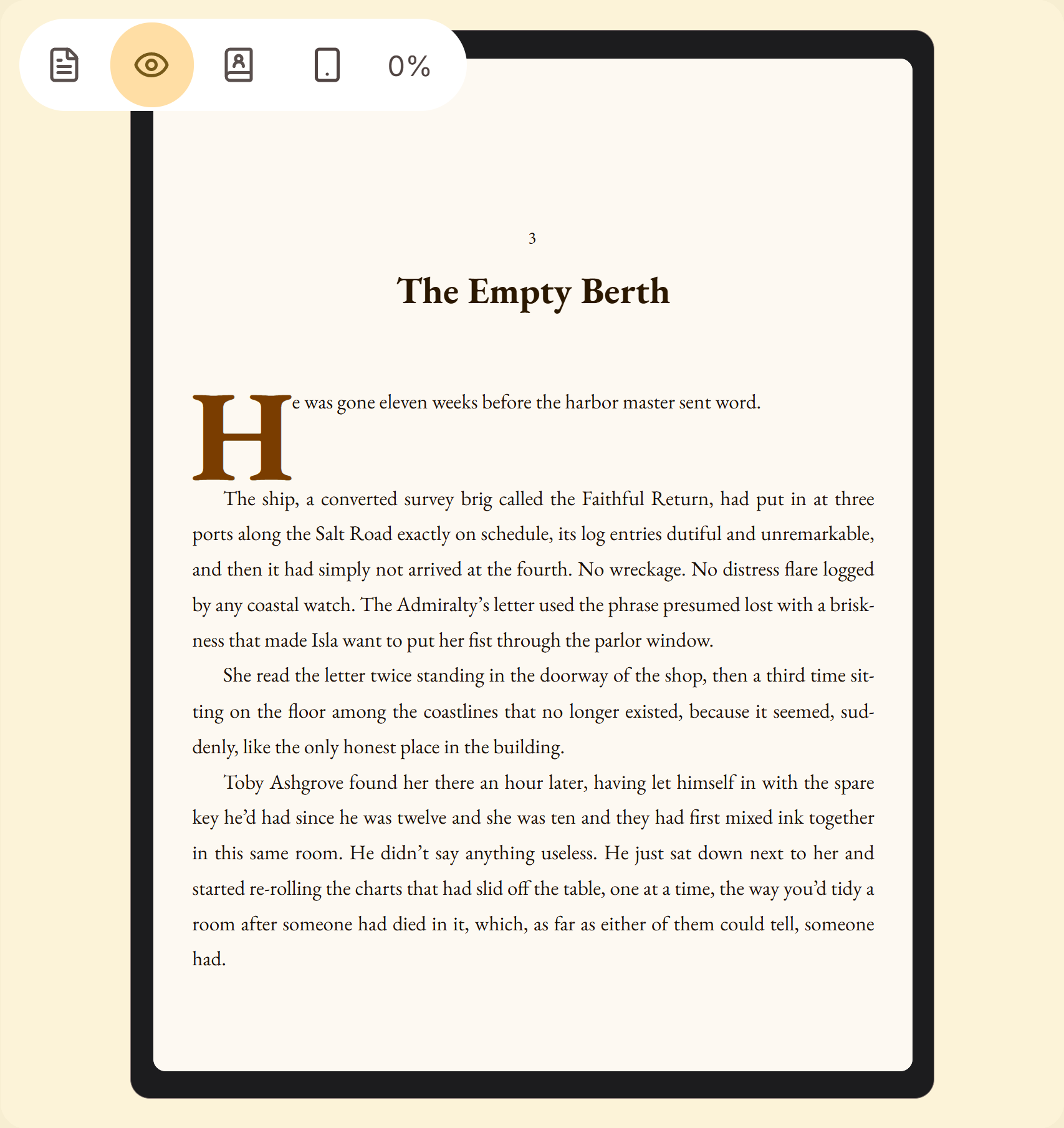 A drop cap in the Inspector's Preview tab
What you would give up. Deckle's drop cap is one book-wide setting, so you cannot give one chapter a different initial, and scenes after a scene break inside a chapter do not get one. Scrivener with your own CSS can style the ePub any way the reading device allows. If you only need an ebook and are comfortable with CSS, Scrivener's first-letter option does the job. Moving from Scrivener to Deckle covers the import, and styling your EPUB covers the ebook settings.
Deckle is a one-time purchase. To try it, click Try it free on the screen Deckle opens to. There is no card, no account and no time limit. It opens a sample novel with every screen open to explore, and you can restyle it and export real EPUB, PDF and DOCX files. New writing is capped at about 500 words, and new documents and imports are blocked.
FAQ
Can Scrivener do drop caps?
Not by itself. The manual says "Scrivener itself cannot create floating boxes." For ePub and Kindle it can add a span around the first letter that you style with CSS.
Where is the drop cap setting in Scrivener?
There is none. The nearest is Add "first-letter" span style to the first letter, in the section layout's New Pages tab (manual section 24.2.5).
How do I make a drop cap in a Scrivener PDF?
Compile to Word or a layout program and add it there. Literature & Latte staff say there is no way to do it in Scrivener's print output.
Why isn't my Scrivener drop cap CSS working?
Target the first-letter class the option adds, not ::first-letter on a heading selector. Check that the checkbox is ticked and that the CSS pane is set to Append or Use.
Do drop caps work on Kindle?
Yes, with a float and relative units. Amazon's Kindle Publishing Guidelines give sample CSS in section 11.3.6 and say to test the result.
Why is there no drop cap after a scene break in Scrivener?
The first-letter span is only added after a section or page break, which usually means a new chapter.
Sources
All retrieved 2026-10-20.
- Scrivener 3 User Manual for macOS, Literature & Latte, revision 3.5.2-01 (24.2.5 New Pages, the only passage on drop caps; 24.5 Styles; 24.7 CSS)
- Scrivener 3 User Manual for Windows, Literature & Latte, revision 3.1.6.0-02 (24.2.5 New Pages, same passage; 24.4 Styles; 24.6 CSS)
- About Us, Literature & Latte (Keith, founder and macOS and iOS developer, posts as KB; Ioa, Head of Support & Documentation, posts as AmberV)
- Chapter Formatting, Literature & Latte forum, answers by AmberV, 2013-07-26, 2013-07-27 and 2018-02-26 (the Scrivener 3 steps)
- Drop Caps in Scrivener for Print, Literature & Latte forum, answer by AmberV, 2018-01-11
- Very Large First Character in a Paragraph, Literature & Latte forum, answer by KB, 2011-11-28
- Issue with misplaced Drop Caps in compiled eBook, Literature & Latte forum, answers by KB, 2018-10-17 and 2018-10-19
- Scrivener Formatting Question: I need help with my "-st" and "-th", Literature & Latte forum, answer by AmberV, 2017-01-20
- Epub possible to get drop cap?, Literature & Latte forum, answers by AmberV, 2021-10-05 and 2021-10-06
- Span with first-letter css-class is not added to ePub on Compile, Literature & Latte forum, answer by AmberV, 2021-06-28
- Kindle Publishing Guidelines, Amazon, version 2026.3 (section 11.3.6 Drop Caps)
- Insert a drop cap, Microsoft Support (Word for Windows and Mac steps)
- CSS Inline Layout Module Level 3, W3C Working Draft, 18 December 2024 (section 7.1.1 Drop Initial, and the
initial-letterproperty in 7.3)
Scrivener is a trademark of Literature & Latte. Microsoft Word is a trademark of Microsoft. Deckle is not affiliated with or endorsed by any product named here.