

The Novelist app is a free novel-planning and writing app by Alessandro Riperi for Android, iPhone, iPad and the web, with no ads or in-app purchases. It plots a story on a board, writes it in scenes, organises the scenes into acts and chapters, tracks goals, and exports EPUB, ODT or HTML. It suits a writer who plans and drafts on a phone or tablet. A second, unrelated app also calls itself Novelist: a $49 Windows app by Kimeko with a built-in AI assistant. This page covers both, then the alternatives.
Facts below come from each developer's own site and app store listings, read on 31 October 2026 unless a different date is given. Prices are US dollars before tax. This is Deckle's own site, and Deckle is one of the apps compared, so weigh that section accordingly. No standards body tests writing apps, so this page ranks nothing.
What is the Novelist app?
Novelist is a mobile-first app for planning and writing a novel. Its Google Play listing says "Novelist is the all-in-one app for managing your writing projects and crafting your novels", "completely free with no ads or in-app purchases". The developer is Alessandro Riperi, a web and mobile developer who publishes it as Return True. His site records that Novelist, his second Android app, reached "over 100k download and 40k active users in less than one year" in 2018.
The app is still maintained. Google Play shows it updated on 11 September 2026, with 1M+ downloads and a 4.3 rating from 8.84K reviews. The App Store lists version 2026.1.19 with a 4.4 rating from 214 US ratings. That release added "multiple books within the same project", for series and multi-volume stories.
Novelist works in four stages, which the developer names on its own site:
- Plot. List every element of the story on a board: characters, locations, themes, events. Each item takes a status, notes, tags, metadata and pictures, and the categories are customisable.
- Outline. Put items together into scenes, and write each scene in the app.
- Organise. Arrange scenes into acts, parts and chapters.
- Schedule. Set a word count goal or a due date.
Around that sit autosave, find and replace, comments, version history, mentions of story items in the text, split-screen reference panels, daily stats, a live preview, templates and dark mode.
What platforms does Novelist run on?
Novelist runs on Android, iPhone and iPad, and in a browser through its companion web app. The App Store lists iOS 13.0 or later, and says it runs on a Mac with an Apple M1 chip or later on macOS 11.0, marked "Designed for iPad. Not verified for macOS." There is no Windows or Linux download; on those, the web app is the route.
Your books live on the device. Replying to a Google Play review on 13 April 2026, the developer wrote: "As Novelist is an offline only app, you have to do regular backups to make sure your work is safe." Backup and restore go to local storage or Google Drive. There is no automatic cloud sync between devices. Asked about it in an App Store review, the developer replied: "Automatic cloud sync would require me to introduce a subscription fee. And that's something I really want to avoid."
What does Novelist export?
Novelist exports a manuscript as EPUB, ODT or HTML. Neither store listing names DOCX, PDF or a print layout. For a Word file, open the ODT in LibreOffice Writer or Word and save it as .docx. For a paperback, the EPUB or ODT goes into a separate formatting tool.
On privacy, Google Play's Data safety section says "No data collected" and "No data shared with third parties". The App Store privacy label lists usage data and crash data "not linked to you". Neither store listing mentions an AI feature. The September 2026 release previews "the upcoming Tools feature (coming soon)" without saying what it does.
What is the other Novelist app, for Windows?
The site novelist-app.com sells a different app, also named Novelist, by Kimeko. It runs on "Windows 10 and Windows 11 (64-bit)" and costs "$49 once", with a 14-day free trial and a 30-day money-back guarantee. Each licence is "for one device". Its pricing card lists export "to .docx and .txt", a chapter and scene editor, character profiles with a relationship map, a plot timeline and corkboard, and a codex for world-building.
Its headline feature is an AI assistant. You "bring your own API key" for one of 10 providers, including Claude, GPT-4o, Gemini and Ollama, and the app sends your characters, plot lines, codex entries and active scene as context with each question. The FAQ says the app "doesn't need an internet connection to run", and that AI stays offline only with a local Ollama model. The latest release on its GitHub releases page is v2.2.1, published 21 July 2026.
The two apps share a name and nothing else. Reviews and listings online sometimes mix them up, so check which developer a review is about.
Novelist app compared with the alternatives
| App | Platforms | Price | Offline | Exports | AI | Story items linked to the draft |
|---|---|---|---|---|---|---|
| Novelist (Alessandro Riperi) | Android, iPhone, iPad, Apple silicon Mac, web | Free, no ads or in-app purchases | Yes; the developer calls it "an offline only app" | EPUB, ODT, HTML | None mentioned | Plot board of items with tags and metadata; items mentioned in the text |
| Novelist (Kimeko) | Windows 10 and 11 | $49 once; 14-day trial | Yes | DOCX, TXT | Yes, your own API key (10 providers) | Character profiles, relationship map, codex, plot timeline |
| Scrivener | macOS, Windows, iOS | $59.99 once per desktop platform; iOS $23.99 | Yes | Word, RTF, PDF, EPUB, Final Draft, plain text | None mentioned | Binder, Corkboard, and Outliner with synopses and metadata |
| bibisco | Windows, macOS, Linux; Android and iOS free | Community free; Supporters $69 once | Yes | PDF, DOCX, TXT; EPUB in Supporters | None mentioned | Characters, storylines and scenes |
| Campfire | Web, Mac, Windows, iOS, Android | Free plan; Standard $12/mo, $99/yr or $336 once | Desktop app only | PDF, EPUB; elements to DOCX | Not mentioned | 18 modules, including Characters, Timeline and Maps |
| Dabble | Windows, Mac, Linux, web, phone browser | $15, $23 or $39 a month billed yearly; $699 or $899 once | Yes | DOCX, Google Docs, Web, Markdown | None now; future AI "strictly opt-in" | Plot Grid, character profiles, Story Notebook |
| Deckle | Windows, macOS, Linux | One-time purchase; free demo | Yes, after activation | EPUB, print PDF, DOCX, Markdown, plain text | None in the app | Codex entries found by name in every chapter; Timeline |
Scrivener, bibisco, Campfire and Dabble figures come from their vendors' pages, read on 20 and 21 October 2026. Two apps here are free outright: Novelist on mobile and bibisco's Community Edition. Scrivener, bibisco, Campfire and Novelist all have phone or tablet versions.
Who does the Novelist app suit?
Novelist (Riperi) suits a writer who plans and drafts on a phone or tablet and pays nothing. Its plot board, scene tags and item mentions give a structured story bible in a pocket. It also suits a series writer, now that one project holds several books sharing the same characters and scenes. A writer who moves between devices backs up and restores by hand, since there is no automatic sync.
Novelist (Kimeko) suits a Windows writer who wants an AI assistant that reads the story's own notes, and is happy to supply an API key. It is a one-time $49 on one computer.
Scrivener suits a writer who wants a desktop project with an iOS companion, synced through Dropbox, and is happy to learn Compile. bibisco suits a writer who wants a free desktop app with free phone apps beside it. Campfire suits a worldbuilder who wants maps, timelines and encyclopedias on every device. Dabble suits a writer who pays yearly for automatic sync across a computer and a phone. The wider field is compared on best novel writing software.
Deckle suits a writer who drafts on a computer, wants the files on their own disk, and wants the same app to format the finished book for ebook stores and print. Many writers pair a phone app for ideas with a desktop app for the long draft and the final files.
How do you plan, write and format a novel in Deckle?
Deckle is our app, so weigh this section accordingly. Deckle is a desktop writing app for Windows, macOS and Linux. Each project is a folder on your own computer, it works offline after activation, and it has no generative AI. The steps below follow Novelist's four stages, then go on to the finished book.
- Start a project. Choose File ▸ New Project… and name it after the book.
- Plot your story items. Open View ▸ Codex. Characters, Locations and Items are there already, and New category adds your own, such as Factions or Themes. Click + beside a category to add an entry, and type nicknames under Also called. The Codex is Deckle's story bible.
- Write in scenes. In the Binder, click + beside Draft (Add to Draft) and choose Chapter, then Scene inside it. As you write, Codex names are underlined. Rest the pointer on one to see its card, or type @ to insert one.
- Organise acts and chapters. Add a Part for each act. Open View ▸ Outliner to see chapters as index cards in Grid View, with each synopsis on its card, and drag a card by its grip into a new order. Set each scene's Status in the Inspector.
- Schedule the book. Open View ▸ Writing Stats. On Manuscript, type a Target word count, then pick a Deadline (optional). On Today, set Goals to Words, Daily or Weekly.
- Keep versions. In the Inspector, open Versions and click + (New Snapshot) before a big rewrite. Restore it from the same list.
- Format the finished book. Choose File ▸ Export… (Ctrl+E, or Cmd+E on a Mac). Pick EPUB for ebook stores, PDF for a print-ready interior, or DOCX for an editor.
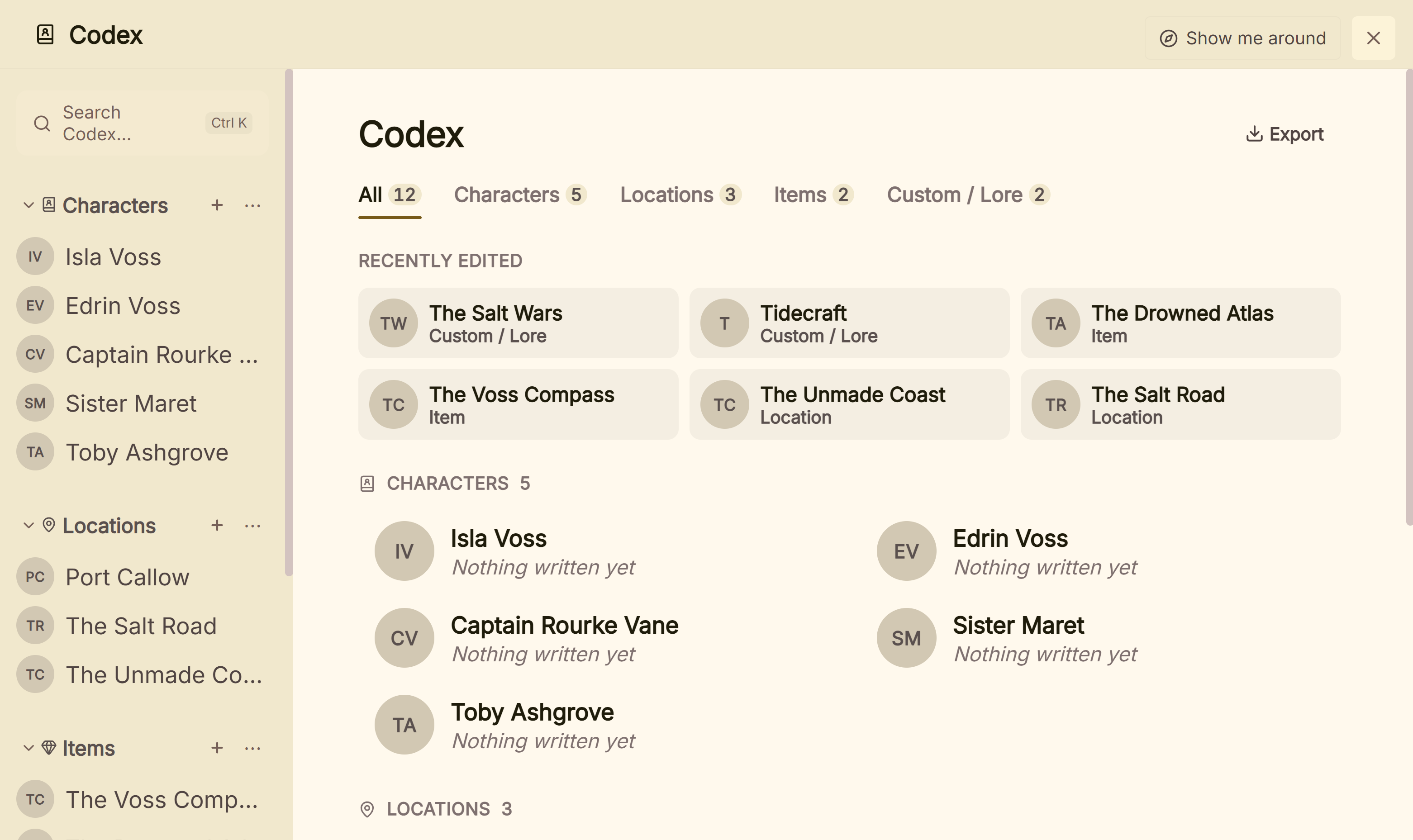 The Codex, where a novel's characters, places and things live beside the draft
For planning on a phone on the bus, Novelist suits that part of the day. For an AI assistant that reads your notes, the Kimeko app suits. What Deckle adds is that the story items, the draft, the goals and the finished EPUB and print PDF all come from one project on your own disk. How Deckle finds characters in the draft is covered on character tracking app.
Deckle is a one-time purchase. To try it, click Try it free on the screen Deckle opens to. There is no card, no account and no time limit. It opens a sample novel with its own Codex, and you can export it as EPUB, PDF or Word. New writing in the demo is capped at about 500 words and new Codex entries at three, and new documents and imports wait for a licence.
What do ranking pages get wrong about the Novelist app?
Three claims in pages that rank for this search disagree with the developers' own pages on 31 October 2026.
- "Dabble runs $10–15/month, Campfire around $9/month." This is in the FAQ on novelist-app.com, the Kimeko app's own site. Dabble's pricing page lists $15, $23 and $39 a month billed yearly, and $19, $29 and $49 billed monthly. Campfire's pricing page lists Standard at $12 a month (both read 20 and 21 October 2026).
- Adjusting Novelist's formatting "isn't an option". A Substack review dated 17 August 2023 says "Novelist uses standard formatting for manuscripts but being able to adjust the formatting yourself isn't an option on the app or website." The App Store version history adds "Compile/preview options" in version 2023.2.3, on 1 January 2024. The review was right when written and is now out of date.
- "A web based cloud version is already in development." This line is still in the FAQ on Novelist's own site. Both current store listings say "Write on any browser with the companion web app", so the web version has shipped. It works as a companion app, with backups rather than automatic sync.
Several other pages that rank for "novelist app" are thin, automatically generated listings that mix up the two apps. Check any claim about encryption, collaboration or AI against the store listing before relying on it.
Common mistakes when choosing the Novelist app
- Downloading the wrong Novelist. The free mobile app and the $49 Windows app share a name. Check the developer: Alessandro Riperi or Kimeko.
- Relying on one device. Novelist has no automatic sync. Back up to Google Drive or local storage after each session, and restore on the other device.
- Expecting a Word file. Novelist exports EPUB, ODT and HTML. Convert the ODT to .docx in a word processor before sending it to an editor or agent.
- Expecting a print interior. No Novelist listing mentions a print PDF. Plan a formatting step for a paperback.
- Choosing on a feature list alone. Write a real chapter and export it during the trial or demo, then open the file in the program your editor or store uses.
- Assuming free means no limits. Novelist is free with no paid tier. Other "free" writing apps cap words or features, as free novel writing software sets out.
FAQ
Is the Novelist app free?
Yes. Novelist by Alessandro Riperi is free on Android, iPhone, iPad and the web, with no ads or in-app purchases. The Windows app called Novelist, by Kimeko, is a different product at $49 once.
Is Novelist available on iPhone?
Yes. The App Store lists it for iPhone and iPad on iOS 13.0 or later, and for Apple silicon Macs. It is also on Google Play and runs in a browser as a web app.
Does the Novelist app sync between devices?
Not automatically. You back up to local storage or Google Drive and restore on the other device. The developer says automatic sync would need a subscription fee, which he wants to avoid.
Does the Novelist app work offline?
Yes. The developer describes it as "an offline only app" and asks writers to back up regularly, to local storage or Google Drive.
What formats does Novelist export?
EPUB, ODT and HTML. For a Word file, open the ODT in a word processor and save it as .docx.
Does the Novelist app use AI?
Neither store listing mentions AI. The Kimeko Windows app called Novelist has an AI assistant that uses your own API key.
Is the Novelist app good?
It has a 4.3 rating from 8.84K reviews on Google Play and 4.4 from 214 US ratings on the App Store. It suits planning and drafting on a phone or tablet for free. Writers who need DOCX, a print PDF or automatic sync pair it with another tool.
What is a good alternative to the Novelist app on a computer?
Scrivener, bibisco, Dabble and Deckle all run on the desktop. bibisco's Community Edition is free; Deckle, a one-time purchase, also formats the finished book as EPUB and print PDF.
Sources
Retrieved 31 October 2026 unless stated. Prices change, so check the vendor page before buying.
- Novelist (Alessandro Riperi), Google Play listing: free, no ads or in-app purchases, features, EPUB, ODT and HTML export, local and Google Drive backup, web app, updated 11 September 2026, 1M+ downloads, Data safety, developer's reply on offline use (13 April 2026)
- Novelist, App Store listing: developer, iOS 13.0, Apple M1 Mac, version 2026.1.19, version history, ratings, privacy label, developer's reply on sync
- Novelist, official site: Plot, Outline, Organise and Schedule; "completely free"; FAQ on a web cloud version; Privacy Policy: Google Drive and iCloud backup by explicit authorisation
- Return True, Alessandro Riperi: developer biography and the 2018 download milestone
- Kimeko, Novelist for Windows: Windows 10 and 11, $49 once, 14-day trial, 30-day refund, one device, DOCX and TXT export, AI providers, offline, FAQ prices for Dabble and Campfire; GitHub releases: v2.2.1, 21 July 2026
- Literature & Latte, Scrivener overview: platforms, export formats; Store: $59.99 per desktop platform, iOS $23.99 (retrieved 20 October 2026)
- bibisco, Download: Community free, Supporters $69, exports; FAQ: free Android and iOS apps (retrieved 20 and 21 October 2026)
- Campfire, Pricing: free plan, Standard $12/mo, $99/yr, $336 lifetime, PDF and EPUB export (retrieved 21 October 2026); FAQ: platforms, desktop offline (retrieved 20 October 2026)
- Dabble, Pricing: plans billed yearly and monthly, lifetime, AI statement (retrieved 20 and 21 October 2026); Export your manuscript: export formats (retrieved 21 October 2026)
- Ranking pages checked for the claims above: Faeries' Grotto on Substack, "Novelist" (17 August 2023); MakeUseOf, "How to Use the Novelist App to Plan and Write Your Book" (9 August 2022); AlternativeTo entries for Novelist and Novelist App
Novelist (Android, iOS and web) is a product of Alessandro Riperi. Novelist (Windows) is a product of Kimeko. Scrivener is a trademark of Literature & Latte. bibisco, Campfire and Dabble are trademarks of their respective owners. Deckle is not affiliated with or endorsed by any product named here.