

Campfire Writing is a writing and worldbuilding platform from Campfire Technology LLC. It gives you 18 linked modules, from Manuscript and Characters to Maps, Magic and Languages, in a browser, a Mac and Windows desktop app and a free phone app. Every module is free up to a cap, and the full Standard plan costs $12 a month, $99 a year or $336 once. It suits fantasy and science fiction writers whose notes are as big as the book. It also runs an ebook store and a reading app, so you can sell the finished EPUB inside Campfire.
This page explains what Campfire is and how its pieces fit together, from Campfire's own pages read on 1 November 2026. Prices are US dollars before tax. This is Deckle's own site, and Deckle appears below as one alternative, so weigh that section accordingly. If you have already tried Campfire and want a yes or no, the verdict is on is Campfire Writing worth it.
What is Campfire Writing?
Campfire calls itself "a book platform for authors, publishers, and readers alike". Its home page says it began with writing software in 2018, then added a mobile writing app, an ebook store and a reading app. The writing part is the one most people mean when they search for Campfire Writing.
Everything sits inside a project. A project holds a manuscript and as many world elements as you make: characters, places, a timeline, maps and so on. Elements link to each other, so a character sheet can point at a culture, a map pin and a family tree. Collaborators can "view, comment on, or edit content in a project" with a free Campfire account. Every account, free or paid, gets unlimited storage, private projects, custom themes and templates, and "corkboard-style organization" for notes.
On ownership, its FAQ says: "We claim no ownership of anything people create using Campfire."
What are Campfire's modules?
Campfire's pricing page lists 18 modules. Each one is a separate tool you can use free up to a limit, or buy on its own.
| Group | Modules | Free plan limit (examples) |
|---|---|---|
| Writing | Manuscript, Research | 25,000 manuscript words; 5 research items |
| People | Characters, Relationships, Arcs | 10 characters; 2 relationship webs; 3 arcs |
| Places and time | Locations, Maps, Timeline, Calendar | 5 locations; 2 maps; 20 timeline events; 1 calendar |
| World | Encyclopedia, Magic, Languages, Species, Cultures, Religions, Philosophies, Systems, Items | 5 articles; 1 magic system; 1 language; 5 species |
When you go over a limit, nothing is deleted. Extra elements become read-only on the browser and desktop apps until you upgrade. The phone app has no element limit, though not every module is there. The Manuscript limit is the one novelists meet first: 25,000 words is about a quarter of a 100,000-word fantasy draft.
What Campfire does best is breadth. Few tools put conlang tools, invented calendars, relationship webs and map pins beside the manuscript, all linked, with a free way to try each one.
What happened to Campfire Blaze and Campfire Pro?
They are Campfire's earlier products, which is why old reviews use those names. Campfire's FAQ says "Campfire Pro was our first product, a desktop application", which still works for people who bought it but gets no new features and is no longer sold. Pro projects move across with "Export Story to Blaze". The FAQ describes Blaze as "a browser application similar to what Campfire is today"; it has been shut down and its users' work moved to the current site.
So a search for "campfire blaze" today lands on the same Campfire at campfirewriting.com. Treat any price or feature in a review of Blaze or Pro as out of date.
Which devices does Campfire Writing run on?
Three apps share one account and sync with each other.
- Browser at campfirewriting.com. "An internet connection is required."
- Desktop app for Mac (macOS 10.11 El Capitan and later) and Windows (Windows 7 and later), free to download. It is the only one that works offline.
- CF Creators, the phone app for iOS and Android. It is free, "An internet connection is required to use the app", and it carries most modules: Characters, Cultures, Encyclopedia, Items, Locations, Manuscript, Magic, Maps, Philosophies, Religions, Species, Systems (no flowchart) and Timeline (events only). The apps page adds Research; the FAQ leaves it out. The App Store listing needs iOS 17 or later and showed 4.3 out of 5 from 198 ratings on 1 November 2026.
Campfire lists no Linux app. The offline rules are covered in full on Campfire Writing offline.
Does Campfire Writing work offline?
Only in the desktop app. You switch to offline mode from the desktop app's home page, write, then sync when you reconnect. Campfire's desktop tutorial sets a check-in rule: on a monthly plan "you'll need to check in online once per month", on an annual plan "once per year", and with only lifetime purchases "you won't ever need to check in online."
Its golden rule is "always sync before and after going offline". If the same element changes in two places, you pick one version and "the version you don't pick is deleted."
How much does Campfire Writing cost?
Campfire has a free plan and three ways to pay, for all modules or for the ones you pick.
- Free: "No credit card required." Every module, with the limits above.
- Standard (all modules): $12 a month, $99 a year or $336 lifetime. Standard Lifetime also includes "future modules we may develop and release".
- Custom (single modules): for example Manuscript at $2 a month, $16 a year or $45 lifetime, and Characters at $2 a month, $16 a year or $30 lifetime.
- Refunds: "within 30 days for lifetime purchases and annual subscriptions". Monthly subscriptions are non-refundable.
The monthly price is shown on the pricing page. The annual and lifetime figures are built from the price table in the page's own script, which Campfire's gifting page matches for the $99 year. Three-year costs, cancelling and the read-only rule after a plan ends are on Campfire Writing price.
Can Campfire Writing export and publish a book?
Yes, with limits. The pricing page lists "Print-Ready Export": the Manuscript module compiles your chapters into a PDF or EPUB. Campfire's compile tutorial offers front and back matter, four pre-formatted styles, and four print sizes from 5" x 8" to 6" x 9". It also says compiler changes "will not be saved", and that DOCX export of the whole manuscript is "coming at a later date". Single elements export to DOCX while you are online, and the desktop app can download a full project backup.
To sell the book, Campfire's store pays "80% of sales" to the author. KDP, Apple Books and Kobo take the EPUB as well. What the PDF and EPUB contain, and the route to KDP, are on Campfire Writing export.
Does Campfire Writing use AI?
Campfire's pricing page, FAQ, apps page and App Store listing describe no AI features, read on 1 November 2026. Its public statement on AI is covered on does Campfire Writing use AI.
How does Campfire Writing compare with its alternatives?
| Tool | Platforms | Price model and price | Offline | Book export | AI | Worldbuilding modules |
|---|---|---|---|---|---|---|
| Campfire Writing | Browser, Mac, Windows, iOS, Android | Free plan; Standard $12/mo, $99/yr or $336 lifetime; single modules | Desktop app only | PDF and EPUB; DOCX per element | None described | 18 linked modules, including maps, magic, languages and calendars |
| World Anvil | Browser only | Free tier; Master $7/mo or $54/yr; Grandmaster $99/yr | No | Manuscripts (Master and up) export HTML | Does not train AI on your work | Article templates, maps, timelines, family trees, calendars |
| Plottr | Mac, Windows; Pro adds a browser app | $60/yr or $150 lifetime; Pro $9.99/mo | Base plan | Outline to Word and Scrivener | "No AI" | Characters, places and notes beside a plot timeline |
| Scrivener | macOS, Windows, iOS | $59.99 once per desktop platform | Yes | Word, PDF, EPUB and more | None mentioned | General research folders; no maps or modules |
| Novelcrafter | Browser | $4 to $20 a month; 21-day trial | No | Word and Markdown | Optional, bring your own key | Codex with types, relations and mentions |
| Deckle | Windows, macOS, Linux | One-time purchase, updates included; free demo | Yes, after activation | EPUB, print PDF, DOCX | None in the app | Codex with Characters, Locations, Items and your own categories |
Campfire facts were read on 1 November 2026. The others come from each vendor's own pages, read between 20 and 26 October 2026. No standards body tests writing software, so there are no scores here.
Who is Campfire Writing for, and who suits an alternative?
Campfire suits writers of fantasy, science fiction and long series, worldbuilders who would otherwise keep a map tool, a wiki and a word processor open at once, co-writers who want free collaborators, and anyone who writes on a phone. Its free plan makes it easy to test with real material.
An alternative suits you better if:
- You run a tabletop campaign as well as a novel. World Anvil is built for public worlds and game masters. The two are compared on Campfire vs World Anvil.
- You plot chapter by chapter with beat templates. Plottr lays scene cards on a timeline of plotlines; see Plottr vs Campfire.
- You want a one-time desktop writing app with a big manuscript. Scrivener has no word limit and no subscription; see Campfire vs Scrivener.
- You want the book laid out as a trade paperback in the same app. A formatting tool gives more trim sizes, running heads and saved styles.
- You use Linux, or want files on your own disk with no account. Campfire lists Mac and Windows desktop apps only.
The wider field, by need, is on Campfire Writing alternatives and best worldbuilding software.
How do you keep a world and a manuscript together in Deckle?
Deckle is our app. It is a desktop writing app for Windows, macOS and Linux; each project is a folder on your own computer, it works offline after activation, and it has no generative AI. The world lives in the Codex, in the same project as the manuscript, and the same project exports the finished book.
- Open the Codex from View ▸ Codex. Characters, Locations and Items are there already.
- Add your own categories. Click New category, give it a name such as Magic, Factions or Cultures, pick an icon, and click Create category.
- Make entries. Click + beside a category and choose Blank or a template. Type nicknames and titles under Also called, so every name for a person points at one entry.
- Shape the fields once. Save as Template turns an entry's fields into a template, and Manage Templates edits it. Editing a template updates the entries made from it.
- Write, and let the Codex find names. Entry names and aliases are underlined in your chapters. Rest the pointer on one to see its card, type @ to insert a name, or press Ctrl+K (Cmd+K on a Mac) to open any entry.
- Check where an entry appears. Its Mentions tab lists each chapter that names it.
- Put the world on a timeline. Open View ▸ Timeline and set Lanes to a Codex category, such as Characters, so each entry on your events gets its own row.
- Export the book. Choose File ▸ Export…, pick EPUB (with a Platform Target such as Generic EPUB, Apple Books or Kobo) or PDF, then click Export EPUB or Export PDF. The Kindle target writes an EPUB for KDP to convert.
- Export the bible. On the Codex home, Export ▸ Story bible (PDF) or Story bible (Word) gives every entry.
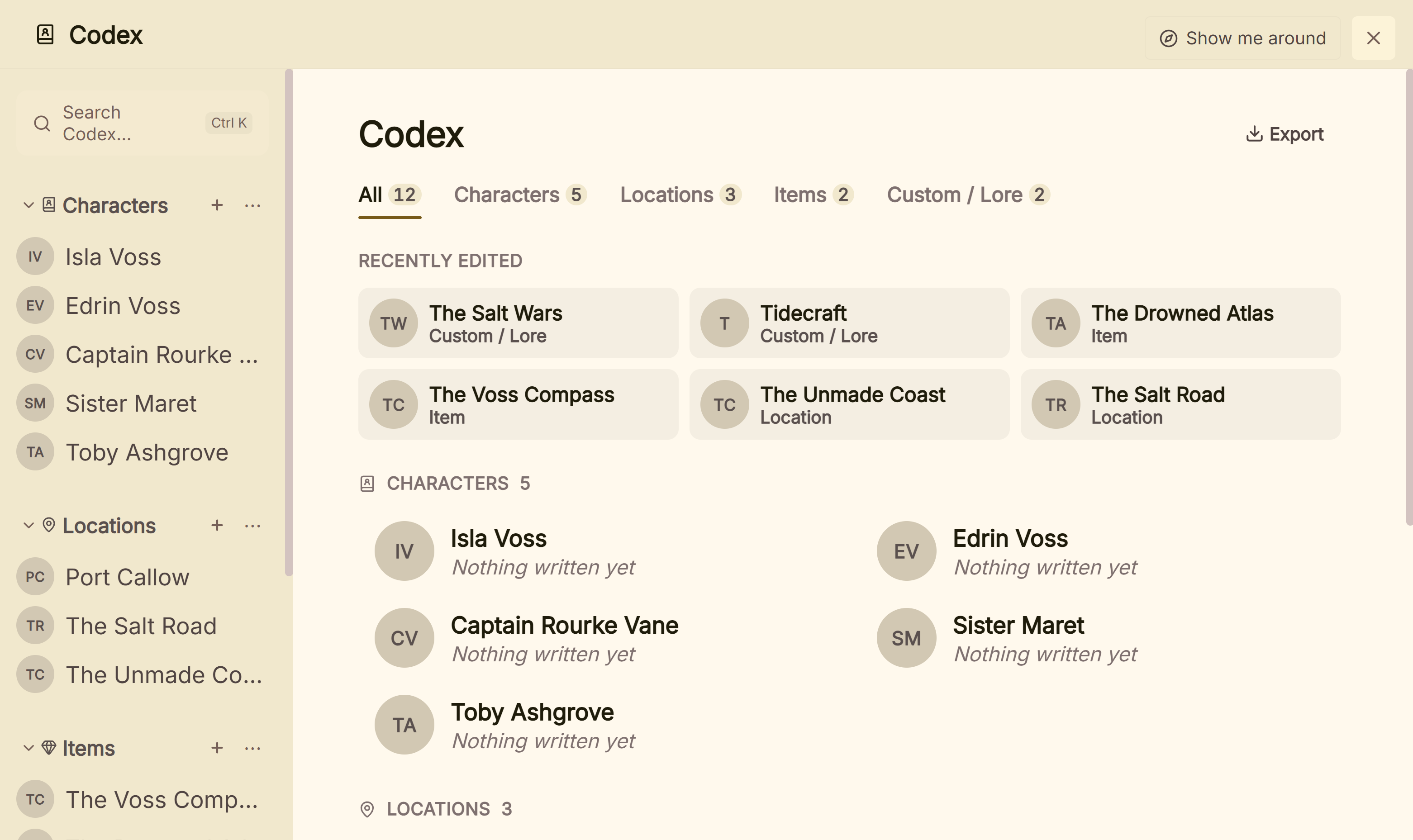 Characters, places, objects and a custom Lore section in one Codex
If maps, conlang tools, a phone app or shared projects come first, Campfire suits you. Deckle suits a writer who wants the world, the draft and the formatted EPUB and print PDF in one project on their own disk. The two are set side by side on Campfire Writing vs Deckle.
To try it, click Take Deckle for a Spin on the screen Deckle opens to. It is a free demo with no card, no account and no time limit. It opens a sample novel with every screen to explore, and you can restyle it and export real files. New writing is capped at about 500 words and new Codex entries at three, so judge it on the sample.
What do ranking pages get wrong about Campfire Writing?
Three pages that rank for these searches disagree with Campfire's own pages on 1 November 2026.
- "$12.50/month or $125/year", "$375" lifetime. Kindlepreneur's Campfire review (Jason Hamilton, updated 8 April 2026) gives these, with Manuscript at $1.50 a month and $15 a year. Campfire's pricing page shows Standard at $12 a month, and its price table gives $99 a year, $336 lifetime, and Manuscript at $2 a month or $16 a year.
- "With the desktop or mobile app version of Campfire Write, you can write offline." Reedsy's Campfire Write review (Martin Cavannagh, updated 2 June 2026) says this, and repeats the $12.50, $125 and $375 prices and "17 modules". Campfire's apps page says the CF Creators phone app needs a connection, and its pricing page lists 18 modules.
- "$49.99 one time payment", "Cloud" only. SourceForge's Campfire Blaze page (titled 2026) shows this, with desktop and mobile apps that "will release in 2021". Campfire's FAQ says Blaze has been shut down; today's Campfire has desktop and phone apps and a $336 lifetime plan.
Common mistakes with Campfire Writing
- Planning a whole novel on the free plan. The Manuscript module stops at 25,000 words. Extra words are not lost, but you cannot add more without paying.
- Testing with a monthly plan. Monthly subscriptions are non-refundable. Annual and lifetime purchases have a 30-day refund window.
- Expecting to write offline on a phone or in the browser. Only the Mac and Windows desktop app works offline.
- Going offline without syncing first. If an element changes in two places, the version you don't pick is deleted.
- Reading an old Blaze or Pro review. Prices, platforms and names have all changed since.
- Leaving compile settings to the last day. The compiler does not save your changes, so note your choices before you export a final file.
FAQ
Is Campfire Writing free?
The free plan includes all 18 modules with limits, such as 25,000 manuscript words, 10 characters and 2 maps, and needs no card. Over a limit, extra elements become read-only.
Is Campfire Writing a desktop app or a website?
Both. It runs in the browser, in a free desktop app for Mac and Windows, and in the free CF Creators phone app for iOS and Android. Only the desktop app works offline.
What is Campfire Blaze?
An earlier browser version of Campfire. Campfire's FAQ says it has been shut down and its users' work moved to the current site at campfirewriting.com.
Is Campfire Writing good for novels?
It is strongest for novels with a large invented world. A novelist with a small cast and no world to build may use only the Manuscript and Characters modules.
How much is Campfire lifetime?
Standard Lifetime, with every module, is $336 as of November 2026. Single modules can be bought for life too, such as Manuscript at $45.
Does Campfire Writing work on Linux?
Campfire lists desktop apps for Mac and Windows only. On Linux the browser version needs a connection; bibisco and Deckle ship for Linux.
Who owns what I write in Campfire?
You do. Campfire's FAQ says "We claim no ownership of anything people create using Campfire."
Is there a Campfire Writing review on this site?
Yes. The verdict, with three-year costs and refunds, is on the "is Campfire Writing worth it" page linked above.
Sources
Retrieved 1 November 2026 unless stated. Prices change, so check the vendor page before buying.
- Campfire, home page: "a book platform for authors, publishers, and readers alike", writing software since 2018, mobile app, ebook store, reading app, 18 modules. Retrieved 1 November 2026.
- Campfire, Pricing: free plan with no card, module limits, read-only rule, no element limit on the phone app, features every account gets, Standard $12 a month, refunds, "Print-Ready Export" to PDF and EPUB; annual $99, lifetime $336 and per-module prices from the price table in the page's own script (chunk 9479). Retrieved 1 November 2026.
- Campfire, Gifting: $99 one-year Standard gift, per-module annual prices. Retrieved 1 November 2026.
- Campfire, Apps: browser needs a connection, desktop app on Mac and Windows with offline mode, CF Creators modules and connection requirement. Retrieved 1 November 2026.
- Campfire, FAQ: Campfire Pro and Blaze history, desktop system requirements, offline sync, collaborators, ownership, 80% store share, DOCX export online, CF Creators modules and "An internet connection is required to use the app". Retrieved 1 November 2026.
- Campfire tutorials: Campfire Desktop App Tutorial (updated 12 August 2025) and Compile Manuscript Tutorial (updated 12 August 2025): check-in rule, sync rule, compiler options and limits. Retrieved 21 October 2026.
- Apple App Store, Campfire – Write Your Book: seller Campfire Technology LLC, free, iOS 17 or later, 4.3 from 198 ratings. Retrieved 1 November 2026.
- World Anvil, Pricing and FAQ; Plottr, Pricing and home page; Literature & Latte, Scrivener overview; Novelcrafter, Pricing and export help. Retrieved 20 to 26 October 2026.
- Ranking pages checked for the claims above: Kindlepreneur, Campfire review (updated 8 April 2026); Reedsy, Campfire Write review (updated 2 June 2026); SourceForge, Campfire Blaze. Retrieved 1 November 2026.
Campfire and CF Creators are products of Campfire Technology LLC. World Anvil is a trademark of World Anvil. Scrivener is a trademark of Literature & Latte. Plottr and Novelcrafter are trademarks of their respective owners. Kindle is a trademark of Amazon.com, Inc. Deckle is not affiliated with or endorsed by any product named here.