

The Ulysses app is a writing app for Mac, iPad and iPhone that keeps everything you write in one library of sheets and groups, written in a light markup language and synced through iCloud. It suits a writer who works only on Apple devices, moves between a Mac and an iPad, and is happy to subscribe: $5.99 a month or $39.99 a year in the US, one subscription for every device, with a free trial. A novelist who writes on Windows or Linux, or who wants a character file, a timeline and a typeset print interior in the same app, will want something beside it or instead of it.
How was this page put together?
Everything about Ulysses here comes from the Ulysses website, its help centre, its release notes and the US App Store listing, read on 1 November 2026. Nobody at Deckle has written a book in Ulysses, and nothing here comes from hands-on testing. Prices are US dollars before tax. This is Deckle's own site, and Deckle is one of the apps compared below, so weigh that part accordingly.
What is the Ulysses app?
The Ulysses home page calls it "The Ultimate Writing App for Mac, iPad and iPhone". It is made by Ulysses GmbH & Co. KG in Leipzig, Germany, and its home page says "Ulysses has existed since 2003". The App Store listing carries the Apple Design Award and an Editors' Choice badge.
Three ideas set it apart from a word processor:
- One library. "Ulysses is a single-library app, and all your texts live in this single library." There is no Open or Save and no files to manage in Finder. You write in sheets, which need no title or file name, and organise them in groups that can nest. Filters gather sheets by criteria, and projects act "more or less like independent libraries", each with its own keywords and export style.
- Markup, not formatting. By default Ulysses uses its own markup, Markdown XL:
#for headings,_underscores_for emphasis,++around a comment,(fn)for a footnote. The help centre says you need not know it already: "it is easy to learn", and every tag is also on a menu or a button. - Sync by iCloud. "If you allow it, Ulysses will automatically sync your texts with iCloud." A local Notes section keeps texts on one device only, and External Folders let you work on Markdown files in a folder on your drive or another cloud service.
Around that sit writing goals and deadlines, keywords, a grammar and style check "for over 20 languages", and publishing straight to WordPress, Ghost, Medium and Micro.blog.
What does the Ulysses app do well?
One library on every Apple device. A sheet started on a Mac is on the iPad and iPhone a moment later, with no files to copy. For a writer who drafts in a café on an iPad and edits at a desk, that is the main reason to choose it.
A calm editor. Text stays plain, with markup in place of toolbars full of fonts. On iPad, version 39 added an editor-only view (Cmd-period) and a resizable dashboard.
Goals that fit a book. A goal can sit on a sheet, a group or a whole project, with a deadline and a set of writing days. How that works for a novel is on Ulysses for novel writing.
Steady updates. Version 42 came out on 23 October 2026, after 41 in September, with a two-sided export preview for PDF and DOCX and Quick Access Buttons on iPad for the outline, attachments and annotations.
Short work goes straight out. For a blogger or newsletter writer, publishing to WordPress, Ghost, Medium or Micro.blog from the same app saves a step.
Where does the Ulysses app stop?
Apple only. The App Store listing needs macOS 15.4, iPadOS 26.0 or iOS 26.0 or later. There is no Windows, Android, Linux or web version. Windows writers have their own page: Ulysses alternatives for Windows.
No story bible or timeline. Keywords can tag every scene a character appears in, but there are no character records with fields and nothing that places events in story time.
Print layout is a text file. PDF and DOCX use export styles. Changing one "is currently only available for Mac", by duplicating a built-in style and editing it in a text editor. The export help says ePub "technically leaves fewer options for an individual layout" than PDF and DOCX.
A subscription. Ulysses "requires a subscription" on the App Store. The one exception is the $199.99 Perpetual License sold inside the app.
Is Ulysses good on iPad?
Yes, and the iPad is where many people start with it. The iPad app is the same Ulysses as on the Mac, under the same subscription, and it needs iPadOS 26.0 or later.
Things worth knowing before you buy it for an iPad:
- Keyboard and trackpad. Ulysses's help says you can use "a mouse, trackpad, or external keyboard with Ulysses on your iPad". With a keyboard attached, ⌘1 toggles the library, ⌘2 the sheet list, ⌘3 the editor, ⌘N makes a new sheet and ⌘6 opens the export preview.
- Two texts side by side. With Windowed Apps turned on in iPadOS Settings ▸ Multitasking & Gestures, you can open a sheet in a new window and arrange two Ulysses windows, or Ulysses and another app, next to each other.
- Touch. Swipe horizontally with one finger to move between library, sheet list and editor. Every markup tag is on a shortcut button above the keyboard.
- Export from the iPad. You can export to all the same formats, and the export preview offers single-page or two-sided views. Exporting a project leaves out its Extras section. Editing an export style needs a Mac; the edited style then syncs to the iPad.
- Apple Intelligence. Writing Tools in Ulysses need "all iPads with an M1 chip and the 2024 iPad mini". Older iPads run Ulysses without them.
The library reaches the iPad through iCloud, so if sheets are missing there, check sync first. The fixes are on Ulysses not syncing.
How much does the Ulysses app cost?
From Ulysses's pricing page, its student page and the App Store listing, on 1 November 2026:
| Option | Price (US) | What it covers |
|---|---|---|
| Monthly | $5.99 a month | Mac, iPad and iPhone, iCloud sync, updates |
| Yearly | $39.99 a year | The same; the App Store also lists a $29.99 yearly plan |
| Students | $10.99 per 6 months | High school, vocational school, college or university students with an ID; renew by hand while enrolled |
| Perpetual Licence | $199.99 | An App Store in-app purchase |
| Family Sharing | Included | Up to five other family members |
The App Store listing says the subscriptions "include a fully functional trial", including export and sync; neither page gives its length. Ulysses is also in the Setapp bundle. What each option costs over three years, and refunds, are on Ulysses app price.
Does the Ulysses app use AI?
Not its own. Ulysses supports Apple Intelligence: Writing Tools proofread, rewrite and summarise, and a Compose option uses ChatGPT once you enable it. Siri can be asked from the context menu. You can switch Writing Tools off in Editor Settings ▸ Substitutions on iPad and iPhone, or under Edit ▸ Writing Tools on a Mac. Ulysses says your texts "are also never used to train AI models". The details are on does Ulysses use AI.
The Ulysses app and its alternatives compared
Prices and features are from each vendor's own pages, read on the dates in Sources. Nothing here is a score.
| App | Platforms | Price model and price | Offline | Export | AI | Library and sync |
|---|---|---|---|---|---|---|
| Ulysses | Mac, iPad (iPadOS 26+), iPhone | Subscription: $5.99 a month or $39.99 a year; $199.99 perpetual in the App Store | Yes, native apps | Plain text, RTF, Markdown, TextBundle, HTML, ePub, PDF, DOCX; publishes to WordPress, Ghost, Medium, Micro.blog | None of its own; supports Apple Writing Tools and Siri | One library of sheets and groups, synced by iCloud |
| iA Writer | Mac, Windows, iPhone, iPad | One-time per platform: $49.99 Mac, $29.99 Windows, $49.99 iPhone and iPad on iA's pricing page | Yes | PDF, Word, HTML, Markdown | No generative AI; marks AI and pasted text | Plain .md files in folders, in iCloud, Dropbox, Google Drive or OneDrive |
| Scrivener | macOS, Windows, iPhone and iPad | One-time: $59.99 per desktop platform; $23.99 iOS | Yes | Word, RTF, PDF, EPUB, plain text and more through Compile | None mentioned | A project per book with a Binder; sync with Dropbox |
| Storyist | Mac, iPhone and iPad (iPadOS 17+) | One-time: $59 Mac, $19 iOS from Storyist's store | Yes | DOCX, Scrivener, RTF, HTML, EPUB, print PDF and more | None mentioned | Projects with story sheets; optional iCloud |
| Obsidian | Windows, macOS, Linux, iOS, Android | Free; Sync from $4 a month | Yes, files on your device | PDF on desktop; Word and EPUB through a community plugin | None built in | Markdown files in a vault; paid Sync or your own folder |
| Deckle | Windows, macOS, Linux | One-time purchase; free demo | Yes, after activation | EPUB (Generic, Kindle, Apple Books, Kobo), print PDF, DOCX, Academia PDF, Markdown, plain text | None in the app | One project folder per book on your own disk, with automatic backups |
Who does the Ulysses app suit, and who suits something else?
Ulysses suits a writer with a Mac and an iPad or iPhone who writes many pieces (articles, essays, a blog, a book in progress) and wants all of them in one synced place, with publishing to the web built in.
iA Writer suits a writer who wants the same quiet Markdown page on Windows as well as Apple devices, keeps plain files, and prefers to pay once per platform.
Scrivener suits a novelist who wants a binder, corkboard and Compile, on Mac, Windows and iPad, for a one-off price.
Storyist suits an Apple-only novelist or screenwriter who wants story sheets for characters and settings and a print-ready book, without a subscription.
Obsidian suits a writer who wants free Markdown files on every platform, including Android and Linux, and enjoys building a setup from plugins.
Deckle suits a novelist who writes at a computer (Windows, Mac or Linux) and wants the book, its characters, its timeline and the finished EPUB and print PDF in one project they own, for one payment. A writer who drafts mostly on an iPad is better served by Ulysses, Scrivener or Storyist. The two side by side are on Ulysses vs Deckle, and the Mac and iPad field is on Ulysses app alternatives.
What do ranking pages get wrong about the Ulysses app?
Three pages that rank for Ulysses searches disagree with Ulysses's own pages on 1 November 2026.
- "USD 49.99/year; student annual USD 14.99", and a web app. Subger's "Ulysses Subscription: Plans from $5.99/mo (2026)" (marked "Updated: November 2026", prices "verified 2026-03-18") gives these prices and marks Web as available, with "mobile and web apps" in its feature list. Ulysses's pricing page lists $39.99 a year, its student page $10.99 per 6 months, and the app runs on Mac, iPad and iPhone only.
- "$49.99/year annual" and a "34.99 dollar annual rate" for "students and educators". Gappsy's "Ulysses Review, Pricing & Features" (updated 19 July 2026) says this. Ulysses lists $39.99 a year, and its student offer is $10.99 per 6 months for students; educators are not mentioned.
- "$4.17/mo, billed yearly". Toolradar's Ulysses alternatives page (updated 27 October 2026) gives this as Ulysses's entry paid plan, about $50 a year. The yearly plan on Ulysses's pricing page is $39.99, about $3.33 a month.
How do you set up a Ulysses-style writing space in Deckle?
Deckle is our app, so weigh this section accordingly. Deckle is a desktop writing and book-formatting app for Windows, macOS and Linux. Each book is a project folder on your own computer, it works offline after activation, and it has no generative AI. Here is how the habits a Ulysses writer is used to map onto it.
- Make the project. Choose New Project from the File menu, under the Deckle logo at the top of the icon rail (Ctrl+N, or Cmd+N on a Mac), name the book and pick the folder it lives in. Everything for this book stays in that one project, much like a Ulysses project.
- Build parts, chapters and scenes. Click Add to Draft (the + at the top of the Binder's Draft section) and choose Part, Chapter or Scene. A chapter holds its scenes, as a Ulysses group holds sheets, and you drag them in the Binder to reorder.
- Keep notes out of the book. From the same menu choose Note. Notes sit beside your chapters but are left out of the book when you export it, so they work like Ulysses material sheets.
- Read a chapter as one page. Select a chapter in the Binder and click Continuous View on the icon rail at the left (or View ▸ Continuous View on a Mac). Its scenes run on as one scrolling page, each still its own document, like glued sheets in Ulysses.
- Set goals and a deadline. Click Writing Stats on the icon rail (or View ▸ Writing Stats on a Mac). On the Today tab, under Goals, pick Words and Daily and type a Target words per day. On the Manuscript tab, set a Target word count and a Deadline (optional).
- Write without the furniture. Click Focus Mode on the icon rail (or View ▸ Focus Mode on a Mac). The Binder, Inspector and icon rail go, and only the page stays. The settings are in Focus Mode.
- Export the book. Press Ctrl+E (Cmd+E on a Mac) for Export. Choose EPUB for the ebook stores, PDF for a print interior with trim size, margins and running heads set in Styles, or DOCX for an editor.
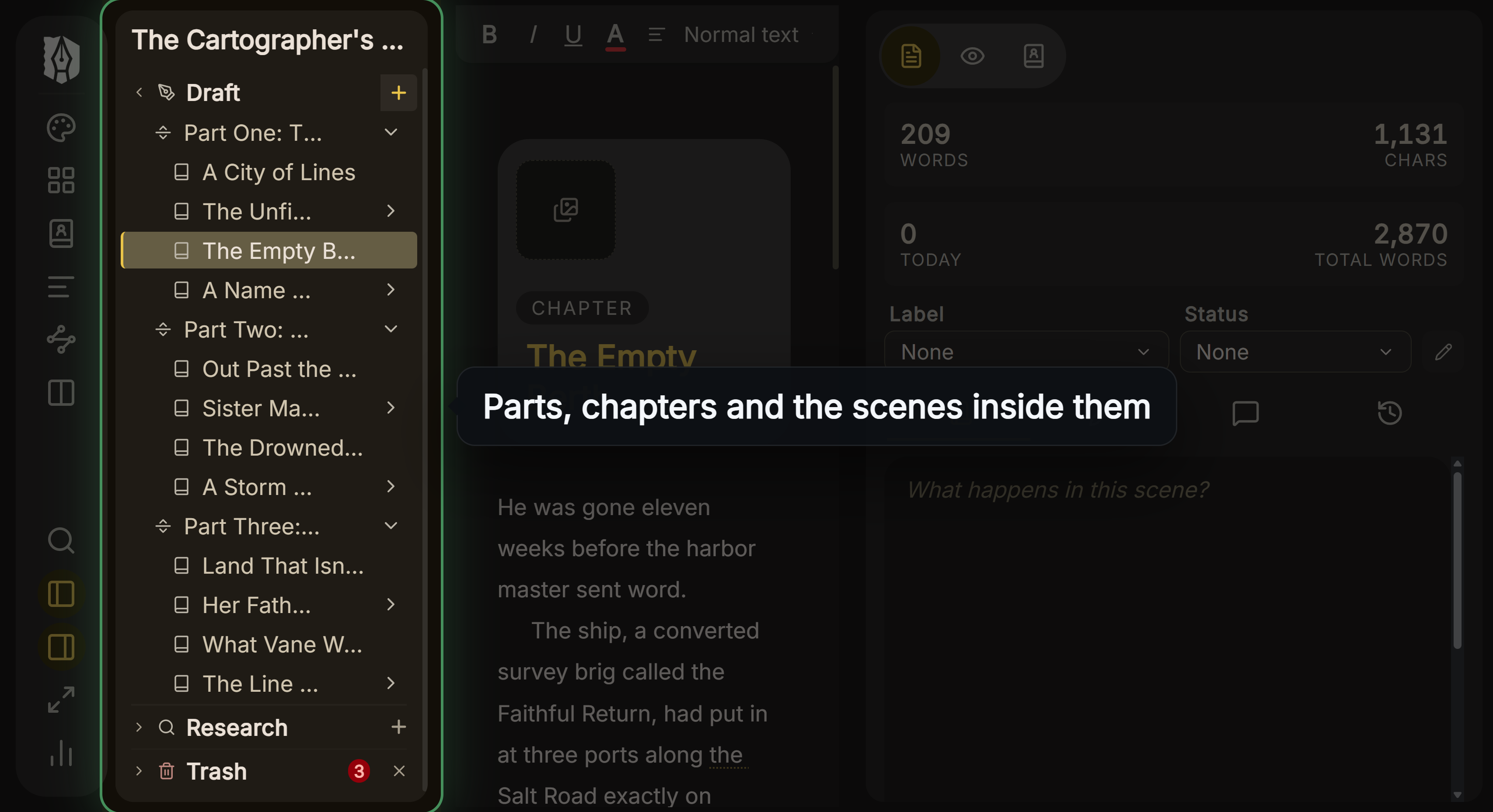 Parts, chapters and scenes in Deckle's Binder
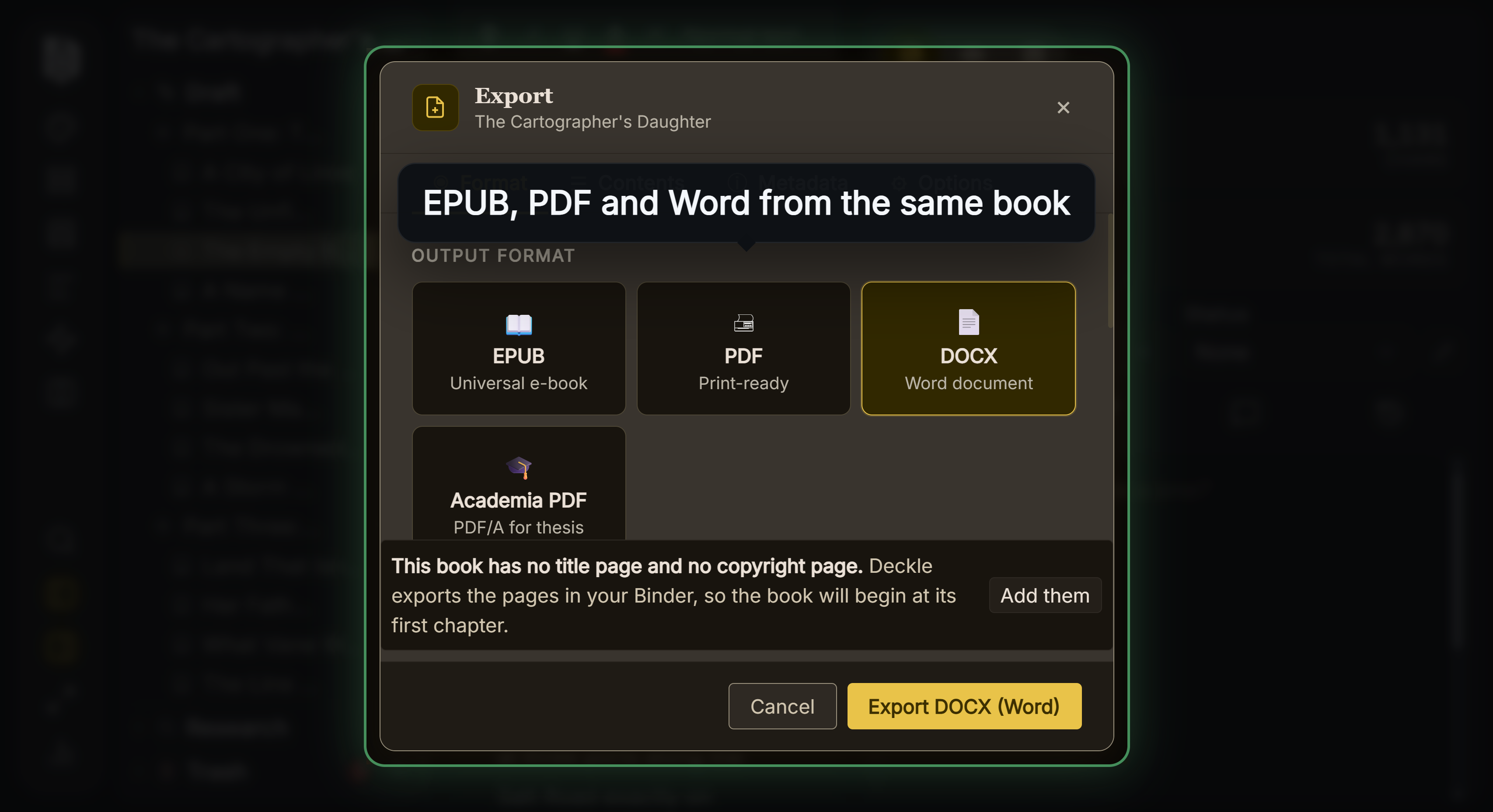 Every export format from one manuscript
Deckle writes rich text rather than markup, and a Ulysses book comes across as a Markdown folder or a DOCX export; the import steps are on Markdown import. Deckle's Kindle target writes an EPUB for KDP to convert, not a KPF file.
Deckle is a one-time purchase. To try it, click Take Deckle for a Spin on the screen Deckle opens to. It is a free demo with no card, no account and no time limit. It opens a sample novel with the Binder, Codex, Timeline and Focus Mode to explore, and you can restyle it and export real EPUB, PDF and DOCX files. New writing is capped at about 500 words, and new documents and imports are blocked.
Common mistakes when choosing the Ulysses app
- Buying on a Windows PC or an Android phone. Ulysses runs on Mac, iPad and iPhone only. Check every device you write on first.
- Missing the system requirement. The current app needs iPadOS 26, iOS 26 or macOS 15.4. An older iPad that cannot update will not run the current version.
- Using the trial on an empty library. Bring in a real chapter, sync it to a second device and export it to PDF and Word before the trial ends.
- Counting on Writing Tools. They need an M1 iPad or the 2024 iPad mini, an M1 Mac or a recent iPhone, and only work in some languages and regions.
- Planning to edit export styles on the iPad. Custom export styles are edited on a Mac. An iPad-only writer gets the built-in styles.
- Turning iCloud off without thinking. Sheets in the local Notes section stay on that device. Know which section a book is in before you change sync.
- Trusting a third-party price. Several ranking pages still quote $49.99 a year. Ulysses's pricing page and the App Store are the current word.
FAQ
What is the Ulysses app?
A writing app for Mac, iPad and iPhone by Ulysses GmbH & Co. KG. It keeps all your writing in one library of sheets and groups, uses a light markup called Markdown XL, syncs through iCloud and exports to PDF, Word, ePub, HTML and text.
How much does the Ulysses app cost?
In the US, $5.99 a month or $39.99 a year, covering Mac, iPad and iPhone. Students pay $10.99 per 6 months, and the App Store also sells a $199.99 Perpetual Licence.
Is the Ulysses app free?
No. The subscriptions come with a free, fully functional trial including export and sync. After that you pay monthly or yearly, or buy the perpetual licence.
Is Ulysses available on iPad?
Yes. The iPad app needs iPadOS 26.0 or later and is included in the same subscription as the Mac and iPhone apps.
Does one Ulysses subscription cover Mac and iPad?
Yes. The pricing page says "Ulysses on all your Macs, iPads and iPhones", and Family Sharing extends it to five other family members.
Is the Ulysses app available for Windows?
No. It runs on Mac, iPad and iPhone only, with no Windows, Android or web version.
Does Ulysses use Markdown?
It uses Markdown XL, its own version of Markdown, by default. It can also work with Markdown files in External Folders and export Markdown.
Is the Ulysses app good for writing a novel?
For drafting across Apple devices, yes: projects, groups, sheets, keywords and goals with deadlines. It has no character records or timeline, and print layout means editing an export style on a Mac.
Does the Ulysses app use AI?
It has no AI of its own. It supports Apple Intelligence Writing Tools, including ChatGPT through Compose, and Siri, and you can switch Writing Tools off.
What is a good alternative to the Ulysses app?
It depends on the job. iA Writer suits Markdown on Windows and Apple, Scrivener a binder and Compile, Storyist an Apple-only novel without a subscription, Obsidian free files everywhere, and Deckle a whole novel and its finished files in one desktop project.
Sources
Retrieved 1 November 2026 unless stated. Prices change, so check the vendor page before buying.
- Ulysses, home page: "The Ultimate Writing App for Mac, iPad and iPhone", sync, goals, grammar and style check for over 20 languages, publishing destinations, free trial on all devices
- Ulysses, Pricing: $39.99 a year, $5.99 a month, all Macs, iPads and iPhones, Family Sharing with up to five others, Setapp
- Ulysses, Students: $10.99 per 6 months, eligibility, manual renewal
- Ulysses, Release notes: version 42 (23 October 2026), 41.3, 41.2, 41.1 and 41 (14 September 2026), iPad items
- Apple, Ulysses: Writing App on the App Store: subscription, in-app purchases including the $199.99 Perpetual License and $29.99 yearly plan, iOS 26.0, iPadOS 26.0 and macOS 15.4 requirements, trial including export and sync, version 39 iPad notes, Apple Design Award and Editors' Choice
- Ulysses, Imprint: company name and Leipzig address; the home page says "Ulysses has existed since 2003"
- Ulysses Help, Ulysses' Library and First Steps: Library and Editor: single library, sheets, groups, filters, projects, iCloud, local Notes, External Folders, iPad gestures
- Ulysses Help, First Steps: Markdown XL: markup examples, "it is easy to learn"
- Ulysses Help, Export: formats, shared PDF and DOCX settings, the ePub layout limit, Extras left out, iPad export preview options
- Ulysses Help, Customize an Export Style: editing styles is Mac only (retrieved 21 October 2026)
- Ulysses Help, Split View and Keyboard Shortcuts (Mac and iPad): Windowed Apps, Open in New Window, hardware keyboard, mouse and trackpad, ⌘1, ⌘2, ⌘3, ⌘N, ⌘6
- Ulysses Help, Writing Tools: device requirements, Compose with ChatGPT, switching off, "never used to train AI models", Siri
- iA, Writer pricing and Features: prices per platform, storage options, export formats
- Literature & Latte, Scrivener overview, features and store: platforms, Dropbox sync, prices, export (retrieved 20 October 2026)
- Storyist, home page, Mac and store: platforms, prices, formats, story sheets (retrieved 20 October 2026); App Store listing for iOS: iPadOS 17 requirement (retrieved 20 October 2026)
- Obsidian, Download, Pricing and PDF export help: platforms, free core app, Sync price, PDF export (retrieved 20 October 2026)
- Ranking pages checked for the claims above: Subger, Ulysses Subscription (updated November 2026, prices verified 18 March 2026); Gappsy, Ulysses Review, Pricing & Features (updated 19 July 2026); Toolradar, Ulysses alternatives (updated 27 October 2026)
Ulysses is a trademark of Ulysses GmbH & Co. KG. Apple, Mac, iPad, iPhone and iCloud are trademarks of Apple Inc. iA Writer is a product of Information Architects AG. Scrivener is a trademark of Literature & Latte. Storyist is a trademark of Storyist Software LLC. Obsidian is a product of Dynalist Inc. Deckle is not affiliated with or endorsed by any product named here.