

To export Plottr to Scrivener, click Export on the Timeline or Outline toolbar, choose Scrivener, name the file and save it, then open it in Scrivener. Plottr writes a new Scrivener project with your outline, notes, characters and places. The export is one-way: it can't go into an existing Scrivener project, and the two files don't sync.

Every Plottr fact on this page comes from Plottr's help centre and website, read on 20 October 2026. Plottr's Exporting article was last updated on 29 May 2025.
What Plottr exports
Plottr exports to two places: Microsoft Word and Scrivener. Its help says "you can easily export your data to both Microsoft Word and Scrivener, including the details of your Timeline, Notes, Characters, and Places."
| Export | What you get | Where the scene cards go |
|---|---|---|
| MS Word | "a full outline of your book, with additional sections for your notes, characters, and places, in one handy document" | In the outline |
| Scrivener | A new Scrivener project with the same outline and sections | "Scene card and plotline data can be viewed via Scrivener's inspector tool" |
Plottr has no PDF or EPUB export. It is an outlining tool, and its help says drafting is "not what Plottr is built for at this time."
How to export Plottr to Scrivener
- Click Export on the Timeline or Outline toolbar.
- Click Scrivener.
- Give the file a name and click Save.
- Open the file with Scrivener.
Plottr's August 2020 release notes, where Scrivener export first shipped, also give File > Export > Scrivener. That first version exported "Chapters and Scenes in order", "Scene Card Details" and "Plotline Details". Characters, places and notes came later.
Which Scrivener version it makes. Plottr's help answers whether the export works on Windows and Mac: "Yes, Plottr outputs a Scrivener 2 file which works on both (it's technically a 1.5 file)." Scrivener 3 reads older projects and updates them. Literature & Latte's upgrade guide for Scrivener 2 users is itself an older project. It tells readers to "open it in Scrivener 3 (which will update the project format)" and to "Follow the prompts to update the file format."
What it can't do. Two of Plottr's own answers:
- "Can my Plottr data be exported to an existing Scrivener file? No, that functionality is not currently available."
- "Will my Plottr file sync with my Scrivener file? No, that functionality is not currently available."
Export once, when the outline is ready to draft from. Changes you make later in Plottr don't reach the Scrivener project, and changes in Scrivener don't come back.
How to export Plottr to Word
- Click Export on the Timeline or Outline toolbar.
- Click MS Word.
- Give the file a name and click Save.
- Open the file with Microsoft Word.
The Word file is the more portable of the two. The Library of Congress lists DOCX as an "international open standard", ISO/IEC 29500, and almost every writing and formatting app imports it.
How to choose what goes into a Plottr export
By default Plottr exports everything. Advanced Export picks what goes.
- Click Export on the Timeline or Outline toolbar, then Advanced.
- Toggle MS Word or Scrivener in the top right of the window.
- Tick the categories or single items to include: General (Title Page), Outline, Characters, Places and Notes.
- Click the green arrow to export.
Leave Save Settings on, at the bottom left, to keep these choices for next time. To export a whole series, start the export from the Series View.
Can you bring a Scrivener project back into Plottr?
Yes. Plottr imports Scrivener 2 and later projects, with limits. Its help says text must be in the Synopsis field and subfolders aren't supported. Main-text content "will cause the import not to work as expected", and notes import alphabetically without images or tags. A round trip will not keep a drafted Scrivener manuscript intact, so treat the export as a one-way handoff.
Common mistakes
- Exporting into a project you already have. Plottr makes a new Scrivener file every time. Copy what you need across in Scrivener.
- Expecting the two to stay in step. There is no sync. Decide where the outline lives after you start drafting.
- Looking for the scene card details in the text. In the Scrivener export they sit in Scrivener's Inspector.
- Exporting everything into a manuscript. Characters, places and notes land in the same file. Use Advanced Export to send only the Outline when you want a clean draft skeleton.
- Letting a Pro plan lapse first. Plottr says that once a Pro plan expires you can no longer "access your projects without renewing your plan", and recommends "downloading/exporting all your projects beforehand." Standard plans keep working without updates.
Deckle: taking a Plottr outline in through Word
Deckle is our app, so weigh this section accordingly.
Deckle imports Word files, so the MS Word export is the way in. Deckle's Scrivener importer reads the Scrivener 3 project layout, so Plottr's older-format Scrivener file won't import as it comes. We have not tested whether a Plottr project updated by Scrivener 3 then imports cleanly, so use Word.
- In Plottr, use Advanced Export to Word with Outline ticked, and leave Characters, Places and Notes for a separate export.
- Open the .docx in Word or LibreOffice. Check which paragraphs are headings in the navigation pane.
- In Deckle, click the + (Add to Draft) button in the Binder, then Import…. The Import Manuscript window takes the .docx.
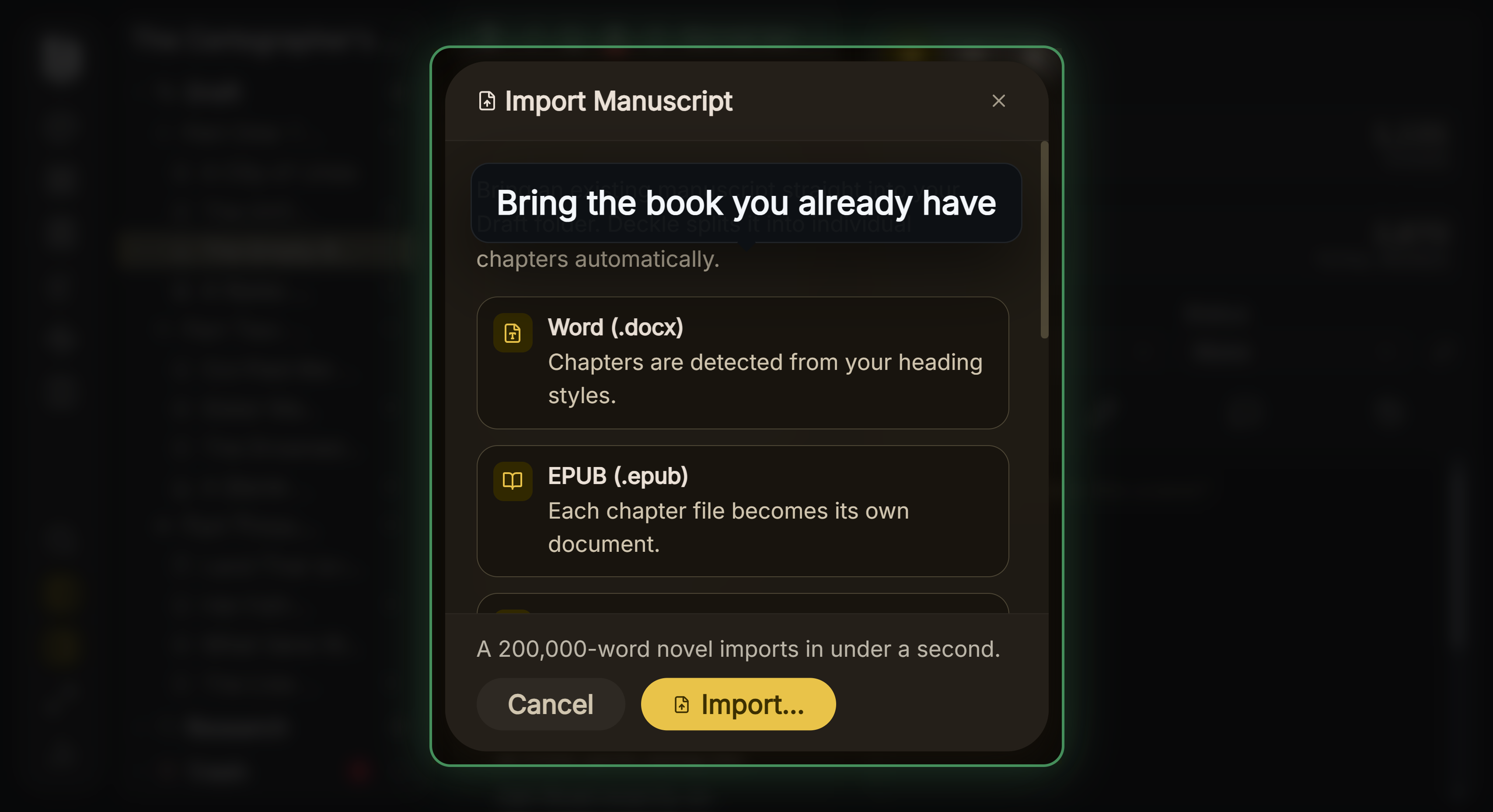 Import Manuscript: a Plottr Word export comes in here
How Deckle reads the headings decides the shape you get:
- Each Heading 1 (or Title style) starts a new chapter.
- A Heading 2 is filed under the Heading 1 above it. A Heading 1 with only its title, followed by Heading 2s, becomes a Part with chapters inside it.
- With no heading styles at all, a short line starting "Chapter", "Prologue" or "Epilogue" becomes a chapter title.
- Text before the first heading becomes a chapter called Prologue.
So if your Plottr chapters come out as Heading 1 and scene cards as Heading 2, Deckle makes each chapter a Part and each scene card a chapter. To get one chapter per Plottr chapter, with the scene notes as text to write over, style the chapter titles as Heading 1 and make the scene card titles ordinary paragraphs before you import.
Characters and places don't come in as Codex entries: Deckle's Codex and Timeline have no import. Re-enter them in the Codex, which has Characters, Locations and Items sections, and rebuild the plotlines in the Timeline.
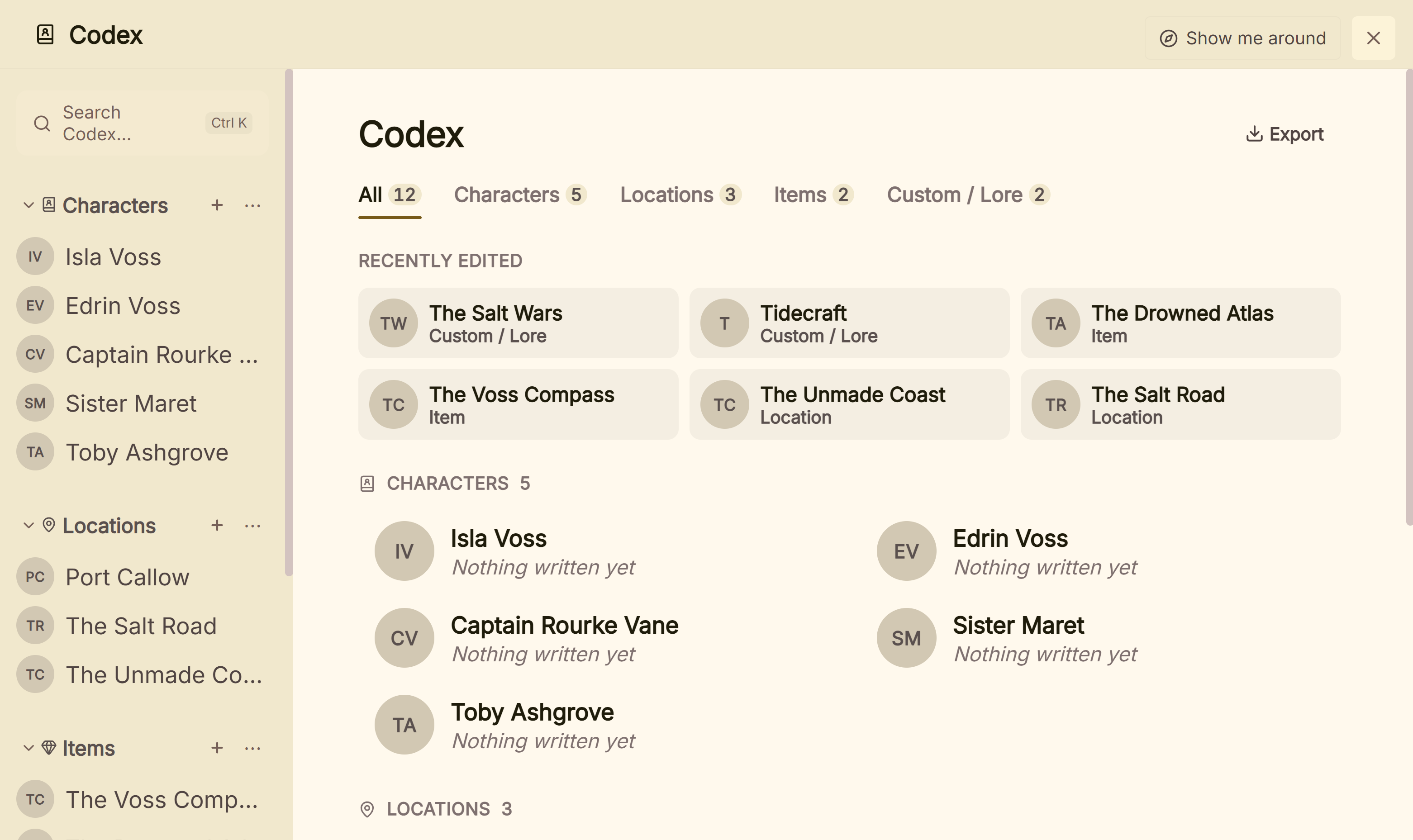 Plottr's characters and places are re-entered in the Codex
Deckle ships no plot templates like Plottr's, and it has no series view. What it adds is drafting and formatting in the same app, with EPUB, print PDF and DOCX export. The wider comparison is on Plottr alternatives and Plottr vs Scrivener, and the test-first method is in how to move a manuscript between writing apps.
Deckle is a one-time purchase. To try it, click Try it free on the screen Deckle opens to. There is no card, no account and no time limit. It opens a sample novel with every screen open to explore, and you can restyle it and export real EPUB, PDF and DOCX files. New writing is capped at about 500 words, and new documents and imports are blocked, so the demo can't take your Plottr file.
FAQ
Can Plottr export to Scrivener?
Yes. Export on the Timeline or Outline toolbar, then Scrivener, writes a new Scrivener project with your outline, notes, characters and places.
Does the Plottr Scrivener export work on Windows and Mac?
Yes. Plottr says it "outputs a Scrivener 2 file which works on both (it's technically a 1.5 file)." Scrivener 3 updates it when you open it.
Can I export Plottr into an existing Scrivener project?
No. Plottr says "that functionality is not currently available." Each export is a new file.
Does Plottr sync with Scrivener?
No. The export is one-way and the files don't stay in step.
Can Plottr export to Word?
Yes. Export, then MS Word, gives one document with the outline plus sections for notes, characters and places.
Can Plottr export to PDF or EPUB?
No. Plottr exports to Word and Scrivener only.
How do I export only my outline from Plottr?
Use Export, then Advanced, and tick only Outline before clicking the green arrow.
Can I export the Plottr Series View?
Yes. Start the export from the Series View to send the series timeline to Word or Scrivener.
Sources
All retrieved 20 October 2026.
- Exporting, Plottr Help (last updated 29 May 2025): Word and Scrivener steps, Advanced Export, Series View, the "1.5 file" answer, no export into an existing project, no sync
- Can I use Plottr if I use Scrivener?, Plottr Help (last updated 29 May 2025)
- August 2020 Update: Scrivener Export, Plottr blog (updated 17 December 2024): File > Export > Scrivener, first export contents
- Importing from Scrivener, Plottr Help: import limits
- Can I write my story in Plottr?, Plottr Help
- Plottr pricing: what happens when a plan expires
- Scrivener 3: A Guide for Scrivener 2 Users, Literature & Latte: Scrivener 3 updates older project formats
- DOCX Transitional (Office Open XML), ISO 29500:2008-2016, ECMA-376, Editions 1-5, Library of Congress: DOCX as an open ISO/IEC standard
Scrivener is a trademark of Literature & Latte. Plottr and every other product name here belong to their owners. Deckle is not affiliated with or endorsed by any product named here.