

Ulysses has no AI of its own, but it does give you Apple's AI. Ulysses supports Apple Intelligence: Writing Tools since October 2024 and Siri AI since September 2026. Both are Apple features, and both can be switched off. Ulysses's help says your texts are "never used to train AI models."

Ulysses is a Markdown-based writing app for Mac, iPad and iPhone, and it has chosen to plug into Apple's AI rather than build or ban its own. The quotes here come from Ulysses's help centre, release notes, privacy policy and blog, read on 20 October 2026.
Does Ulysses have AI features?
Yes, through Apple. Ulysses builds in two Apple Intelligence features and adds no AI model of its own. Its help page on the subject says "Apple Intelligence is Apple's built‑in AI system for iPhone, iPad, and Mac. It powers features such as Writing Tools and Siri AI, both of which are available in Ulysses."
- Writing Tools. Ulysses 36, released on 30 October 2024, announced "Ulysses is ready for Writing Tools." Writing Tools "are designed to help you proofread, rewrite, and summarize text." You select text, choose an action, and click Replace to accept the suggestion. Ulysses says Replace keeps "links, footnotes, images, and more while ignoring code blocks and tables."
- Compose with ChatGPT. Inside Writing Tools, the help page says "You can also compose text with the help of ChatGPT by selecting the 'Compose' option." This runs through Apple's ChatGPT extension, which you are asked to enable on first use. Apple's Writing Tools guide says that with it, "you choose what content to send to ChatGPT."
- Siri AI. Ulysses 41, released on 14 September 2026, added "Full support for the latest Siri: On-screen awareness. Ask Siri. Write with Siri." An Ask Siri item appears in the context menu for sheets, groups, projects and selected text.
The home page lists none of these as Ulysses features. It describes the writing app, the library, goals, the grammar and style check, export and blog publishing.
What can Siri AI do in Ulysses?
Ulysses lists what Siri AI can do in the app, and says the list is fixed by Apple: "we cannot add further actions ourselves because the set of possible interactions is predefined by Apple." Today Siri AI can:
- create, move and open sheets, and mark them as Favorites
- export sheets and groups as PDF, RTF, Markdown, ULYZ or HTML
- start a search, read sheets, and give an overview of groups
- work with text in the editor, such as proofreading and summarizing
Siri AI needs iOS 27, iPadOS 27 or macOS 27 on a supported device set to English. Ulysses's help says it "is currently not available in the EU on iOS and iPadOS devices," though EU users can use it on a Mac, and it is not available in China.
Can you turn off AI in Ulysses?
Yes. Writing Tools has its own switch in Ulysses:
- Mac: Edit › Writing Tools, then uncheck Enable Writing Tools.
- iPad and iPhone: Editor Settings › Substitutions, then uncheck Enable Writing Tools.
For Siri AI, the Ulysses 41 release notes say "You can turn this off on macOS." Siri AI also needs Siri switched on in System Settings before it appears. The Ulysses 36 notes say the same of Writing Tools: "Apple Intelligence needs to be enabled in System Settings." A writer who leaves Apple Intelligence off sees no AI in Ulysses at all.
Does Ulysses train AI on your writing?
No. Ulysses's help states it directly: "Your texts in Ulysses stay securely on your device unless you explicitly choose to send them to Writing Tools. They're also never used to train AI models."
Two details sit behind that sentence:
- Apple processes the AI requests. Ulysses's help says "Apple aims to process AI features on-device, though occasionally, tasks may be sent to their 'Private Cloud Compute'." The ChatGPT option follows the ChatGPT extension's privacy terms, which depend on whether you are signed in to a ChatGPT account.
- Ulysses doesn't hold your library. Its app privacy policy, last updated 28 September 2026, says your written words "are not saved on our servers nor do we have access to this data." They are stored on your device and in your own iCloud Drive, or in Dropbox if you use that integration.
Is the Ulysses grammar checker AI?
Ulysses doesn't call it AI. The home page describes a "built-in grammar and style check" for over 20 languages, offering suggestions for "capitalization, punctuation, semantics, redundancy, style and more." It arrived in Ulysses 20 in July 2020, before Apple Intelligence.
The check is not done on your device. The app privacy policy says that for Advanced Check "the contents of the checked text are sent to our servers hosted by Hetzner Online, from which they are forwarded to the LanguageTool service for analysis," and that the text is "deleted shortly after the text checking has been completed." The policy calls Advanced Check optional.
Has Ulysses taken a stance on AI?
Not a formal one. Ulysses has published no no-AI pledge, and no post on its official blog sets out a policy on AI. What it has said is in its help and release notes: it supports Apple's AI features, it can't add actions of its own to Siri AI, and your texts are not used to train AI models. Its blog, at stories.ulysses.app, has spent 2025 and 2026 on interviews with writers.
That puts Ulysses between two groups. It has no generative model of its own, unlike apps built around one. It is not an AI-free app either, because Writing Tools, ChatGPT Compose and Siri AI are one menu away once Apple Intelligence is on. The vendor-by-vendor picture is in novel writing software without AI.
Which of those tools you touch can matter at publication. Amazon's KDP content guidelines treat proofreading your own text as AI-assisted, and say "You are not required to disclose AI-assisted content." Text that Compose writes for you is AI-generated, which KDP requires you to declare "even if you applied substantial edits afterwards."
Is there an app like Ulysses with no AI menu at all?
Deckle is our app, so weigh this section accordingly.
Deckle is a writing, organising and formatting app for Mac, Windows and Linux. Ulysses's AI comes from Apple and can be switched off; Deckle has none to switch off, and no AI library or AI service appears anywhere in its code. A project is a folder on your own disk, holding one .deckle database plus research/ and .deckle-assets/ folders, and nothing is stored on a Deckle server. It works offline after activation, and it is a one-time purchase.
Where Ulysses exports a PDF, Deckle lays out a print book: eight trim sizes, margins with an inner gutter for the spine, and bleed, as well as EPUB and DOCX.
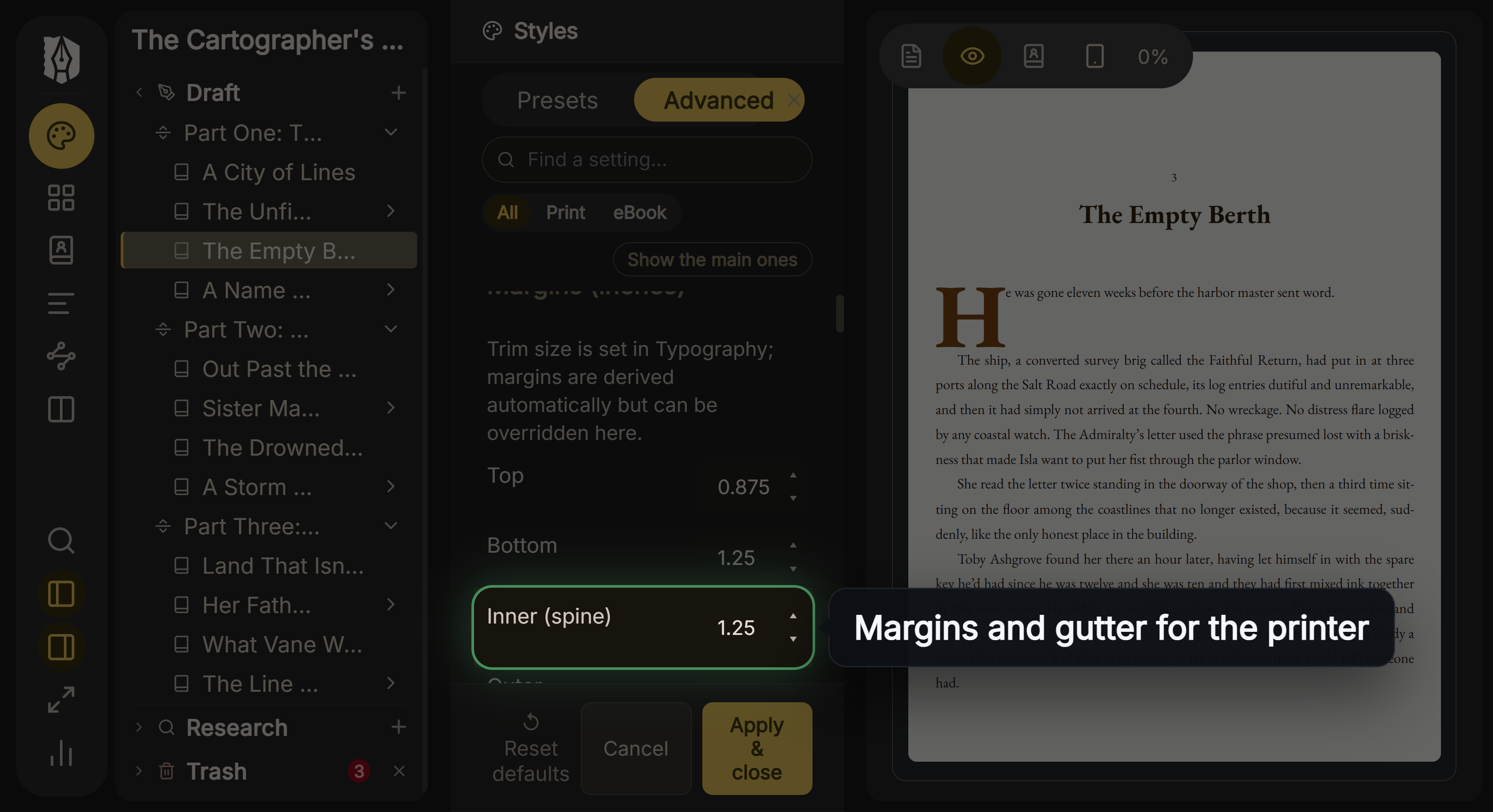 Print margins and gutter, previewed on the page
What you would lose by switching: Deckle has no iPad or iPhone app, no cloud sync and no blog publishing, all of which Ulysses offers, and it is not a Markdown editor. Deckle has also published no written no-AI policy; it has a codebase with no AI in it today. A Ulysses library exported as Markdown comes across through Deckle's Markdown folder import, and the general method is in how to move a manuscript between writing apps.
To try it, click Try it free on the screen Deckle opens to. There is no card, no account and no time limit. It opens a sample novel with every screen open to explore, and you can restyle it and export real EPUB, PDF and DOCX files. New writing is capped at about 500 words, and new documents and imports are blocked.
FAQ
Q: Does the Ulysses app use AI? A: Ulysses has no AI of its own. It supports Apple Intelligence's Writing Tools and Siri AI, which run only when Apple Intelligence is on.
Q: Does Ulysses use my writing to train AI? A: No. Ulysses's help says your texts are "never used to train AI models."
Q: How do I turn off Writing Tools in Ulysses? A: On a Mac, go to Edit › Writing Tools and uncheck Enable Writing Tools. On an iPad or iPhone, go to Editor Settings › Substitutions.
Q: Does Ulysses have ChatGPT? A: Writing Tools offers a Compose option that uses ChatGPT through Apple's ChatGPT extension. You are asked to enable it the first time.
Q: Is Siri AI available in Ulysses in Europe? A: On a Mac set to English, yes. Ulysses says Siri AI is not available in the EU on iPhone and iPad.
Q: Is the Ulysses grammar check AI? A: Ulysses doesn't describe it as AI. Advanced Check sends the checked text to Ulysses's servers and on to the LanguageTool service, then deletes it.
Q: Is there a writing app like Ulysses without AI? A: Ulysses's own AI features are Apple's, and they can be switched off. Plottr and Deckle are among the writing apps with no AI features, and Dabble has none apart from the text-to-speech voices behind Read to Me.
Sources
All retrieved 20 October 2026.
- Ulysses Help, Apple Intelligence: Writing Tools, ChatGPT Compose, Siri AI actions and restrictions, how to switch off, "never used to train AI models" (no date shown)
- Ulysses, Release notes: Ulysses 36 (30 October 2024) Writing Tools; Ulysses 41 (14 September 2026) Siri AI
- Ulysses, Releases: Writing Tools "Powered by Apple Intelligence"; grammar and style check in Ulysses 20 (July 2020)
- Ulysses, App Privacy Policy: personal content not on Ulysses servers; Advanced Check and LanguageTool (last updated 28 September 2026)
- Ulysses, home page: feature list, grammar and style check for over 20 languages
- Ulysses, official blog: recent posts, none setting out an AI policy
- Apple, Use Writing Tools on Mac: the ChatGPT extension, "you choose what content to send to ChatGPT"
- Amazon KDP, Content Guidelines: AI-generated versus AI-assisted content
- Dabble Help, Understanding your subscription (retrieved 21 October 2026): "Dabble is AI-free", with Read to Me's text-to-speech voices as "the one exception"
Last checked 20 October 2026. Ulysses is a trademark of Ulysses GmbH & Co. KG. Apple Intelligence and Siri are trademarks of Apple Inc. ChatGPT is a trademark of OpenAI. LanguageTool is a trademark of its owner. Dabble is a trademark of its owner. Scrivener is a trademark of Literature & Latte. Deckle is not affiliated with or endorsed by any product named here.