

To export from Ulysses to Word, open the export preview with ⇧⌘P on a Mac, choose DOCX from the format switcher at the top, pick an export style, and click Export. The export style sets the fonts, spacing and page breaks in the Word file. To change the look, duplicate a built-in style in Ulysses › Settings… › Styles and edit the copy.

Every step on this page comes from Ulysses's own help centre, release notes and blog, read on 2026-10-20. Ulysses is a Markdown-based writing app for Mac, iPad and iPhone.
What you'll need
- Ulysses on a Mac, iPad or iPhone. Exporting works on all three.
- A Mac, if you want to edit an export style. Ulysses's help says "Customizing an export style is currently only available for Mac".
- A text editor for editing a style, such as TextEdit or TextMate.
- Microsoft Word or Apple Pages to open the file. Ulysses says Pages "uses a proprietary format that cannot be used directly in Ulysses", so DOCX is the route into Pages too. Apple's Pages guide says Pages opens and edits
.docand.docxfiles.
How do I export a Ulysses sheet or group as DOCX on a Mac?
- Choose what to export. Use the Export button in the editor toolbar for the current sheet. Right-click a sheet, group or filter in the library or sheet list and choose Export… for more. Hold ⇧ while selecting to export several sheets at once. For a whole project, click Export in the project library.
- The export preview opens. Press ⇧⌘P to open it from the keyboard.
- At the top centre, switch the format to DOCX.
- Below the switcher, choose an export style, a page size and the table of contents settings.
- Click Export to save the file. The circled ellipsis next to it offers Open With, Send as Mail…, Attach to Mail… and Print….
PDF and DOCX "share the same settings", so a style that looks right in PDF sets up the Word file too.
How do I export to Word on an iPad or iPhone?
- Tap the circled ellipsis in the editor and choose Export for the current sheet, or in the sheet list for a group.
- To pick sheets, tap the circled ellipsis in the sheet list, choose Select Sheets…, mark them, then tap the circled ellipsis at the bottom right and choose Export.
- Tap the format at the top of the export preview and choose DOCX.
- Tap the controls icon next to Export to choose the export style and paper format.
- Tap Export and choose an action, such as saving to Files or opening in Word.
A project exported from an iPad or iPhone leaves out its Extras section.
What are Ulysses export styles?
An export style sets how a file looks when it leaves Ulysses. Ulysses keeps writing and formatting apart: editor themes change the writing screen, and export styles change the exported PDF, DOCX, ePub or HTML. Ulysses comes with built-in styles, including Swiss Knife and Novel Cochin. The Revision style is the one that keeps comments in the export.
PDF and DOCX styles use Ulysses's own format, the Ulysses Style Sheet (ULSS), which "resembles the popular CSS (Cascading Style Sheets) format". ePub and HTML styles use standard CSS.
Where do I get more Ulysses export styles?
More styles come from the Ulysses Styles & Themes website, styles.ulysses.app. This is the site that was called the Ulysses Style Exchange until March 2019, when the Ulysses blog announced its new name.
- Open styles.ulysses.app and choose Export Styles from the menu at the top.
- Open a style's page to see its description and a preview.
- Press Install below the description. Ulysses opens, and the style appears in the Styles menu under its format.
You don't need an account to download a style. Ulysses's help says "The Styles & Themes account is unrelated to the use of the app". You need one only to share a style of your own, which the Ulysses team reviews before it goes live.
How do I customize a DOCX export style?
Pre-installed styles are locked. You edit a copy.
- Open Ulysses › Settings… on a Mac.
- Switch to Styles and choose a style from the PDF/DOCX section, such as Swiss Knife.
- Right-click the style and select Duplicate.
- Right-click the copy and select Edit in, then choose a text editor.
- Make the change, save the file, and select the custom style in the export preview.
A style made on a Mac syncs to your iPhone and iPad through iCloud. Ulysses's help gives the exact ULSS line for the changes novelists ask about most:
| What you want in Word | Where to change it | Setting from Ulysses's help |
|---|---|---|
| Each chapter on a new page | heading-1 or heading-2 |
page-break: before |
A page break at every ---- divider |
paragraph-divider |
page-break: after |
| Chapter titles lower on the page | the heading | margin-top, for example 300pt |
| Indented paragraphs, but not the first | paragraph + paragraph |
first-line-indent |
| A different body font and size | defaults |
font-family, font-size, line-height |
| Footnotes at the end of the document | document-settings |
footnote-placement: end-of-document |
| Comments kept in the file | block-comment, inline-comment |
visibility: visible |
| A running header with page numbers | area-header |
content: "%heading-1 · %p" |
The full syntax is in Ulysses's ULSS reference and its guide "Create Your Own PDF / DOCX Styles". To share a custom style, right-click it in Settings › Styles and choose Export.
How do I add a table of contents to a Ulysses Word export?
Type (toc) on its own line where the contents should go, or use the Insert menu on a Mac or the Markup bar on an iPad or iPhone. Markdown XL must be on. The table is built at export from the headings below the placeholder, and it includes the first two heading levels by default. Change the levels under Table of Contents in the export preview.
When Word opens the file, it may ask to update the document fields. Ulysses says to choose Yes, so Word fills in the correct page numbers. If you add chapters later, right-click the table in Word and choose Update Field, then Update entire table, as Microsoft's Word help describes. The (toc) placeholder arrived in Ulysses 36 on 30 October 2024.
Why is something missing from my Ulysses Word file?
- Comments are missing. Ulysses's Markdown XL guide says "Most export styles will automatically exclude these editorial tags from being exported". Export with the Revision style, or set
visibility: visibleon the comment classes. - Some sheets are missing. Material sheets are skipped when you export several sheets or a group. Ulysses says you can still "export single material sheets".
- Text marked for deletion is gone. Text in double pipes,
||like this||, is marked to "be struck from the exported document". - Chapters run together. The style has no page break on headings. Add
page-break: beforeto the heading level your chapters use. - The formatting vanished. Check the format switcher. Plain Text export "will strip out all of your markup tags". DOCX keeps them as formatting.
- There is no way to edit the style on an iPad. Style editing is Mac only. Ulysses's help says to contact its support team if you have no Mac.
Is Ulysses's Word export good enough for an agent or editor?
Yes, for a draft to share. DOCX is the format most editors work in, and the Revision style keeps comments for a review copy. Ulysses gives no standard manuscript format setting on its export pages, so a submission layout has to be built into a custom style. The rules for that layout are in what is standard manuscript format.
How does Deckle export to Word?
Deckle is our app, so weigh this section accordingly.
Deckle is a desktop app for Mac, Windows and Linux that writes, organises and formats a book. Its DOCX export has two variants: Word, "For editors & review", and InDesign, which applies paragraph style names that match your InDesign styles.
 The two Word variants in Deckle's export window
The Word variant has a Standard Manuscript Format switch. It adds a submission title page with contact details and word count, and a running header of surname, title and page number from Chapter 1 on.
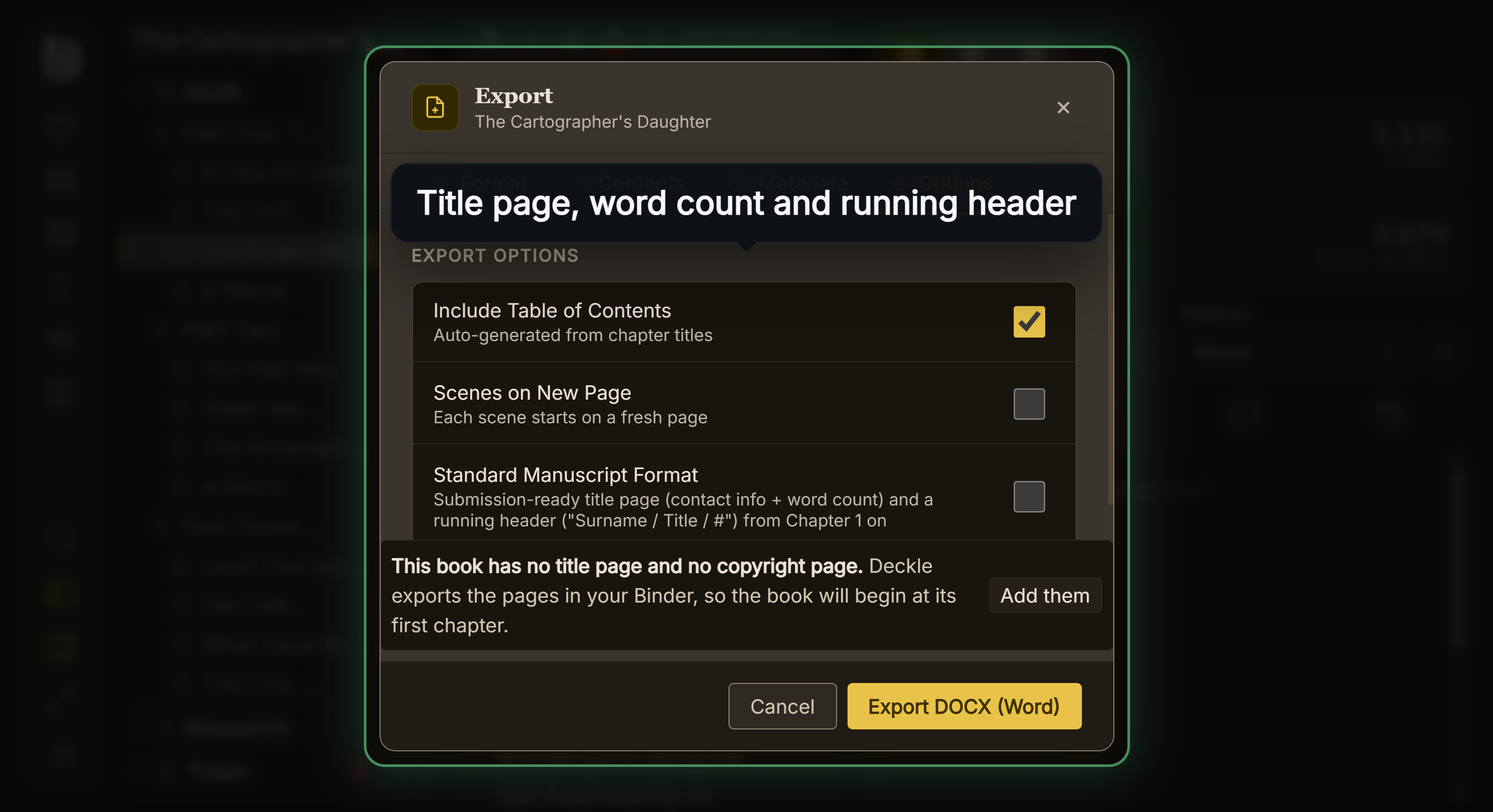 Standard Manuscript Format is one switch in the export options
Deckle writes chapter titles with Word's own Heading 1 style, its inline comments become real Word comments, and footnotes become Word footnotes. The settings are described in DOCX export in Deckle.
Deckle is not a Markdown editor, and it has no iPad or iPhone app and no cloud sync. A Ulysses library can come across as Markdown: Deckle's Markdown folder import makes each file a chapter, and splits one long file at its # headings.
Deckle is a one-time purchase. To try it, click Try it free on the screen Deckle opens to. There is no card, no account and no time limit. It opens a sample novel with every screen open to explore, and you can restyle it and export real EPUB, PDF and DOCX files. New writing is capped at about 500 words, and new documents and imports are blocked.
FAQ
Q: Can Ulysses export to Word? A: Yes. Ulysses exports DOCX on Mac, iPad and iPhone. Choose DOCX in the export preview, pick an export style, and export.
Q: How do I change the font in a Ulysses Word export?
A: Duplicate a PDF/DOCX style in Ulysses › Settings… › Styles, edit the copy, and change font-family under defaults.
Q: Where are Ulysses export styles? A: On a Mac, in Ulysses › Settings… › Styles. On an iPad or iPhone, tap the controls icon in the export preview.
Q: What happened to the Ulysses Style Exchange? A: It was renamed Styles & Themes in March 2019. It is at styles.ulysses.app.
Q: Why are my comments missing from the Ulysses DOCX? A: Most export styles leave comments out. Use the Revision style, or make the comment classes visible in a custom style.
Q: Can I open a Ulysses file in Pages? A: Export it as DOCX first. Pages can't read Ulysses's own format.
Q: Can I customize a Ulysses export style on an iPad? A: No. Editing a style is Mac only, but a style made on a Mac syncs to an iPad through iCloud.
Sources
All retrieved 2026-10-20.
- Ulysses Help, Export (Mac and iOS steps, ⇧⌘P, PDF and DOCX share settings, Pages, material sheets, Plain Text)
- Ulysses Help, Customize an Export Style (Mac only, duplicate and edit, page breaks, indents, fonts, footnotes, comments, headers)
- Ulysses Help, Create Your Own PDF / DOCX Styles (ULSS, style classes)
- Ulysses Help, Getting Started with Styles & Themes (installing styles, no account needed, review before publishing)
- Ulysses Help, How Can I Create a Table of Contents? (
(toc), heading levels, updating fields in Word) - Ulysses Help, Markdown XL (comments excluded, Revision style, deletions)
- Ulysses blog, The New Styles & Themes (15 March 2019, formerly the Ulysses Style Exchange)
- Ulysses, Release notes (table of contents in Ulysses 36, 30 October 2024)
- Ulysses, Styles & Themes (PDF/DOCX export styles and editor themes)
- Microsoft Support, Update fields (Update Field, Update entire table)
- Apple Support, Open or close a document in Pages on Mac (Pages opens and edits .doc and .docx)
Last checked 2026-10-20. Ulysses is a trademark of Ulysses GmbH & Co. KG. Microsoft Word is a trademark of Microsoft Corporation. Pages is a trademark of Apple Inc. Deckle is not affiliated with or endorsed by any product named here.