

Yes. Dabble Writer is offline-first: every edit saves to your device as you type, and Dabble syncs it to your account when the connection comes back. There is no offline switch to turn on. You do need an internet connection to sign in the first time, and Dabble's help recommends installing it as an app so it opens without a connection.

Every Dabble fact on this page comes from Dabble Help, read on 20 October 2026.
How Dabble's offline mode works
Dabble Help puts it plainly: "using Dabble offline isn't a mode you switch on. It's just how Dabble works."
- Your device saves first. "As you type, each change saves straight to your device before anything reaches the server." When you have a connection, Dabble syncs in the background. When you don't, "it keeps saving locally and waits."
- Each device holds the whole book. "A full copy of your novel lives on your device. Another lives in the cloud."
- Sync is automatic. "There's no 'sync now' button and no 'work offline' switch."
- Two devices at once are merged. If you edit the same project on two devices, "Dabble merges the changes instead of letting one overwrite the other."
Dabble says this is new: "This is a real shift from older versions of Dabble." Older advice about keeping one window open, or making daily Word backups to write offline, no longer applies.
What you need before you go offline
Dabble's system requirements list "a supported browser, a Dabble account, and an internet connection to sign in and sync." Writing while disconnected needs nothing: "Dabble is offline-first and saves to your device."
So the order matters:
- Sign in once while online, on the device you'll take offline.
- Let your projects load. The desktop app "signs in to the same account as the browser, loads your projects, and then keeps a local copy so you can write offline."
- Check the cloud icon in the top-right of the header reads "All changes saved and synced."
- Then disconnect. The icon turns into a yellow cloud with a slash, and its tooltip says your changes "are saved on this device and will sync when you reconnect."
Is there a Dabble desktop app?
Yes. Dabble has a downloadable desktop app for Windows, Mac and Linux at dabblewriter.com/downloads. The Linux download is an AppImage, and the Mac app runs on Apple silicon and Intel. Once you've signed in, "the desktop app keeps a local copy of your work, so a dropped connection doesn't stop you."
You can also install Dabble from the browser instead of downloading anything: Chrome or Edge on Windows, macOS and Linux, or Safari 17 and newer on a Mac (File, then Add to Dock). In Chrome the menu item is Cast, save, and share, then Install page as app, per Google's Chrome help. On a Mac, Apple's guide to Safari web apps says Add to Dock needs macOS Sonoma 14 or later. Firefox on desktop can't install web apps. Either way, Dabble Help says installing "makes Dabble more reliable offline, because the app loads from your device instead of waiting on the network." The two differ in updates: "the installed web app reloads itself, and the desktop app relaunches."
Does Dabble work offline on iPhone, iPad and Android?
Dabble's phone and tablet version is a web app, not an App Store download. Dabble Help says "You won't find it there, and that's on purpose." You add it to your home screen from Safari on iPhone and iPad, or from Chrome, Edge or Firefox on Android. The same offline-first saving applies: "Your work saves to your device first, then syncs to your account. So a spotty connection won't stop you from writing."
What can go wrong when writing Dabble offline
- Private or incognito windows. "In those modes your browser may refuse to save anything to your device, so your edits live only in memory and vanish when you reload or close the tab." Dabble shows a red octagon in the header when this happens, and its help calls it "the one state to act on immediately."
- A red cloud while you are online. "You're online, but Dabble's server isn't answering." Dabble says the most common cause is a firewall on a school or work network. Your work stays on the device.
- Resetting the device before syncing. Resync Database under Preferences, Advanced "throws out this device's local copy and takes the server's. Anything on this device that never made it up can't be recovered." Dabble warns you with Unsynced Changes first.
If you want a copy you hold yourself, Preferences, Advanced, Data has Export Project Data and Export Entire Local Database. Dabble says "no subscription is required to hold on to it." To get the manuscript out as Word or Markdown, see Dabble Writer export.
Common mistakes
- Going offline on a device you haven't signed in on. Sign-in needs a connection, and the local copy only exists once your projects have loaded.
- Writing in a private browser window. Dabble may not be able to save anything to the device.
- Expecting a "work offline" button. There isn't one, because offline saving is always on.
- Resyncing with unsynced work. Wait for "All changes saved and synced" first, or export a backup.
Deckle: a desktop app with no account to sign in to
Deckle is our app, so weigh this section accordingly.
Deckle works the other way round from Dabble. It is a native desktop app for Windows, macOS and Linux. A project is a folder on your own disk, holding one .deckle database for all the writing, notes and settings, plus research/ and .deckle-assets/ folders. Nothing is stored on a server, and there is no account to sign in to. Deckle works offline after activation: the licence check runs on your computer, and the server recheck at startup passes when you're offline.
What Deckle does not have is Dabble's strength. It has no sync, no phone or browser version and no co-authoring. Moving a book between two computers means moving the folder yourself, or putting it in a sync folder such as Dropbox. Deckle keeps zip backups, 20 by default, in a "Project Name Backups" folder in Downloads (falling back to Desktop or Documents). It makes one every 500 words and when you close a project.
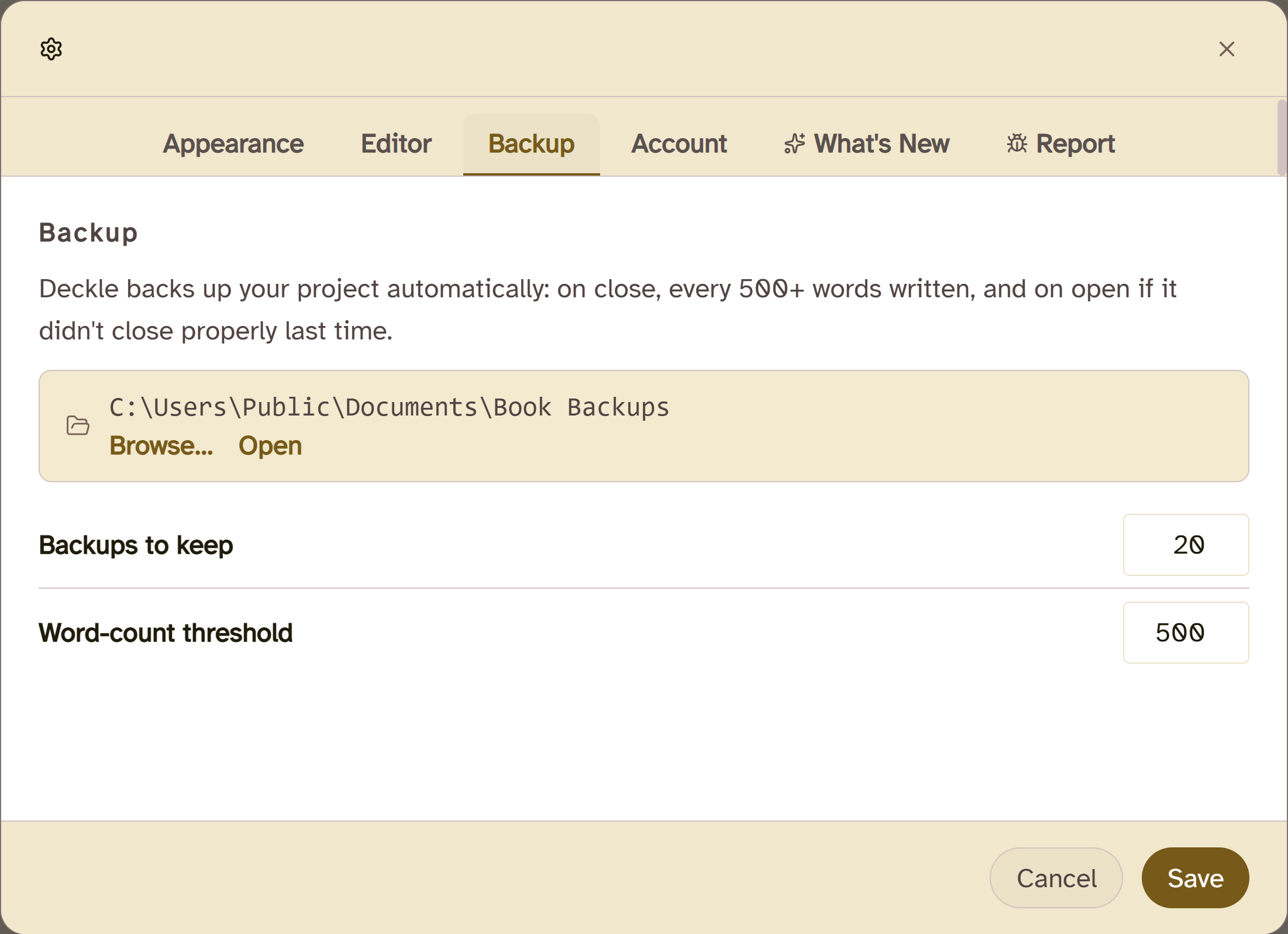 Backups are kept on your own computer, with no account involved
How the two compare more broadly is on Dabble vs Deckle, and other offline apps are on Dabble Writer alternatives.
Deckle is a one-time purchase. To try it, click Try it free on the screen Deckle opens to. There is no card, no account and no time limit. It opens a sample novel with every screen open to explore, and you can restyle it and export real EPUB, PDF and DOCX files. New writing is capped at about 500 words, and new documents and imports are blocked.
FAQ
Does Dabble Writer work offline?
Yes. Every edit saves to your device first and syncs automatically when you reconnect.
Do I need the internet to use Dabble?
Only to sign in and sync. Dabble's system requirements say writing while disconnected needs no connection.
Does Dabble have an app?
Yes. There is a desktop app for Windows, Mac and Linux, and an installable web app for browsers, iPhone, iPad and Android.
Is Dabble on the App Store?
No. On iPhone and iPad you add Dabble to your home screen from Safari. Dabble says that is "on purpose."
How do I know Dabble has synced my offline work?
The cloud icon in the header shows a check mark, with the tooltip "All changes saved and synced."
Can I lose work writing offline in Dabble?
Dabble's help names private browsing as the main risk, because the browser may not save to the device. Resyncing a device before it has synced also discards its unsynced changes.
Does Dabble work on Linux?
Yes. The desktop app downloads as an AppImage, and Dabble also runs in Chrome or Edge on Linux.
Sources
Dabble Help pages unless marked, all retrieved 20 October 2026.
- Working offline: offline-first saving, the offline icon, reconnecting, installing, private browsing
- How Dabble syncs your work: local and cloud copies, automatic sync, merging edits from two devices
- Sync status icons: the five cloud states and the red private-browsing alert
- System requirements: platforms, browsers, connection needed to sign in and sync
- Install the Dabble desktop app: Windows, Mac and Linux downloads, local copy after sign-in
- Install Dabble from your browser: installed web app, Firefox limit, updates
- Install Dabble on mobile: no App Store or Google Play, home-screen install
- Reset Dabble on this device: Resync Database and the unsynced-changes warning
- Back up your work: Export Project Data and Export Entire Local Database
- Use web apps, Google Chrome Help: Install page as app
- Use Safari web apps on Mac, Apple Support: Add to Dock, macOS Sonoma 14 or later
Dabble and every other product name here belong to their owners. Scrivener is a trademark of Literature & Latte. Deckle is not affiliated with or endorsed by any product named here.