

Fictionary is web-based story editing software for fiction writers: you import a finished draft as a Word file, and it helps you check the structure scene by scene against its 38 Story Elements and an automated Story Arc. It works on plot, character and setting, not on grammar or sentences. StoryTeller costs $19 a month or $168 a year, StoryTeller Premium $39 a month or $348 a year, and both start with a 7-day free trial with no card.
This page sets out what Fictionary does, what it costs, who it suits and what else does the same job, from Fictionary's own pages and each other vendor's pages, read on 31 October 2026. Prices are US dollars before tax. This is Deckle's own site, and Deckle is one of the tools compared, so weigh that section accordingly. Nothing here is scored or ranked.
What is Fictionary?
Fictionary is story editing software for novelists. Its home page headline is "Learn To Write Your Best Novel", and it says you can "Outline, write, and edit your novel, all in one place". Its main use, and the one most reviews describe, is revising a draft that already exists.
The kind of editing it does has a name in publishing. The Editorial Freelancers Association says developmental editors "deal with content, organization, and genre considerations", and may send "a revision (or "editorial" or "edit") letter" that sets out the big-picture problems. Fictionary turns that big-picture check into a guided process you run yourself. How it differs from the later stages is set out on developmental vs line vs copy editing.
There are three products:
- StoryTeller, for writers editing their own novel.
- StoryTeller Premium, StoryTeller plus courses, track changes and comments, and more manuscripts at once.
- StoryCoach, for professional editors who edit other people's manuscripts. Fictionary also lists "Certified StoryCoach Editors" for writers who would rather hire someone.
What does Fictionary story editing software do?
Fictionary's pages describe five parts.
- The 38 Story Elements. Fictionary's learning page tells writers to "evaluate your story using the 38 Fictionary Story Elements". Its support page says the focus is "Characters, Plot, and Settings".
- Scene feedback. The StoryTeller page says you can "Assess your scene goal, word count, tension, conflict and more."
- The Story Arc. The StoryTeller page promises "the automated Story Arc", drawn from your scenes. Its support page says the arc needs "all 5 key scenes" set on the evaluate page, and enough scenes and words to draw at all.
- Visualisations. "Fictionary's 15 visualizations give you the insights you need to find issues and improve your story structure", in the StoryTeller page's words.
- AI feedback. The home page says "Our safe, built-in AI writing instructor, Edwina, gives immediate, scene-specific feedback." The pricing page lists "Immediate AI-powered story feedback" in every StoryTeller plan.
The work of judging each scene is still yours. Kindlepreneur's review lists "A lot of legwork is done by the author" among its cons, and that is the point of the method: it gives you the questions, and you answer them for every scene.
How much does Fictionary cost?
From Fictionary's pricing and product pages on 31 October 2026, "All plans in USD":
| Plan | Monthly | Annual | What it adds |
|---|---|---|---|
| StoryTeller | $19 a month | $168 a year ($14 a month) | Genre templates, the editing journey, plot, character and setting insights, AI story feedback |
| StoryTeller Premium | $39 a month | $348 a year ($29 a month) | Everything in StoryTeller, 10 manuscripts, track changes and comments, Fictionary Live! courses |
| StoryCoach | $49 a month | $396 a year ($33 a month) | For editors: up to 20 clients at a time, all Premium features |
The StoryTeller plans "include a 7-day free trial. No credit card required. Cancel anytime." The FAQ says StoryTeller holds three manuscripts at once, and that after you cancel, "your subscription will last until the end of your billing period".
A structural edit usually takes more than one month. At $19 a month, two months is $38 and six months is $114. If the revision runs longer than nine months, the annual plan costs less than paying monthly.
Is Fictionary worth it?
It is worth it for a writer with a complete draft who wants a structured way to find what is wrong with the story before paying a developmental editor, or instead of one. Fictionary's FAQ says "25,000 words or more is a great time to start using Fictionary!", which tells you it is built for a draft with a shape to check.
It is less useful at the start of a book, or for sentence-level work. Kindlepreneur calls Fictionary to ProWritingAid and Grammarly "what developmental editing is to proofreading", and the tools are often used together for that reason. It is also a subscription: you pay while the revision lasts, and the manuscript lives in your Fictionary account.
On privacy, the support page says "You retain the full rights to your manuscript. We make no claims on your work", that accounts are encrypted, and that the service runs on "Google's secure cloud infrastructure".
How does Fictionary import and export a manuscript?
Import is a Word file. "Your manuscript needs to be in a Microsoft Word .docx file for Fictionary to recognize it." Fictionary reads the structure from plain text:
- Start each chapter with the word "Chapter", in plain text or as a Heading 1.
- Put "Prologue" on its own line if there is one.
- Separate scenes inside a chapter with a scene break such as
* * *on its own line, and not at the end of a chapter. - Remove images and emoji if the import fails.
Export is also a Word file: "You can also export your edited manuscript back to a Word .docx file", along with your notes. A manuscript with track changes or comments in it cannot be exported. Fictionary works in Safari and Google Chrome "for Macs and PCs", on a laptop or desktop; phone and tablet support is described as coming "at a later date". Its pages do not mention working offline.
Fictionary compared with other story editing and writing tools
| Tool | What it is for | Platforms | Price (31 October 2026) | Offline | Import / export | Automated feedback | Structural revision |
|---|---|---|---|---|---|---|---|
| Fictionary StoryTeller | Story editing of a finished draft | Web app in Chrome or Safari, laptop or desktop | $19/mo or $168/yr; Premium $39/mo or $348/yr; 7-day trial | Not mentioned | DOCX in, DOCX out | "AI-powered story feedback" (Edwina) | 38 Story Elements, automated Story Arc, 15 visualisations |
| ProWritingAid | Line editing, plus story critiques | Web editor, desktop app, Word, Google Docs, browser | Free; Premium $30/mo, $120/yr or $399 once; Premium Pro $36/mo, $144/yr or $699 once | Not stated | Works inside your documents | LLM features; "We will never use your writing to train our algorithms" | Chapter Critique; Plot, Manuscript and Character Analysis and Virtual Beta Reader on credits |
| AutoCrit | Writing and prose editing platform | Not stated on the pricing page | Free plan; Pro $30/mo or $15/mo billed annually (the page also shows other figures) | Not stated | Exports EPUB and print PDF | "Automated Alpha & Beta Readers" (Pro) | Story Analyzer+: character arcs, conflict, plot threads, story beats |
| Scrivener | Long-form drafting and organising | macOS, Windows, iOS | $59.99 once per desktop platform; $95.98 for both | Yes | Imports Word; exports Word, PDF, EPUB and more | None mentioned | Outliner, labels, status, snapshots; you do the judging |
| Deckle | Writing, organising and formatting a book | Windows, macOS, Linux | One-time purchase; free demo | Yes, after activation | Imports Word, EPUB, Scrivener (zipped), Markdown; exports EPUB, PDF, DOCX, Markdown, Plain Text | No generative AI, by design | Outliner List View with synopsis, labels, statuses, custom columns, filters, snapshots; you do the judging |
The split is simple. Fictionary, ProWritingAid and AutoCrit give feedback on the draft. Scrivener and Deckle are where the draft is written and rearranged, and the structural judgement is the writer's own. Many writers use one of each.
What are the best Fictionary alternatives?
The right alternative depends on which part of Fictionary you wanted.
ProWritingAid, for sentences first and story critiques on top
ProWritingAid is best known for line editing, with "25+ writing analysis reports" in its paid plans. Its story side is Chapter Critique, and Plot, Manuscript, Character and Marketability Analysis and a Virtual Beta Reader, paid for with Story Credits. Its Responsible AI page says "Some of our features use Large Language Models" and that none of its AI features "are intended to write for you". It suits a writer who wants prose help every day and an occasional story check, and it has a lifetime plan.
AutoCrit, for automated readers and story analysis in one platform
AutoCrit's pricing page lists a free plan "with no word limits" and a Pro plan with Story Analyzer+, described as "near-instant feedback on character arcs, conflict, active plot threads, and more", plus automated alpha and beta readers and EPUB and print PDF export. Its pricing page showed conflicting figures on 31 October 2026, so check the plan card before paying. It suits a writer who wants feedback generated for them rather than a method to apply.
A human developmental editor, for judgement
Fictionary itself points writers to certified StoryCoach editors. The EFA says a developmental editor may give "an overall critique of the content in a "manuscript evaluation"". Software checks a draft against a framework; an editor reads it as a reader. A writer can use Fictionary first so the editor's time goes on harder problems.
Your own writing app, for a structural pass you run yourself
A reverse outline, one line per scene, is the oldest structural editing tool there is, and any app with an outliner can hold one. The method is on revision passes explained. Scrivener's Outliner and Deckle's Outliner both show a synopsis, label and status per scene, so you can mark beats, track POV and see the shape of the book without importing it anywhere else. Planning tools for before the draft are compared on best plotting software.
How is Fictionary different from writing software?
Fictionary is a stage you pass the draft through. A writing app is where the draft lives. In Fictionary you import a Word file, evaluate it and export a Word file, so the revised text has to go back into wherever you write and format the book. In a writing app, the reverse outline, the labels and the text sit in the same project, so moving a scene moves its notes with it.
Fictionary also has a writing side. Its home page says it covers "every stage of their writing journey, from the first outline to the final revision", with genre-based outlining templates. Most reviews, though, treat it as the editing step, and its own FAQ suggests starting at 25,000 words.
What do ranking pages get wrong about Fictionary?
Two claims in pages that rank for this search disagree with Fictionary's own pages on 31 October 2026.
- "StoryTeller Premium is $29 a month" and "a 14-day free trial". Kindlepreneur's "Fictionary Review: Pricing, Pros, Cons, & My Experience" (updated 15 July 2026) gives Premium as "$29/month or $21.58/month with annual billing" and lists a "14-day trial". Fictionary's pricing page gives Premium as $39 a month, or $29 a month billed as $348 a year, and its trial as 7 days.
- "$20 a month" and "Free two-week trial". SelfPublishing.com's "Fictionary Review: Is This Writing Software Worth It?" (13 December 2022) gives both. StoryTeller is $19 a month and the trial is 7 days.
Chapter's review (31 August 2026) notes that the trial "is quoted as anywhere from 7 to 14 days depending on which page you land on". Fictionary's own pricing, product and FAQ pages all said 7 days on the date above. Check the pricing page on the day you sign up.
How do you do a structural revision in Deckle?
Deckle is our app, so weigh this section accordingly. Deckle is a desktop writing app for Windows, macOS and Linux. Each project is a folder on your own computer, it works offline after activation, and it has no generative AI. These steps run a Fictionary-style scene check by hand, inside the project that holds the book.
- Bring the draft in. Click + beside Draft (Add to Draft), choose Import…, and pick your Word file. Chapters are detected from your heading styles, and a
***or* * *line becomes a scene break. - Snapshot first. With a chapter open, go to the Inspector, open Versions and click New Snapshot. A structural pass changes the most, so take one before you cut or move anything.
- Write a one-line reverse outline. In the Inspector's Synopsis tab ("What happens in this scene?"), write one line per chapter or scene. Under Characters, tag who is in it.
- Name your beats. Click the pencil beside Status to open Edit labels & statuses. On Labels, double-click a default colour such as Red to rename it, or use Add New Label: Inciting incident, Midpoint, Climax, and so on. Set each chapter's Label in the Inspector.
- See the book as a list. Open View ▸ Outliner and click Grid View to switch to List View. Each row shows Words, Synopsis, Status and Label. Click Words to sort by length and spot chapters that run long.
- Add your own checks. Click Add custom column and add a Dropdown called POV, or a Text column called Scene goal. This is where your version of a story element checklist lives.
- Filter for one thread. Click Filters and pick a label, a status, or a character under All entries, to see only the scenes that carry that beat or that person.
- Move scenes. Switch back to Grid View and drag the cards into the new order, or drag rows in List View.
- Check the pacing. Open View ▸ Writing Stats and read Words per chapter, a bar per chapter with the average beside it.
- Mark progress. Set each chapter's Status to Revised as you finish it, then filter by status to see what is left.
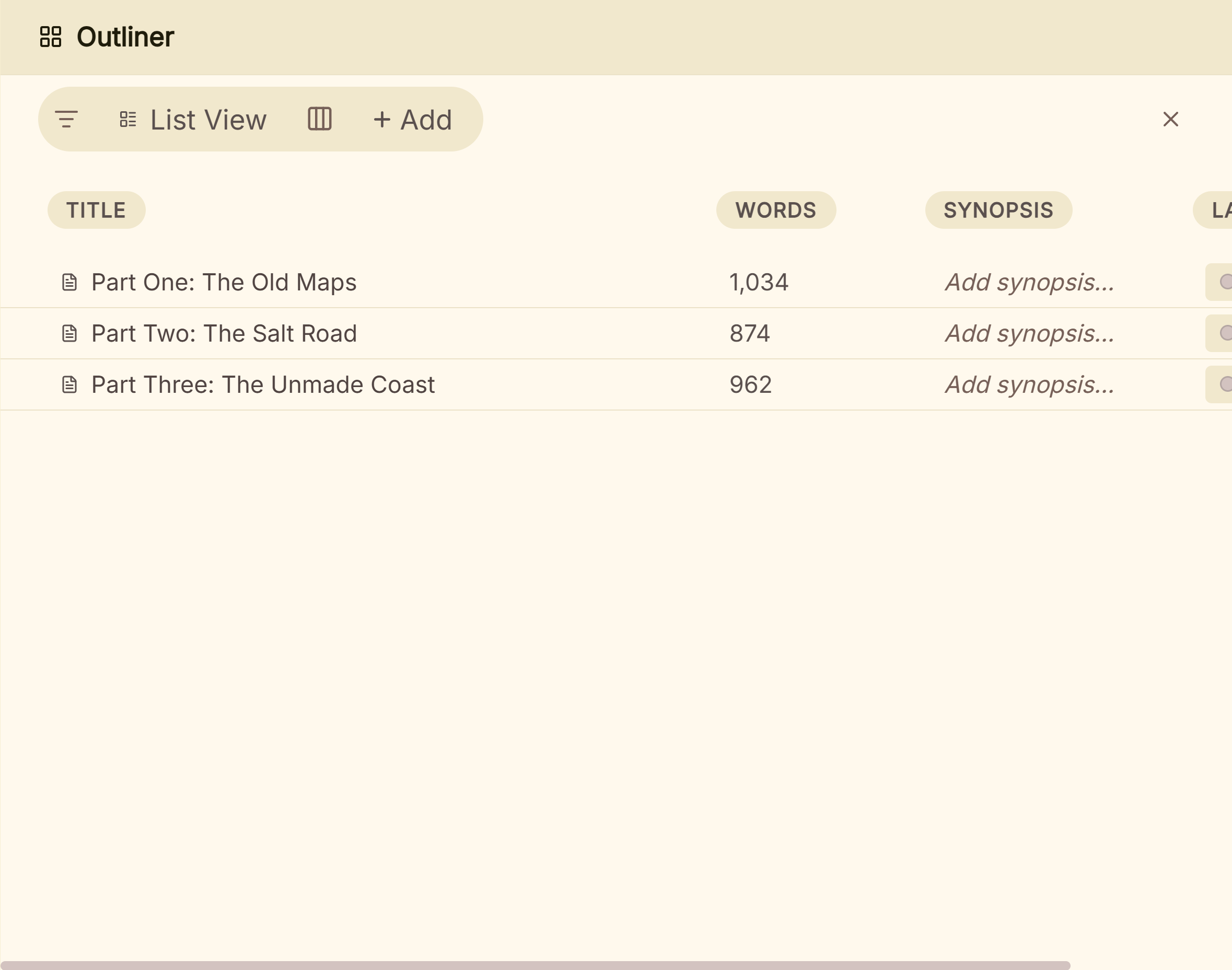 The Outliner's List View: one row per chapter with its synopsis, words, label and status
 Dated snapshots in the Versions tab, taken before a structural change
The full working order for this pass is on restructuring your novel with the Outliner. For an automated arc drawn from your scenes, Fictionary suits that part of the job, and its Word export comes back into Deckle through the same Import… route. What Deckle adds is that the reverse outline, the beats, the revised text and the finished EPUB and print PDF all stay in one project on your own disk.
Deckle is a one-time purchase. To try it, click Take Deckle for a Spin on the screen Deckle opens to. There is no card, no account and no time limit. It opens a sample novel, and labels, statuses and synopses can be set in the demo, so you can try the List View, filters and labels on a real book. New writing in the demo is capped at about 500 words, and imports are switched off.
Common mistakes with Fictionary and story editing software
- Starting too early. Story editing needs a whole draft. Fictionary's own FAQ suggests 25,000 words or more.
- Importing a messy Word file. Chapters need "Chapter" or a Heading 1, and scenes need a break line. Fix the file first, or the scenes come in wrong.
- Leaving comments in before export. Fictionary cannot export a manuscript with track changes or comments, so resolve them first.
- Fixing sentences in a structural pass. Line edits on scenes you later cut are wasted. Work from the largest problems down, as in the self-editing checklist for a first draft.
- Treating the arc as a rule. Any target arc is a template. Literary and experimental structures will not match it, and that is not always a fault.
- Forgetting the subscription. Note when the trial ends, and cancel or pick the annual plan once you know how long the revision will take.
- Editing in two places. Decide where the master copy lives. If you revise in Fictionary, re-import the export into your writing app before you carry on there.
FAQ
What is Fictionary?
Fictionary is web-based story editing software for fiction. You import a Word manuscript and check its structure scene by scene against 38 Story Elements, with an automated Story Arc and AI feedback.
How much does Fictionary cost?
On 31 October 2026, StoryTeller was $19 a month or $168 a year, StoryTeller Premium $39 a month or $348 a year, and StoryCoach for editors $49 a month or $396 a year, in US dollars.
Does Fictionary have a free trial?
Yes. Fictionary's pricing and FAQ pages give a 7-day free trial with no credit card. Some reviews still say 14 days.
Does Fictionary use AI?
Yes. Its home page describes "Edwina", a "built-in AI writing instructor" that gives scene-specific feedback, and its plans list "Immediate AI-powered story feedback".
Is Fictionary a desktop app?
No. It is a web app that runs in Safari or Google Chrome on a laptop or desktop computer. Its pages do not mention offline use.
What file types does Fictionary accept?
Microsoft Word .docx only. Scrivener, Pages and Google Docs users export a .docx first. It exports the revised manuscript back as .docx.
Is Fictionary better than ProWritingAid?
They do different jobs. Fictionary checks story structure; ProWritingAid mainly checks sentences, with story critiques on top. Many writers use both.
What is a good Fictionary alternative?
For automated story feedback, AutoCrit or ProWritingAid's critiques. For judgement, a developmental editor. For a structural pass you run yourself, an outliner with synopses and labels, as in Scrivener or Deckle.
Sources
Retrieved 31 October 2026 unless stated. Prices change, so check the vendor page before buying.
- Fictionary, home page: "Outline, write, and edit your novel, all in one place"; Edwina, the AI writing instructor; Story Arc; certified StoryCoach editors
- Fictionary, Pricing: StoryTeller, StoryTeller Premium and StoryCoach prices, "All plans in USD", 7-day trial with no card, "Immediate AI-powered story feedback"
- Fictionary, StoryTeller and StoryTeller Premium: the automated Story Arc, scene goal, tension and conflict, 15 visualisations, genre templates, track changes and comments, 10 manuscripts
- Fictionary, The 38 Fictionary Story Elements
- Fictionary, Format your manuscript: .docx only, "Chapter" or Heading 1, scene breaks
- Fictionary, Support and FAQs: .docx import and export, Safari and Chrome, laptop or desktop, rights and storage, Story Arc requirements, three manuscripts, 25,000 words, cancellation
- Editorial Freelancers Association, Editorial services definitions: developmental editing, manuscript evaluation and edit letter
- ProWritingAid, Pricing: plans, lifetime prices, Chapter Critique, Story Credits analyses, line editing reports; Responsible AI: LLM use, no training on your writing
- AutoCrit, Pricing: free plan, Pro plan, Story Analyzer+, automated readers, EPUB and print PDF export
- Literature & Latte, Scrivener overview: platforms, export formats, Outliner and snapshots; Store: $59.99 per platform, $95.98 for both (retrieved 20 and 26 October 2026)
- Ranking pages checked for the claims above: Kindlepreneur, Fictionary Review: Pricing, Pros, Cons, & My Experience (updated 15 July 2026); SelfPublishing.com, Fictionary Review: Is This Writing Software Worth It? (13 December 2022); Chapter, Fictionary Review: Is StoryTeller Worth the Subscription? (2026) (31 August 2026)
Scrivener is a trademark of Literature & Latte. Fictionary, StoryTeller, StoryCoach, ProWritingAid and AutoCrit are trademarks of their respective owners. Deckle is not affiliated with or endorsed by any product named here.