

Manuskript is a free, open-source novel writing app (GPL-3.0) for Linux and Windows, which Mac users can run from source, with an outliner, index cards, character, plot and world sheets and a snowflake-method assistant. Its latest release is 0.17.0, from 30 June 2025, and it has no Mac download for that version. It suits a writer who wants a free planning-and-drafting tool and is happy to install pandoc for Word, ePub and PDF export. The project calls itself "still in development, and in need of extensive testing", so frequent backups are part of using it.
Every Manuskript fact on this page comes from the project's own GitHub repository, release pages, wiki and website, read on 31 October 2026. Facts about the other apps come from each vendor's own pages, read on 20 October 2026 unless a different date is given. This is Deckle's own site, and Deckle is one of the alternatives, so weigh that section accordingly. No standards body tests writing software, so this page ranks nothing.
This page reviews Manuskript as a product. For a comparison of open-source apps by licence and file format, see open source Scrivener alternatives.
What is Manuskript?
Manuskript describes itself as "an open-source tool for writers". It is written in Python 3 and PyQt5, and its GitHub repository says it is "distributed under the GNU General Public License version 3 or (at your option) any later version". It is free, and its website asks users to consider donating.
The repository lists what it is for, in its own words:
- "Grow your premise from one sentence, to a paragraph, to a full summary"
- "Create characters", "Conceive plots" and "Build worlds"
- "Construct outlines", in an outline mode or as index cards
- "Track items"
- "Edit and re-organize chapters and scenes"
- "View Story line"
- "Write with focus", in a distraction-free mode
- "Compose with fiction or non-fiction templates and writing modes"
It also has a spell checker, a Markdown highlighter and a frequency analyser, which shows the words and phrases you use most. Its work is saved automatically "in open and plain text file format", so your text is readable without the app.
The planning tool most writers notice is the novel assistant. The Manuskript website says it walks you through the snowflake method, growing one sentence into a summary with characters, plot and a world. The method itself is explained on the snowflake method, step by step.
Is Manuskript still maintained?
Yes, slowly. GitHub lists ten releases since April 2019: up to three in a year (2023) and none in 2024.
| Version | Date | What the project says about it |
|---|---|---|
| 0.17.0 | 30 June 2025 | Tagged Latest. Mostly crash fixes, with no major new features |
| 0.16.1 | 14 December 2023 | Fixed Windows issues that stopped existing projects loading |
| 0.16.0 | 7 December 2023 | Crash fixes and better translations |
| 0.15.0 | 4 March 2023 | Bug fixes, some new features, translation progress |
| 0.14.0 | 8 June 2022 | Mostly bug fixes |
Work continues between releases. The newest commit on the develop branch is dated 1 September 2026, a packaging fix for Debian 13, after translation updates in July 2026. A pull request merged on 7 June 2026 fixes the macOS app bundle and is filed under a 0.18.0 milestone. No 0.18.0 had been released on 31 October 2026. The repository shows 579 open issues.
The project's own status line has not changed: the website says "still in development, and in need of extensive testing", and the download page says it is "still in the early development stages" and recommends "creating frequent backups".
Where do you download Manuskript?
Download it from the Manuskript download page or the GitHub releases page. Those two are the project's own. Third-party download sites and look-alike GitHub accounts also rank for "manuskript download", and some list builds the project never made.
Linux distribution repositories can lag behind. On 31 October 2026, Debian 13 (trixie, the stable release) carried 0.16.1, and 0.17.0 was only in testing and unstable. Check the version before you install from a repository.
For 0.17.0, the project offers:
- Windows:
manuskript-0.17.0-windows.zip. "Unzip it, and run manuskript/manuskript.exe." There is no installer. - Debian and Ubuntu:
manuskript-0.17.0-1.deb, installed withdpkg. - Fedora:
manuskript-0.17.0-1.noarch.rpm, installed withdnf. - Flatpak:
ch.theologeek.Manuskripton Flathub, where the listing is marked as unverified, community-provided packaging. - Snap:
sudo snap install --edge manuskript. - From source, on any system: "You'll need at least python3, pyqt5, lxml", then run
bin/manuskript.
Two optional extras change what it can do. pandoc adds "more import and export document formats". language_tool_python adds grammar checking, which "requires Java" and "might slow down the loading times significantly".
Is Manuskript available for Mac?
Not as a download for the current version. The 0.17.0 release has no macOS file, and its notes say the app can be run from source on Mac OS X. The last Mac download was manuskript-0.16.1-osx.dmg, from December 2023, and the 0.16.1 notes give a workaround for macOS blocking unsigned apps. The macOS bundle fix on the develop branch suggests a Mac build is planned for 0.18.0, but nothing has shipped. Apps that install on a Mac today are compared on novel writing software for Mac.
Is Manuskript safe? Why does Windows flag it?
The 0.17.0 release notes say some antivirus software flags the Windows build as a false positive, because it is packaged with PyInstaller, and suggest installing from source if that worries you. Downloading from the two official pages above is the main protection. The source is public, so anyone can check what the app does.
What does Manuskript export, and do you need pandoc?
Manuskript exports plain text, Markdown and HTML on its own. Almost everything else goes through pandoc, a separate free converter you install yourself. The project's import and export table says "Manuskript relies a lot on pandoc to export projects".
| Format | Export | Import |
|---|---|---|
| Plain text | built in, or pandoc | no |
| Markdown | built in, or pandoc | yes, work in progress |
| HTML | built in (needs python3-markdown), or pandoc |
yes, work in progress |
| ePub | pandoc | yes, work in progress |
| OpenDocument (.odt) | pandoc | yes, work in progress |
| DocX (Word) | pandoc | yes, work in progress |
| LaTeX, reST, OPML | pandoc | yes, work in progress |
| pandoc and LaTeX | no |
So a Word file for an editor needs pandoc, and a PDF needs pandoc plus a LaTeX distribution such as TeX Live or MiKTeX. Neither produces a typeset book interior with trim sizes and running heads unless you write the LaTeX template yourself. The table lists no Scrivener import.
Manuskript review: what does it do well?
- It costs nothing, and the licence is real. GPL-3.0 means the source is public and anyone can keep it running if the project stops.
- Your words stay in plain text. The project saves "in open and plain text file format", which any editor can open, today or in thirty years.
- Planning is built in, not bolted on. Outline mode, index cards, character sheets, plots, a world section, item tracking and a story-line view sit beside the draft. The snowflake assistant is rare in any writing app, free or paid.
- It is offline and private. It is a desktop app with no account.
- It runs natively on Linux. A
.deb, an.rpm, a Flatpak and a Snap are offered, where many writing apps offer no Linux build at all. The wider Linux field is on book writing software for Linux. - No AI. The repository and website mention no AI features.
What are Manuskript's drawbacks?
Each of these is stated on the project's own pages.
- Development status. "Still in development, and in need of extensive testing", with backups recommended on every release.
- No current Mac download. 0.17.0 runs on a Mac only from source.
- Export depends on other software. Word, ePub and PDF need pandoc, and PDF needs LaTeX as well.
- Import is unfinished. Every import format is marked as work in progress.
- Slow releases. The last release was 30 June 2025, mostly crash fixes, with 579 issues open.
- No phone or tablet app, and no sync. It is a desktop app only.
Manuskript alternatives compared
| App | Platforms | Price model and price | Offline | Export | AI | Planning tools |
|---|---|---|---|---|---|---|
| Manuskript | Linux, Windows; Mac from source for 0.17.0 | Free, GPL-3.0 | Yes | Text, Markdown, HTML built in; ePub, ODT, DocX via pandoc; PDF via pandoc and LaTeX | None mentioned | Outline, index cards, characters, plots, world, items, snowflake assistant |
| novelWriter | Linux, Windows; Mac from PyPI only | Free, GPLv3 | Yes | ODT, DOCX, PDF, HTML, Markdown | None mentioned | Plain-text notes with synopses, comments and cross-references |
| bibisco | Windows, macOS, Linux (64-bit) | Free Community; Supporters $69 once | Yes | PDF, DOCX, TXT; EPUB in Supporters only | None mentioned | Chapters, scenes, storylines, character development; timeline in Supporters |
| yWriter 7 | Windows; Mac in beta; Android and iOS paid | Free on Windows | Yes | EPUB, Mobi, RTF, DOCX, LaTeX | None mentioned | Chapters, scenes with goal, conflict and outcome fields, characters, items, locations |
| Scrivener | macOS, Windows, iOS | $59.99 once per desktop platform; iOS $23.99 | Yes | Word, RTF, PDF, EPUB, Final Draft, plain text | None mentioned | Binder, Corkboard, Outliner |
| Deckle (ours) | Windows, macOS, Linux | One-time purchase; free demo | Yes, after activation | EPUB, print PDF, DOCX, Markdown, plain text | None | Binder, Outliner Grid View and List View, Codex, Timeline |
Prices are US dollars before tax, as of October 2026.
Which Manuskript alternative suits you?
If you want open source but a simpler editor, novelWriter is the other GPL novel app that stores your text as plain files. It builds Word, OpenDocument, PDF, HTML and Markdown without pandoc. Its features page lists no EPUB, and new Mac builds come only through Python's PyPI.
If you want free and a Mac download, bibisco installs on Windows, macOS and Linux. Its free Community Edition covers chapters, scenes, storylines and characters. The Timeline, EPUB export and writing goals are in the paid Supporters Edition. The full field is on bibisco alternatives.
If you write on one Windows PC, yWriter is free, mature and scene-based, with goal, conflict and outcome fields on every scene. It is Windows only, apart from a Mac beta and paid phone apps. Its options are on yWriter alternatives.
If you want the established paid tool, Scrivener runs on Mac, Windows and iOS, with a Corkboard, an Outliner and Compile to Word, PDF and EPUB, after a 30-day trial counted in days of use.
More free options, including ones that are free but not open source, are on free novel writing software.
How do you plan and write a novel in Deckle?
Deckle is our app, so weigh this section accordingly. Deckle is a desktop app for Windows, macOS and Linux that plans, drafts and formats a book in one project. It is not open source: it is a paid app with a personal licence, and its source is not published. A project is a folder on your own disk holding a SQLite database, nothing is stored on a Deckle server, and it works offline after activation. It has no generative AI.
Here is the Manuskript way of working, mapped onto Deckle's real screens.
- Start the project. Choose File ▸ New Project… and name the book.
- Grow the premise. Open View ▸ Outliner, choose Add ▸ Scene, and write your one-sentence premise in the card's synopsis. Add Folder cards for the main parts of the story and give each a sentence, as the snowflake method does.
- Create characters. Open View ▸ Codex and click New entry (the +) beside Characters. The built-in Character template has sections for Motivation & Goals, Flaw / Inner Conflict, The Lie They Believe, Arc and Backstory. Locations and Items sit beside it, and you can add sections of your own for world notes.
- Lay out chapters and scenes. Click the + beside Draft (Add to Draft) and choose Chapter or Scene. In the Outliner, Grid View shows them as index cards. Click it to switch to List View, where each scene is a row with its synopsis, words, label and status, and Add custom column adds fields of your own.
- See the story line. Open View ▸ Timeline, click Add Plotline for each thread, and use Add event on a plotline's row. Each event can link to its chapter or scene.
- Write with focus. Choose View ▸ Focus Mode. Set a daily word or minute goal under Goals in View ▸ Writing Stats.
- Export without pandoc. Choose File ▸ Export… (Ctrl+E, or Cmd+E on a Mac) and pick EPUB, PDF or DOCX. The print PDF is typeset by Deckle itself in one of 8 trim sizes, and the EPUB has targets for Kindle, Apple Books and Kobo. The Kindle target writes an EPUB for KDP to convert.
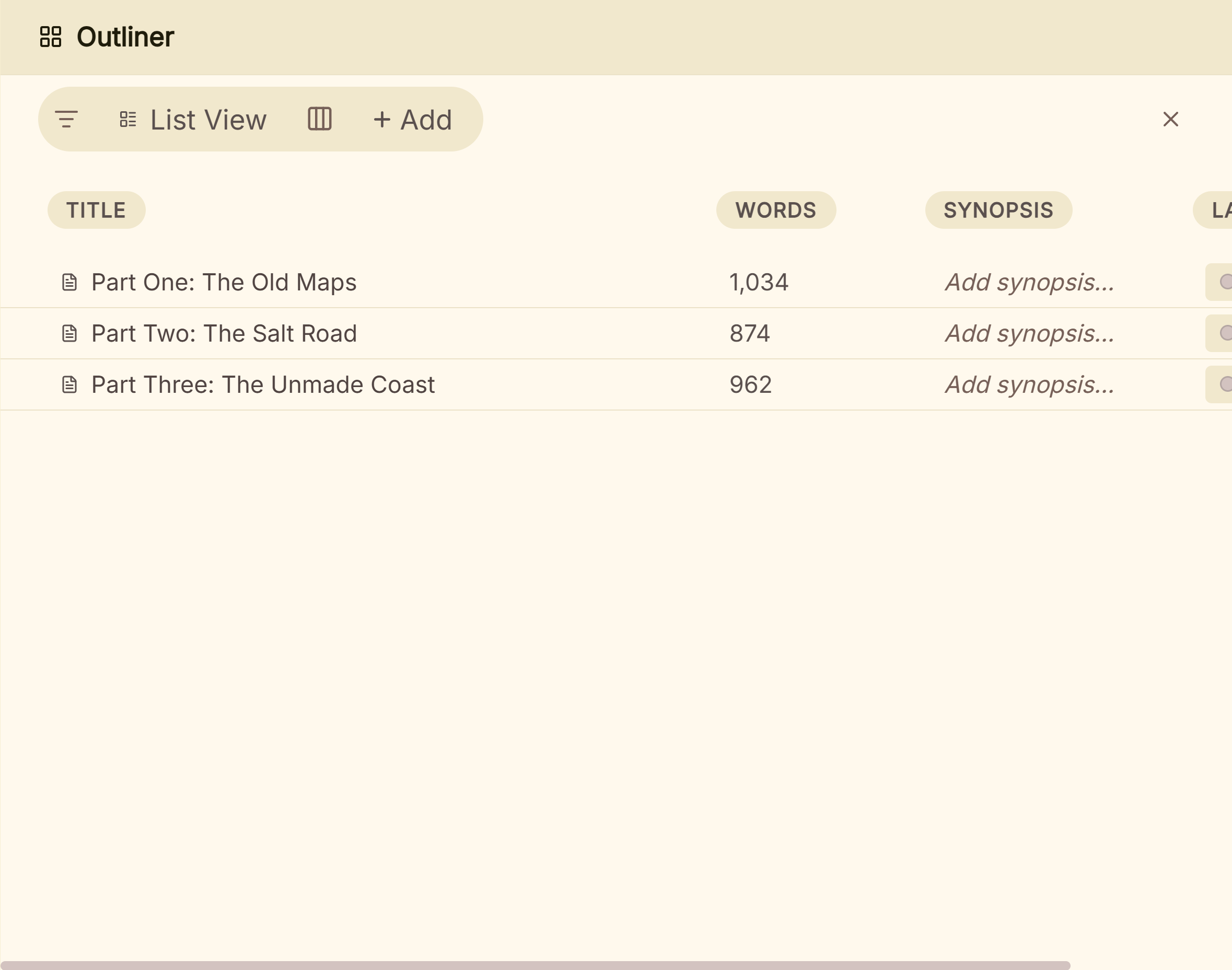 The Outliner's List View, one row per chapter or scene
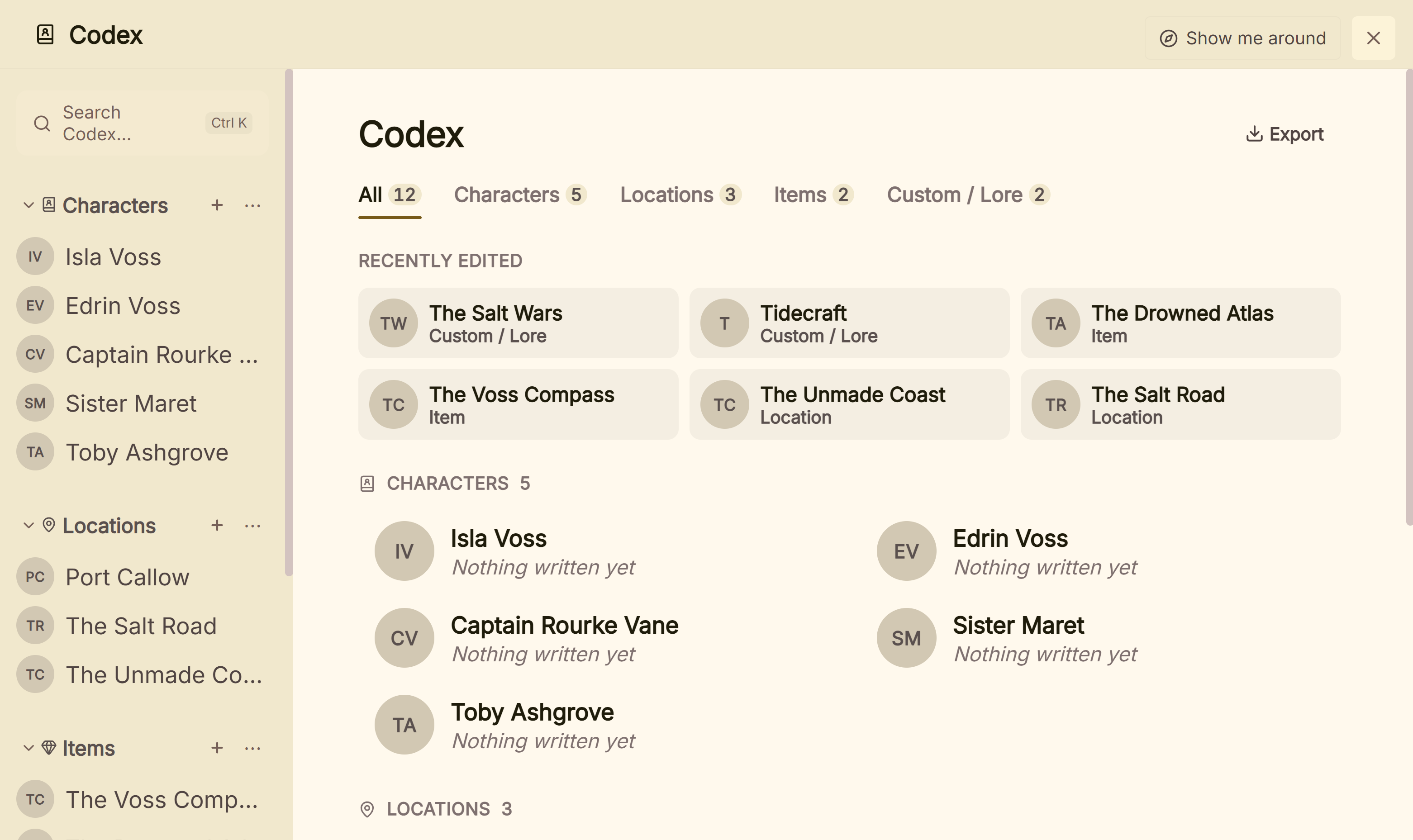 Characters, Locations and Items in the Codex
If open source or a free price is the requirement, Manuskript, novelWriter or bibisco Community suits you better. A writer who wants plain-text files to be the project itself also suits Manuskript or novelWriter. Deckle exports the whole project to Markdown folders, which it can import again.
To move a book across, export it from Manuskript to Markdown (built in) and put that file in its own folder. In Deckle, click the + beside Draft, choose Import…, and use Markdown folder (Obsidian) ▸ Choose Folder…. One long file splits at its # headings, so check that each chapter title sits on a # line first. With pandoc, a DocX export also works, since Deckle reads chapters from Word heading styles. Character, plot and world sheets go into the Codex by hand. The general method is in how to move a manuscript between writing apps.
To try Deckle, click Try it free on the screen Deckle opens to. It is a free demo with no card, no account and no time limit. It opens a sample novel with every screen open to explore, and you can restyle it and export real EPUB, PDF and DOCX files. New writing is capped at about 500 words, and new documents and imports are blocked.
What do ranking pages get wrong about Manuskript?
Three pages that rank for Manuskript searches disagree with the project's own pages on 31 October 2026.
- A macOS download for 0.17.0. Gizmodo's Manuskript download page (updated 2 December 2025) lists version 0.17.0 with a macOS download and says it is "Available for Windows, macOS, and Linux computers". The 0.17.0 release has no macOS file.
- "Download the dmg file from GitHub releases." MakeUseOf's "What Is Manuskript" (19 April 2023) was written for 0.15.0, which had a
.dmg. The current release does not. The same article lists epub and docx among Manuskript's formats without saying they need pandoc, which the project's wiki says they do. - "Cloud-Based" and Scrivener import. Techjockey's Manuskript listing gives the deployment as "Cloud-Based, Perpetual" and its FAQ names "plain text, Markdown, and Scrivener" as import formats. Manuskript is a desktop app that saves local plain-text files, and its import table names no Scrivener import and marks plain-text import as unsupported. The same page says both "available for free" and "price is available on request".
Common mistakes with Manuskript
- Skipping backups. Every release repeats the warning. Copy the project folder somewhere else on a schedule.
- Downloading from a mirror. Use the theologeek.ch download page or the olivierkes GitHub releases, not a third-party site.
- Expecting Word or ePub export out of the box. Install pandoc first. For PDF, install LaTeX too.
- Following an old Mac guide. Guides that say "download the dmg" describe 0.16.1 or earlier. 0.17.0 runs on a Mac only from source.
- Treating export as book formatting. pandoc converts the text. A print-ready interior with trim size and running heads needs a LaTeX template or a formatting tool.
- Planning only in the snowflake assistant. Its summaries are a start. Move what you decide into scene cards and character sheets so the draft can use it.
FAQ
Q: Is Manuskript free? A: Yes. It is free and open source under the GNU GPL version 3 or later, and the project accepts donations.
Q: Is Manuskript still being developed? A: Yes, slowly. The latest release is 0.17.0 (30 June 2025), and the develop branch had commits up to 1 September 2026, with a 0.18.0 milestone open.
Q: Does Manuskript work on Mac?
A: Only from source for 0.17.0. The last Mac download was the 0.16.1 .dmg from December 2023.
Q: Can Manuskript export to Word or PDF? A: Yes, with pandoc installed. Word (DocX), ePub and OpenDocument need pandoc, and PDF needs pandoc and LaTeX.
Q: Is Manuskript a virus? A: No. The project says some antivirus tools flag its PyInstaller-built Windows zip as a false positive. Download it only from the official pages, or run it from source.
Q: What is the difference between Manuskript and novelWriter? A: Both are GPL apps that store your text as plain files. Manuskript has index cards and a snowflake assistant and needs pandoc for Word and PDF. novelWriter is a plain-text editor that builds Word, OpenDocument and PDF itself.
Q: Does Manuskript use AI? A: Its repository and website mention no AI features.
Q: What is a good alternative to Manuskript? A: novelWriter if you want open source, bibisco if you want a free Mac download, yWriter if you write on Windows, and Scrivener or Deckle if you will pay for a one-time licence.
Sources
Manuskript pages retrieved 31 October 2026. Other vendors' pages retrieved 20 October 2026 unless stated.
- Manuskript, GitHub repository: description, GPL-3.0 wording, feature list, plain-text save, platforms, 579 open issues
- Manuskript, releases and 0.17.0 release notes: versions and dates, assets per release, no macOS file for 0.17.0, backups warning, antivirus false positive
- Manuskript, commits on develop and pull request #1430: newest commit 1 September 2026; macOS app bundle fix merged 7 June 2026, 0.18.0 milestone
- Manuskript, website: "still in development, and in need of extensive testing", novel assistant and snowflake method, release posts, donations
- Manuskript, download page: packages, install commands, pandoc and language_tool_python, "early development stages"
- Manuskript wiki, Import and Export capabilities: format table, pandoc and LaTeX
- Flathub, Manuskript: 0.17.0, unverified community packaging
- The LaTeX Project, Getting LaTeX: TeX Live and MiKTeX
- novelWriter, GitHub repository (GPLv3, human-readable text files), releases (2026.2.2), website ("as of release 2026.1, MacOS DMGs have been discontinued"; Mac users install the Python package) and features (build formats), all retrieved 31 October 2026
- Debian, package search for manuskript: 0.16.1 in trixie, 0.17.0 in testing and unstable, retrieved 31 October 2026
- bibisco, download page and Community vs Supporters (updated 28 February 2026)
- Spacejock Software, yWriter 7 and yWriter versions
- Literature & Latte, Scrivener overview, FAQ and store
- Ranking pages checked for the section on wrong claims, retrieved 31 October 2026: Gizmodo, Manuskript download; MakeUseOf, What Is Manuskript and How Does It Help You Write Novels?; Techjockey, Manuskript
Features, releases and prices last checked 31 October 2026. Manuskript is a project of its contributors, distributed under the GPL. Scrivener is a trademark of Literature & Latte. novelWriter, bibisco, yWriter and pandoc belong to their owners. Deckle is not affiliated with or endorsed by any product named here.