Deckle · Press & Blog

News, releases,
and honest writing.

Press releases, product updates, and articles about Deckle and the tools authors use to write and publish books.

Press enquiries: hello@deckle.studio  ·  Screenshots and brand assets available on request.

Request Media Kit

Waterloo, ON  ·  June 10, 2026  ·  Contact: Ezzy, co-founder  |  hello@deckle.studio  |  deckle.studio

Deckle, the all-in-one writing and publishing app for independent authors, today released its biggest update yet. Version 1.3 makes it easier to write without distractions, keep track of characters and locations as a story grows, and hand a manuscript off to an editor or designer without wrestling with file formats. As always, the update is free for everyone who already owns Deckle — no subscriptions, no upgrade fees.


From the Co-Founder

"Every one of these came from authors who were already using Deckle and told us what was missing — a place to write in their own font, a way to keep their characters straight across a 100,000-word draft, and a smoother way to work with an editor. This update is us listening and shipping."

Ezzy, co-founder, Deckle

What's New for Writers

Write in Your Own Fonts

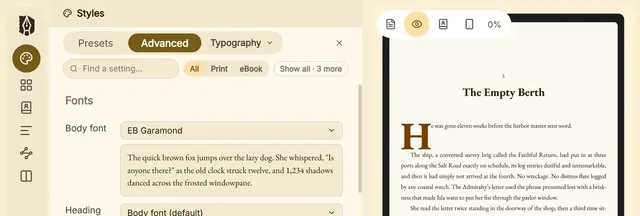
Authors who already have a favourite font — or a set bought specifically for their book's branding — can now bring it straight into Deckle. Drop in a font folder or a handful of files, and Deckle automatically sorts out the regular, bold, and italic versions and adds them to the Styler, ready to use in the manuscript and the finished book.

Focus Mode: Just You and the Page

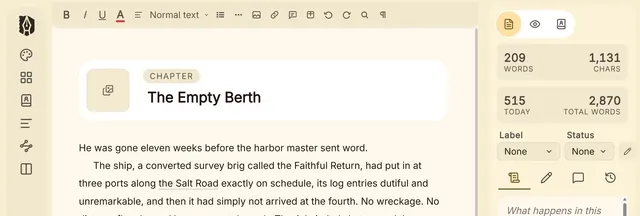
One click hides everything but the manuscript — no sidebar, no panels, nothing pulling the eye away from the sentence being written. Pressing Escape brings everything back. For writers who want the simplicity of a typewriter with none of the limitations, this is that.

Typewriter Scrolling

For those who like their current line to stay put in the middle of the screen rather than creeping toward the bottom as they type, Deckle now offers typewriter-style scrolling. It's entirely optional, turned on in Preferences → Writing for anyone who wants it.

The Codex: A Story Bible That Lives With the Manuscript

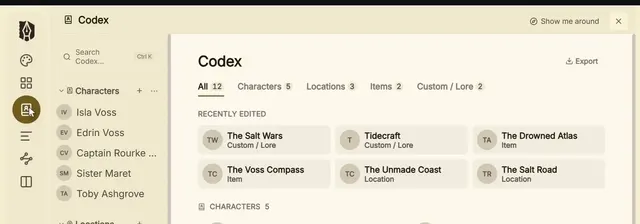
Long projects mean a lot to keep straight — eye colour, who knows what secret, which town has the bakery. The Codex is a new built-in reference for characters and places, with room for appearance, personality, motivations, flaws, backstory, and more, plus photos or images for each entry. Best of all, Deckle automatically shows where every character appears throughout the manuscript, so continuity checks take seconds instead of an afternoon of searching.

See Your Writing Habits at a Glance

A new stats view shows a full year of writing activity as a heatmap, plus today's word count, current and longest streaks, and averages for the past week and month. For anyone trying to build — or just see — a consistent writing habit, it's all in one place from the sidebar.

Sending a Manuscript to an Editor or Designer Just Got Easier

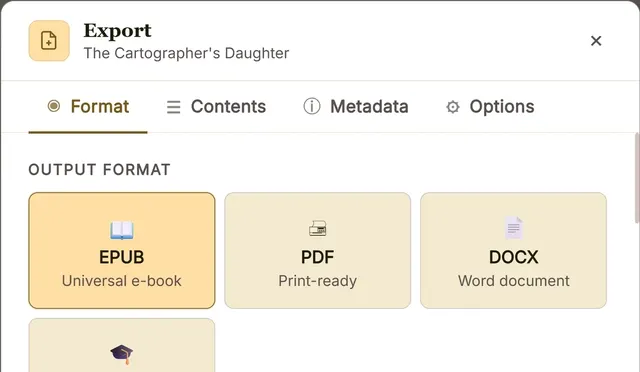
Deckle now exports two kinds of Word documents built for different people. One is set up with proper manuscript formatting (chapter headings, verse, attributions, and more) so an editor or agent can open it and start reading and marking up right away. The other is built for book designers working in Adobe InDesign, with every paragraph labelled so layout can begin almost immediately — no time lost reformatting.

Comments That Travel With the Manuscript

Working with an editor often means going back and forth in Word — and now those comments don't get lost. Open a Word file with existing comments and they come into Deckle exactly as they were, with who wrote them and when. Export back to Word, and Deckle's comments appear the same way for the editor. When a note has been addressed, it can be marked resolved with one click, so it's easy to see what's left to deal with.


Availability

Version 1.3 is available now as a free update for everyone who owns Deckle. New writers can get early access for $107 (a one-time payment, rising to $157 at full launch), which includes every feature above and all future updates, forever. Deckle works on Windows and Mac, runs fully offline, and comes with a 30-day, no-questions-asked refund.


About Deckle

Deckle is a desktop writing and publishing app built for independent authors — one place to write, organise, format, and publish a book, for one price, with no subscription. deckle.studio

Media Contact

Ezzy, co-founder
hello@deckle.studio
deckle.studio

Waterloo, ON  ·  May 27, 2026  ·  Contact: Ezzy, co-founder  |  hello@deckle.studio  |  deckle.studio

Deckle today announced the early access launch of its native desktop application for Windows and Mac, giving indie authors a single offline tool that takes a manuscript from first draft to publish-ready file. Writing, organizing, formatting, and export are handled in one place, for a one-time payment of $107, with no subscription required.


From the Co-Founder

"Writers deserve a place that feels like home: one app where you write your first word and export your final file, and nothing pulls you out in between. No switching tools, no wrestling with formats, no subscriptions eating into your royalties. Just you and your book."

Ezzy, co-founder, Deckle

The Problem

Most indie authors run a three-app workflow they never asked for. They draft in one tool, format in another, and spend hours troubleshooting file compatibility between the two right when they should be finishing their book. The result: more money spent, more time lost, and a manuscript bounced between file formats before a single reader ever sees it.

Scrivener is excellent for organizing a manuscript. But when it's time to publish, many writers end up buying Vellum ($249, Mac only) or Atticus ($147) just to get polished output. That's $298 and two separate learning curves for a workflow that should be one tool.


What Deckle Does

Deckle is a single offline desktop app for Windows and Mac that handles the full journey from first draft to publish-ready file. One purchase. Every feature included. All future updates free, forever.

Every feature described below is in the product today. This is a working tool, not a promise.

What Early Access Means

Deckle is a fully functional, native desktop application. Because it runs entirely offline, manuscripts never leave the author's machine and the app works with or without an internet connection. There is no server that can go down and no cloud dependency that can take files with it.

"Early access" means the product is complete and in active use today, with continued refinements shipping regularly. Purchases directly fund that continued development, and every future update is included at no extra cost. Covered by a 30-day, no-questions-asked refund.

Writing Environment

  • Binder-based manuscript organizer: Draft, Notes, Research, and Trash folders with chapters, scenes, and notes with drag-and-drop reordering
  • Four view modes: Editor, Outliner (grid and list), Continuous View (full manuscript as one scroll), and Live Preview (see your actual EPUB or print layout in real time)
  • Fiction-specific block types: scene breaks, verse, dialogue blocks, inset text, epigraphs, images with captions
  • Autosaves on every keystroke; no manual saving, no lost work
  • Split up to 4 panes simultaneously
  • Research panel: import PDFs, images, and documents directly into your project, side-by-side with your manuscript
  • Import from Scrivener (.zip), DOCX, and EPUB — chapters, scenes, synopses, notes, and research all come across in one step
  • Named version snapshots with restore

Formatting: Done-For-You or Fully Custom

  • 26 done-for-you style presets including Meridian, Oxford, Scribe, Kindred, and Artisan — each a complete package: typeface pairings, color palette, layout, chapter styles
  • Advanced mode with over 60 granular controls: typography, margins, running headers, drop caps, chapter ornaments, scene break glyphs, blockquote styling, special pages layout, and more
  • Every change previews instantly — the actual export compiler runs in real time
  • 30+ professional typefaces bundled, including accessibility options: Atkinson Hyperlegible and OpenDyslexic

Front and Back Matter

Deckle automatically typesets: title page, copyright, dedication, epigraph, table of contents (auto-generated from chapter hierarchy), about the author, acknowledgments, also-by, and glossary.

Export Formats

  • EPUB 3.1, EPUBCheck validated, with separate targets optimized for Kindle, Apple Books, Kobo, and generic EPUB
  • Print PDF via the Typst typesetting engine; passes KDP preflight, fonts fully embedded, compatible with KDP and IngramSpark
  • DOCX in clean standard manuscript format for agents and editors

Pricing

Early access: $107 one-time payment. Price increases to $157 at full launch. No subscription. All future updates included forever. 30-day no-questions-asked refund. Available now on Windows and Mac. iOS and Android on the roadmap.

Affiliate Program

An affiliate program is available. Affiliates receive a custom coupon code: readers get 10% off, affiliates earn 20% commission on each sale.


About Deckle

Deckle is a desktop writing and publishing application built for indie and self-publishing authors. One app, one purchase, from first draft to publish-ready file. deckle.studio

Media Contact

Ezzy, co-founder
hello@deckle.studio
deckle.studio